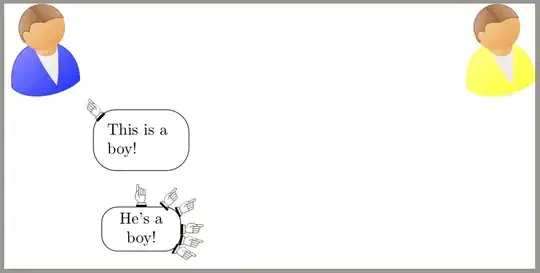
A not so nice approach, because everything is manual and no styles are used, but you probably get the idea:
\documentclass[tikz]{standalone}
\usepackage{tikzpeople,dingbat}
\begin{document}
\begin{tikzpicture}
    \node at (0,0) {};
    \nodebob,shirt=blue,minimum size=1.5cm at (0,0) {};
    \nodebob,shirt=yellow,minimum size=1.5cm at (10,0) {};
\node[anchor=north west,text width=1.5cm,draw,rounded corners=0.5cm,inner sep=0.3cm,outer sep=0.3cm](this) at (bob1.south east) {This is a boy!};
\node[anchor=south east,rotate=-45,inner sep=0pt,outer sep=0pt,xshift=0.75cm,yshift=-0.2cm] at (this.north west) {\rightpointleft};

\node[anchor=north,text width=1.5cm,draw,rounded corners=0.5cm,inner sep=0.3cm,outer sep=0.3cm](hes) at (this.south) {He's a boy!!};
\node[anchor=south east,rotate=35,inner sep=0pt,outer sep=0pt,xshift=-0.1cm,yshift=-0.4cm] at (hes.north east) {\leftpointright};

\end{tikzpicture}
\end{document}
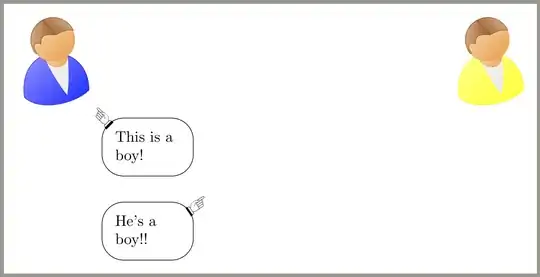
Update
Here is an approach coupled with the rectangle with rounded corners shape created in https://tex.stackexchange.com/a/68568/156791 which places the hand correctly and rotates it in the same angle (theoratically, you could also rotate it differently)
\documentclass[tikz]{standalone}
\usepackage{tikzpeople,dingbat}
\makeatletter
\pgfkeys{/pgf/.cd,
    rectangle corner radius/.initial=3pt
}
\newif\ifpgf@rectanglewrc@donecorner@
\def\pgf@rectanglewithroundedcorners@docorner#1#2#3#4{%
    \edef\pgf@marshal{%
        \noexpand\pgfintersectionofpaths
        {%
            \noexpand\pgfpathmoveto{\noexpand\pgfpoint{\the\pgf@xa}{\the\pgf@ya}}%
            \noexpand\pgfpathlineto{\noexpand\pgfpoint{\the\pgf@x}{\the\pgf@y}}%
        }%
        {%
            \noexpand\pgfpathmoveto{\noexpand\pgfpointadd
                {\noexpand\pgfpoint{\the\pgf@xc}{\the\pgf@yc}}%
                {\noexpand\pgfpoint{#1}{#2}}}%
            \noexpand\pgfpatharc{#3}{#4}{\cornerradius}%
        }%
    }%
    \pgf@process{\pgf@marshal\pgfpointintersectionsolution{1}}%
    \pgf@process{\pgftransforminvert\pgfpointtransformed{}}%
    \pgf@rectanglewrc@donecorner@true
}
\pgfdeclareshape{rectangle with rounded corners}
{
    \inheritsavedanchors[from=rectangle] % this is nearly a rectangle
    \inheritanchor[from=rectangle]{north}
    \inheritanchor[from=rectangle]{north west}
    \inheritanchor[from=rectangle]{north east}
    \inheritanchor[from=rectangle]{center}
    \inheritanchor[from=rectangle]{west}
    \inheritanchor[from=rectangle]{east}
    \inheritanchor[from=rectangle]{mid}
    \inheritanchor[from=rectangle]{mid west}
    \inheritanchor[from=rectangle]{mid east}
    \inheritanchor[from=rectangle]{base}
    \inheritanchor[from=rectangle]{base west}
    \inheritanchor[from=rectangle]{base east}
    \inheritanchor[from=rectangle]{south}
    \inheritanchor[from=rectangle]{south west}
    \inheritanchor[from=rectangle]{south east}
\savedmacro\cornerradius{%
    \edef\cornerradius{\pgfkeysvalueof{/pgf/rectangle corner radius}}%
}

\backgroundpath{%
    \northeast\advance\pgf@y-\cornerradius\relax
    \pgfpathmoveto{}%
    \pgfpatharc{0}{90}{\cornerradius}%
    \northeast\pgf@ya=\pgf@y\southwest\advance\pgf@x\cornerradius\relax\pgf@y=\pgf@ya
    \pgfpathlineto{}%
    \pgfpatharc{90}{180}{\cornerradius}%
    \southwest\advance\pgf@y\cornerradius\relax
    \pgfpathlineto{}%
    \pgfpatharc{180}{270}{\cornerradius}%
    \northeast\pgf@xa=\pgf@x\advance\pgf@xa-\cornerradius\southwest\pgf@x=\pgf@xa
    \pgfpathlineto{}%
    \pgfpatharc{270}{360}{\cornerradius}%
    \northeast\advance\pgf@y-\cornerradius\relax
    \pgfpathlineto{}%
}

\anchor{before north east}{\northeast\advance\pgf@y-\cornerradius}
\anchor{after north east}{\northeast\advance\pgf@x-\cornerradius}
\anchor{before north west}{\southwest\pgf@xa=\pgf@x\advance\pgf@xa\cornerradius
    \northeast\pgf@x=\pgf@xa}
\anchor{after north west}{\northeast\pgf@ya=\pgf@y\advance\pgf@ya-\cornerradius
    \southwest\pgf@y=\pgf@ya}
\anchor{before south west}{\southwest\advance\pgf@y\cornerradius}
\anchor{after south west}{\southwest\advance\pgf@x\cornerradius}
\anchor{before south east}{\northeast\pgf@xa=\pgf@x\advance\pgf@xa-\cornerradius
    \southwest\pgf@x=\pgf@xa}
\anchor{after south east}{\southwest\pgf@ya=\pgf@y\advance\pgf@ya\cornerradius
    \northeast\pgf@y=\pgf@ya}

\anchorborder{%
    \pgf@xb=\pgf@x% xb/yb is target
    \pgf@yb=\pgf@y%
    \southwest%
    \pgf@xa=\pgf@x% xa/ya is se
    \pgf@ya=\pgf@y%
    \northeast%
    \advance\pgf@x by-\pgf@xa%
    \advance\pgf@y by-\pgf@ya%
    \pgf@xc=.5\pgf@x% x/y is half width/height
    \pgf@yc=.5\pgf@y%
    \advance\pgf@xa by\pgf@xc% xa/ya becomes center
    \advance\pgf@ya by\pgf@yc%
    \edef\pgf@marshal{%
        \noexpand\pgfpointborderrectangle
        {\noexpand\pgfqpoint{\the\pgf@xb}{\the\pgf@yb}}
        {\noexpand\pgfqpoint{\the\pgf@xc}{\the\pgf@yc}}%
    }%
    \pgf@process{\pgf@marshal}%
    \advance\pgf@x by\pgf@xa%
    \advance\pgf@y by\pgf@ya%
    \pgfextract@process\borderpoint{}%
    %
    \pgf@rectanglewrc@donecorner@false
    %
    % do southwest corner
    \southwest\pgf@xc=\pgf@x\pgf@yc=\pgf@y
    \advance\pgf@xc\cornerradius\relax\advance\pgf@yc\cornerradius\relax
    \borderpoint
    \ifdim\pgf@x<\pgf@xc\relax\ifdim\pgf@y<\pgf@yc\relax
    \pgf@rectanglewithroundedcorners@docorner{-\cornerradius}{0pt}{180}{270}%
    \fi\fi
    %
    % do southeast corner
    \ifpgf@rectanglewrc@donecorner@\else
    \southwest\pgf@yc=\pgf@y\relax\northeast\pgf@xc=\pgf@x\relax
    \advance\pgf@xc-\cornerradius\relax\advance\pgf@yc\cornerradius\relax
    \borderpoint
    \ifdim\pgf@x>\pgf@xc\relax\ifdim\pgf@y<\pgf@yc\relax
    \pgf@rectanglewithroundedcorners@docorner{0pt}{-\cornerradius}{270}{360}%
    \fi\fi
    \fi
    %
    % do northeast corner
    \ifpgf@rectanglewrc@donecorner@\else
    \northeast\pgf@xc=\pgf@x\relax\pgf@yc=\pgf@y\relax
    \advance\pgf@xc-\cornerradius\relax\advance\pgf@yc-\cornerradius\relax
    \borderpoint
    \ifdim\pgf@x>\pgf@xc\relax\ifdim\pgf@y>\pgf@yc\relax
    \pgf@rectanglewithroundedcorners@docorner{\cornerradius}{0pt}{0}{90}%
    \fi\fi
    \fi
    %
    % do northwest corner
    \ifpgf@rectanglewrc@donecorner@\else
    \northeast\pgf@yc=\pgf@y\relax\southwest\pgf@xc=\pgf@x\relax
    \advance\pgf@xc\cornerradius\relax\advance\pgf@yc-\cornerradius\relax
    \borderpoint
    \ifdim\pgf@x<\pgf@xc\relax\ifdim\pgf@y>\pgf@yc\relax
    \pgf@rectanglewithroundedcorners@docorner{0pt}{\cornerradius}{90}{180}%
    \fi\fi
    \fi
}

}
\makeatother
\begin{document}
    \tikzset{textbox/.style={text width=1.5cm,rectangle with rounded corners,draw,rectangle corner radius=10pt,align=center,outer sep=0pt}}
    \tikzset{finger_right/.style={anchor=west,inner sep=0pt,outer sep=0pt}}
\newcommand{\rightfinger}[1]{\node[finger_right,rotate=#1] at (hes.#1) {\hspace{-0.2em}\raisebox{-2ex}{\leftpointright}};}
\begin{tikzpicture}
    \node at (0,0) {};
    \node[bob,shirt=blue,minimum size=1.5cm](bob1) at (0,0) {};
    \node[bob,shirt=yellow,minimum size=1.5cm](bob2) at (10,0) {};

    \node[anchor=north west,text width=1.5cm,draw,rounded corners=0.5cm,inner sep=0.3cm,outer sep=0.3cm](this) at (bob1.south east) {This is a boy!};
    \node[anchor=south east,rotate=-45,inner sep=0pt,outer sep=0pt,xshift=0.75cm,yshift=-0.2cm] at (this.north west) {\rightpointleft};

    \node[anchor=north,textbox,yshift=-0.5cm](hes) at (this.south) {He's a boy!};
    \rightfinger{90}
    \rightfinger{45}
    \rightfinger{25}
    \rightfinger{0}
    \rightfinger{-15}
    \rightfinger{-30}
\end{tikzpicture}

\end{document}
The problem however: On a circle the rotation for the finger as well as the angle-anchor on the boundary would match. The problem with a rounded rectangle however is, that this does not work, so what exactly would you like your graphic look like in those cases?