Maths digits are in the Mathematical Alphanumeric Symbols unicode block (hence: unicode-math package commands and options and thousands of symbols); text digits are in Basic Latin unicode block along with punctuation and letters, so "No (not yet)" to the question as asked.
But ...
... you can do:
Method (1)
You can define and then manually apply a font to the text digits.
Definition \newfontfamily\fdigits{Noto Serif}[Scale=0.9,Colour=blue] plus usage abc{\fdigits 123} gives:
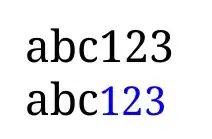
MWE
\documentclass{article}
\usepackage{xcolor}
\usepackage{fontspec}
\setmainfont{Noto Serif}
\newfontfamily\fdigits{Noto Serif}[Scale=0.9,Colour=blue]
\begin{document}
abc123
abc{\fdigits 123}
\end{document}
Method (2)
Automatically apply the scaled font.
With Xe(La)TeX, you can use its interchartoks ability:
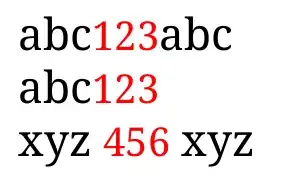
MWE
\documentclass{article}
\usepackage{xcolor}
\usepackage{fontspec}
\setmainfont{Noto Serif}
\newfontfamily\fdigits{Noto Serif}[Scale=0.9,Colour=blue]
\newfontfamily\fdigitsu{Noto Serif}[Scale=0.9,Colour=red]
\XeTeXinterchartokenstate = 1
\newXeTeXintercharclass \mychardigits
\XeTeXcharclass \0 \mychardigits \XeTeXcharclass\1 \mychardigits
\XeTeXcharclass \2 \mychardigits \XeTeXcharclass\3 \mychardigits
\XeTeXcharclass \4 \mychardigits \XeTeXcharclass\5 \mychardigits
\XeTeXcharclass \6 \mychardigits \XeTeXcharclass\7 \mychardigits
\XeTeXcharclass \8 \mychardigits \XeTeXcharclass\9 \mychardigits
% between " " and "digits":
\XeTeXinterchartoks 4095 \mychardigits = {\bgroup\fdigitsu}
\XeTeXinterchartoks \mychardigits 4095 = {\egroup}
% between <most chars> and "digits":
\XeTeXinterchartoks 0 \mychardigits = {\bgroup\fdigitsu}
\XeTeXinterchartoks \mychardigits 0 = {\egroup}
\begin{document}
abc123abc
abc{\fdigits 123}
xyz 456 xyz
\end{document}
Method (3) - A bit of .sty coding
In ucharclasses.sty package (make a copy first, save it locally, rename it perhaps), you can split BasicLatin unicode block into digits, letters, punctuation mini blocks; add the relevant Package Options; and then in your preamble define the transitions between blocks (or between blocks and word boundaries).


