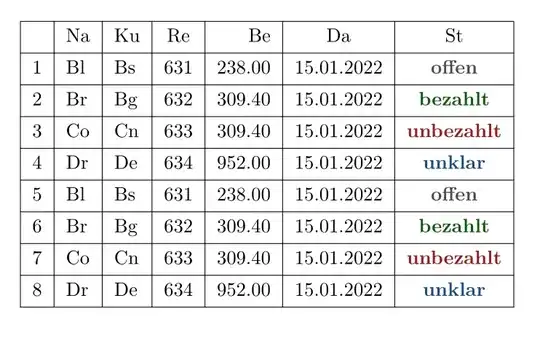
A possible solution with csvsimple-l3 and tabularray packages:
For Short Tables
\documentclass{article}
\usepackage{csvsimple-l3}
\usepackage{xcolor}
\usepackage{tabularray}
\begin{filecontents}[overwrite]{\jobname.csv}
Na,Ku,Re,Be,Da,St
 Bl,Bs,631,238.00,15.01.2022,offen
 Br,Bg,632,309.40,15.01.2022,bezahlt
 Co,Cn,633,309.40,15.01.2022,unbezahlt
 Dr,De,634,952.00,15.01.2022,unklar
Bl,Bs,631,238.00,15.01.2022,offen
Br,Bg,632,309.40,15.01.2022,bezahlt
Co,Cn,633,309.40,15.01.2022,unbezahlt
Dr,De,634,952.00,15.01.2022,unklar
\end{filecontents}
\begin{document}
\csvreader[
tabularray = {
colspec = {|l|l|l|c|r|c|c|},
cell{2-Z}{Z} = {font=\bfseries},
},
table head = \hline & Na & Ku& Re & Be& Da & St\\hline,
late after line = \\hline
]{\jobname.csv}{Na=\Na,Ku=\Ku,Re=\Re,Be=\Be,Da=\Da,St=\St}{
\thecsvrow & \Na & \Ku & \Re & \Be & \Da &
\ifcsvstrcmp{\St}{offen}{\SetCell{fg=gray3}\St}{
\ifcsvstrcmp{\St}{bezahlt}{\SetCell{fg=green3}\St}{
\ifcsvstrcmp{\St}{unbezahlt}{\SetCell{fg=red3}\St}{
\ifcsvstrcmp{\St}{unklar}{\SetCell{fg=azure3}\St}{\St}
}
}
}
}%
\end{document}
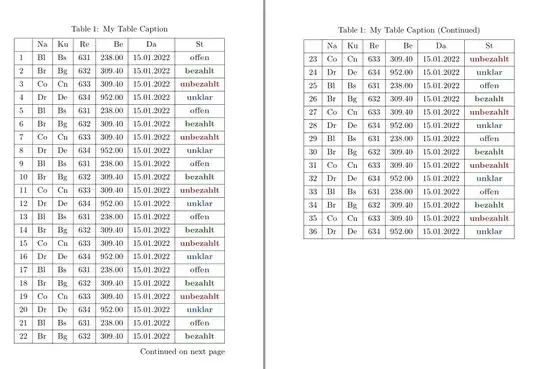
For Long Tables
\documentclass{article}
\usepackage[b6paper,margin=1.5cm]{geometry}
\usepackage{csvsimple-l3}
\usepackage{xcolor}
\usepackage{tabularray}
\begin{filecontents}[overwrite]{\jobname.csv}
 Na,Ku,Re,Be,Da,St
 Bl,Bs,631,238.00,15.01.2022,offen
 Br,Bg,632,309.40,15.01.2022,bezahlt
 Co,Cn,633,309.40,15.01.2022,unbezahlt
 Dr,De,634,952.00,15.01.2022,unklar
 Bl,Bs,631,238.00,15.01.2022,offen
 Br,Bg,632,309.40,15.01.2022,bezahlt
 Co,Cn,633,309.40,15.01.2022,unbezahlt
 Dr,De,634,952.00,15.01.2022,unklar
 Bl,Bs,631,238.00,15.01.2022,offen
 Br,Bg,632,309.40,15.01.2022,bezahlt
 Co,Cn,633,309.40,15.01.2022,unbezahlt
 Dr,De,634,952.00,15.01.2022,unklar
 Bl,Bs,631,238.00,15.01.2022,offen
 Br,Bg,632,309.40,15.01.2022,bezahlt
 Co,Cn,633,309.40,15.01.2022,unbezahlt
 Dr,De,634,952.00,15.01.2022,unklar
 Bl,Bs,631,238.00,15.01.2022,offen
 Br,Bg,632,309.40,15.01.2022,bezahlt
 Co,Cn,633,309.40,15.01.2022,unbezahlt
 Dr,De,634,952.00,15.01.2022,unklar
 Bl,Bs,631,238.00,15.01.2022,offen
 Br,Bg,632,309.40,15.01.2022,bezahlt
 Co,Cn,633,309.40,15.01.2022,unbezahlt
 Dr,De,634,952.00,15.01.2022,unklar
 Bl,Bs,631,238.00,15.01.2022,offen
 Br,Bg,632,309.40,15.01.2022,bezahlt
 Co,Cn,633,309.40,15.01.2022,unbezahlt
 Dr,De,634,952.00,15.01.2022,unklar
 Bl,Bs,631,238.00,15.01.2022,offen
 Br,Bg,632,309.40,15.01.2022,bezahlt
 Co,Cn,633,309.40,15.01.2022,unbezahlt
 Dr,De,634,952.00,15.01.2022,unklar
 Bl,Bs,631,238.00,15.01.2022,offen
 Br,Bg,632,309.40,15.01.2022,bezahlt
 Co,Cn,633,309.40,15.01.2022,unbezahlt
 Dr,De,634,952.00,15.01.2022,unklar
\end{filecontents}
\begin{document}
\SetTblrTemplate{head,foot}{empty}
\csvreader[
  generic collected table = longtblr,
  generic table options = {[
    %caption = {My Table Caption},
    %label = {my:label},
    label = none,
  ]{
    rowhead = 1,
    colspec = {|l|l|l|c|r|c|c|},
    cell{2-Z}{Z} = {font=\bfseries},

  }},
  table head = \hline & Na & Ku& Re & Be& Da & St\\hline,
  late after line = \\hline
]{\jobname.csv}{Na=\Na,Ku=\Ku,Re=\Re,Be=\Be,Da=\Da,St=\St}{
  \thecsvrow & \Na & \Ku & \Re & \Be & \Da &
  \ifcsvstrcmp{\St}{offen}{\SetCell{fg=gray3}}{
    \ifcsvstrcmp{\St}{bezahlt}{\SetCell{fg=green3}}{
      \ifcsvstrcmp{\St}{unbezahlt}{\SetCell{fg=red3}}{
        \ifcsvstrcmp{\St}{unklar}{\SetCell{fg=azure3}}{}

      }
    }

  }
  \St
}%
\end{document}


csvsimplepackage. – L.J.R. Feb 02 '22 at 08:43\usepackage{csvsimple-l3}, not\usepackage{csvsimple}. – L.J.R. Feb 02 '22 at 09:15