Leave solving overfull lines for the very last phase of document production, because even minimal changes to the text might solve the issue.
You have several strategies available, the main one is rewording. Nobody is like Mozart who allegedly was able to write down a complete piece with orchestration and all in a single work session: reread your paragraphs and quite likely you'll find some weak point or, at least, different wording to express the same thing without the paragraph being badly typeset.
Remove or add an adjective; place a missing comma, remove one too much; add a tie ~ to keep some words together. There are many other possibilities.
If all else fails, there are other tools available without resorting to the ultimate weapon sloppypar. I find it convenient to locally set \emergencystretch without touching \tolerance like sloppypar does. Here's a comparison.
\documentclass{article}
\begin{document}
\parindent=0pt
- overfull
\medskip
changed systematically, and the intensity that manages to survive passage through
changed systematically, and the intensity that manages to survive passage through
changed systematically, and the intensity that manages to survive passage through
\bigskip
- not overfull
\medskip
changed systematically, and the intensity that manages to survive passage through
changed systematically, and the intensity that manages to survive passage through
changed systematically, and the intensity that manages to survive passage through
{\setlength{\emergencystretch}{0.5\textwidth}\par}
\bigskip
- sloppy
\medskip
\begin{sloppypar}
changed systematically, and the intensity that manages to survive passage through
changed systematically, and the intensity that manages to survive passage through
changed systematically, and the intensity that manages to survive passage through
\end{sloppypar}
\end{document}
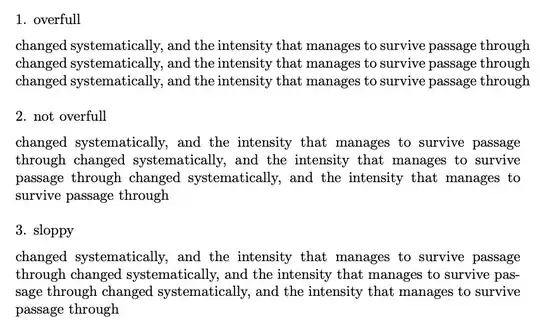
The trick I used is to issue \par in a group where \emergencystretch is set to a nonzero value. The } brace after \par ensures that this setting won't carry over for the rest of the document.
You can see that my trick better distributes badness across all lines, rather than concentrate it in the first line like in the sloppypar case.
Take your time to solve each overfull and your document will look perfect. But I emphasize once again that rewording is the best approach in the vast majority of cases.


microtypepackage may help. – Zarko Feb 03 '22 at 11:31throughand flow the text onto two lines? – John Rennie Feb 03 '22 at 11:33\sloppyorsloppy parto give TeX a bit more freedom. – Pieter van Oostrum Feb 03 '22 at 11:34babelOf course you can do this manually, but people do this only if there is no defined pattern for particular word. – Zarko Feb 03 '22 at 11:36