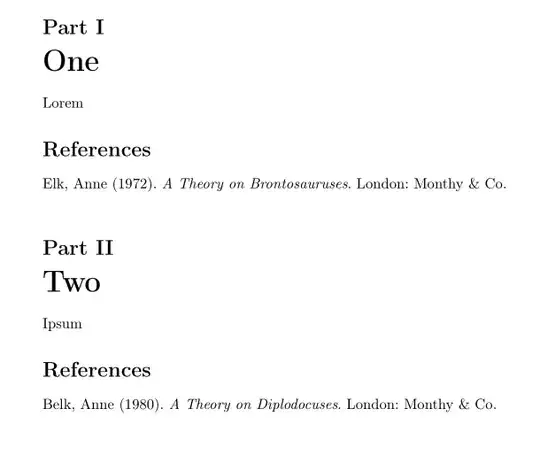
You can use refsections to create separate bibliographies per part of your document. With the optional argument of \begin{refsection}...\end{refsection} you can fix one specific .bib file for that refsection. Then \nocite{*} will only use entries from that .bib file.
\documentclass[british]{article}
\usepackage[T1]{fontenc}
\usepackage{babel}
\usepackage{csquotes}
\usepackage[backend=biber, style=authoryear]{biblatex}
\begin{filecontents}[overwrite]{\jobname-one.bib}
@book{elk,
  author    = {Anne Elk},
  title     = {A Theory on Brontosauruses},
  year      = {1972},
  publisher = {Monthy & Co.},
  location  = {London},
}
\end{filecontents}
\addbibresource{\jobname-one.bib}
\begin{filecontents}[overwrite]{\jobname-two.bib}
@book{belk,
  author    = {Anne Belk},
  title     = {A Theory on Diplodocuses},
  year      = {1980},
  publisher = {Monthy & Co.},
  location  = {London},
}
\end{filecontents}
\addbibresource{\jobname-two.bib}
\begin{document}
\begin{refsection}[\jobname-one]
\part{One}
Lorem
\nocite{*}
\printbibliography
\end{refsection}
\begin{refsection}[\jobname-two]
\part{Two}
Ipsum
\nocite{*}
\printbibliography
\end{refsection}
\end{document}
If you don't want to use refsections because completely separate bibliographies are not desirable, you can look into solutions with keywords based on file names like biblatex: multiple bibliographies categorised by different .bib files and Separate multiple bib files reference using biblatex.


keywordat each entry, e.g.keywords = {parti},keywords = {partii}etc. and then wherever you want to print bibliography, just use a filter:\printbibliography[keyword=parti, title={References from Part I}]. Since you don't reference anything in text, you probably have to use\nocite{*}before each execution ofprintbibliography[...]and may also need to add the option:heading=subbibliography. – Celdor Feb 04 '22 at 18:45