You can insert a tcolorbox --with Matlab code inside-- in a footnote.
For listing the code I found two options. See the answers to typeset matlab code in a document
In both cases you can directly include an external m-file from somewhere using \lstinputlisting{/SOMEPATH/FILENAME.M}.
(1) Using the M-code LaTeX Package from download the package m-code
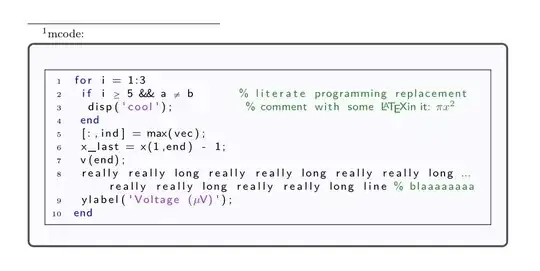
with this code (see https://tex.stackexchange.com/a/78393/161015)
\documentclass{article}
%% See  https://tex.stackexchange.com/a/78393/161015
%% https://www.mathworks.com/matlabcentral/fileexchange/8015-m-code-latex-package
\usepackage[framed,numbered,autolinebreaks,useliterate]{mcode}
% default font
\def\lstbasicfont{\sffamily\footnotesize}
\usepackage{tcolorbox}
\begin{filecontents}[overwrite]{sample.m}
for i = 1:3
    if i >= 5 && a ~= b       % literate programming replacement
        disp('cool');           % comment with some §\mcommentfont\LaTeX in it: $\mcommentfont\pi x^2$§
    end
    [:,ind] = max(vec);
    x_last = x(1,end) - 1;
    v(end);
    really really long really really long really really long really really long really really long line % blaaaaaaaa
    ylabel('Voltage (µV)');
end
\end{filecontents}
\begin{document}
See as example\footnote{mcode: %
        \begin{tcolorbox}[colback=blue!2]

            \lstinputlisting{sample.m}%
        \end{tcolorbox}
    }
\end{document}
(2) Using the package matlab-prettifier:
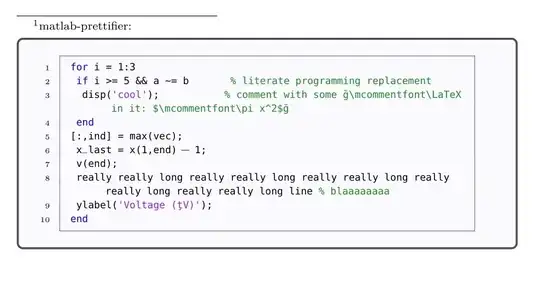
This is the code: (see https://tex.stackexchange.com/a/158816/161015)
\documentclass{article}
\usepackage[T1]{fontenc}
%% See https://tex.stackexchange.com/a/158816/161015
\usepackage[numbered,framed]{matlab-prettifier}
\usepackage{tcolorbox}
\begin{filecontents}[overwrite]{sample.m}
    for i = 1:3
        if i >= 5 && a ~= b       % literate programming replacement
            disp('cool');           % comment with some §\mcommentfont\LaTeX in it: $\mcommentfont\pi x^2$§
        end
    [:,ind] = max(vec);
        x_last = x(1,end) - 1;
        v(end);
        really really long really really long really really long really really long really really long line % blaaaaaaaa
        ylabel('Voltage (µV)');
    end
\end{filecontents}
\let\ph\mlplaceholder
\lstMakeShortInline"
\lstset{
    style              = Matlab-editor,
    basicstyle         = \mlttfamily,
    escapechar         = ",
    mlshowsectionrules = true,
    numberstyle=\tiny,
}
\begin{document}
See as example\footnote{matlab-prettifier: %
    \begin{tcolorbox}[colback=blue!2,boxsep=20pt,top=-10pt,bottom=-15pt]

        \lstinputlisting{sample.m}%
    \end{tcolorbox}
}
\end{document}
Notice the different outputs to % comment with some §\mcommentfont\LaTeX in it: $\mcommentfont\pi x^2$§ (line #3) and to
Voltage (µV) (line #9)


