2
\begin{document}
\textbf{2b. }
\definecolor{Cyan}{rgb}{0.88,1,1}
\begin{table}
\begin{tabular}{|c|c|c|c|c|c|c|c|c|c|c|c|c|}
\hline
p & q & r & $\neg p$ & $\neg q$ & $\neg r$ & $p \vee r$ & $p \vee q$ & $\neg q \vee \neg r$ & $(p \vee r) \wedge (p \vee q) \wedge (\neg q \vee \neg r)$ \\
\hline
\rowcolor{Cyan}
T & T & T & F & F & F & T & T & F & F\\
T & T & F & F & F & T & T & T & T & T\\
\rowcolor{Cyan}
T & F & T & F & T & F & T & T & T & T\\
T & F & F & F & T & T & T & T & T & T\\
\rowcolor{Cyan}
F & T & T & T & F & F & T & T & F & F\\
F & T & F & T & F & T & F & T & T & F\\
\rowcolor{Cyan}
F & F & T & T & T & F & T & F & T & F\\
F & F & F & T & T & T & F & F & T & F\\
\hline
\end{tabular}
\end{table}
\begin{table}
\begin{tabular}{|c|c|c|}
\hline
$ (q \wedge r)$ & $\neg (q \wedge r)$ & $p \wedge \neg (q \wedge r)$\\
\rowcolor{Cyan}
T & F & F\\
F & T & T\\
\rowcolor{Cyan}
F & T &T\\
F & T &T\\
\rowcolor{Cyan}
T & F &F\\
F & T &F\\
\rowcolor{Cyan}
F & T & F\\
F & T & F\\
\hline
\end{tabular}
\end{table}
\end{document}

Result

Mico
  • 506,678
Crimson
  • 21
  • Welcome to TEX.SX! Are these two tables all in your file? Since the arrangement of LaTeX depends on the space left on a page, it matters if there are other texts. – Teddy van Jerry Feb 09 '22 at 02:03
  • 2
    You don't seem to be putting a \caption on your table (unless that's the purpose of 2b, in which case you should read up on how to caption a table). If there's no caption, there's no reason they need to be in separate table environments (or in a table environment at all). See https://tex.stackexchange.com/q/39017/107497 – Teepeemm Feb 09 '22 at 02:24
  • 1
    Welcome to TeX.SE. While code snippets are useful in explanations, it is always best to compose a fully compilable MWE that reproduces the problem including the \documentclass and the appropriate packages so that those trying to help don't have to recreate it. When I complete your document, I don't get the space that you see, so without a MWE not sure how to help here. – Peter Grill Feb 09 '22 at 03:55

2 Answers2

2

If you don't want the two tabular environments to be typeset independently of and possibly quite far from each other, don't place them in separate table environments. Instead, just insert an instruction such as \vspace{1cm} (or whatever other distance suits your needs) between the two tabular environments.

Incidentally, doesn't the first tabular environment contain just 10 columns, instead of the 13 columns indicated by your code? Now, it's generally the case that indicating more than the required number of columns doesn't immediately generate an error or warning message -- or even necessarily mess up the appearance of the tabular material right away. I'd still avoid overstating the number of columns, though, as providing incorrect numbers of columns can sometimes lead to puzzling bugs that are tedious to track down.

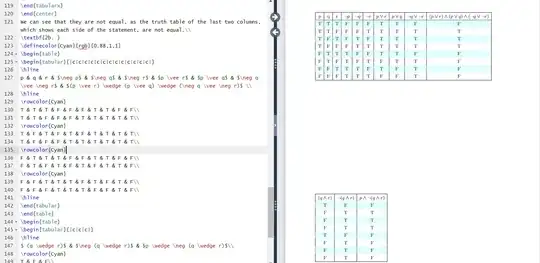
enter image description here

\documentclass{article} % or some other suitable document class
\usepackage[table]{xcolor}
\definecolor{Cyan}{rgb}{0.88,1,1}
\newcommand\rcC{\rowcolor{Cyan}} % handy shortcut macro

\begin{document}

\begin{table}[htbp] \setlength\tabcolsep{4.5pt} % <-- new (default value: 6pt) \centering % <-- new

\begin{tabular}{ | *{10}{c|} } % Not 13, but 10 columns, right? \hline $p$ & $q$ & $r$ & $\neg p$ & $\neg q$ & $\neg r$ & $p \vee r$ & $p \vee q$ & $\neg q \vee \neg r$ & \medmuskip=3mu % <-- new (default value: 4mu) $(p \vee r) \wedge (p \vee q) \wedge (\neg q \vee \neg r)$ \ \hline \rcC T & T & T & F & F & F & T & T & F & F\ T & T & F & F & F & T & T & T & T & T\ \rcC T & F & T & F & T & F & T & T & T & T\ T & F & F & F & T & T & T & T & T & T\ \rcC F & T & T & T & F & F & T & T & F & F\ F & T & F & T & F & T & F & T & T & F\ \rcC F & F & T & T & T & F & T & F & T & F\ F & F & F & T & T & T & F & F & T & F\ \hline \end{tabular} %\end{table} %\begin{table}

\vspace{5mm} % or whatever length value suits your needs

\begin{tabular}{|c|c|c|} \hline $ (q \wedge r)$ & $\neg (q \wedge r)$ & $p \wedge \neg (q \wedge r)$\ \hline \rcC T & F & F\ F & T & T\ \rcC F & T &T\ F & T &T\ \rcC T & F &F\ F & T &F\ \rcC F & T & F\ F & T & F\ \hline \end{tabular} \end{table}

\end{document}

Mico
  • 506,678
1

As supplement to nice @Mico answer (+1). In your particular case, when all columns are of the same type (c), with use table package tabularray you not need to care about number of columns. They will automatically adopted to content of table body.

Beside this, you can color rows (again automatically) by row{even} = {bg=Cyan} and also put first table row into math mode:

\documentclass{article}
\usepackage{xcolor}
\definecolor{Cyan}{rgb}{0.88,1,1}
\usepackage{tabularray}

\begin{document} \begin{table}[htb] \centering % <-- new \begin{tblr}{hline{1,2,Z}={solid},vlines, cells = {c}, colsep = {4.4pt}, row{1} = {mode=math}, row{even} = {bg=Cyan} } p & q & r & \neg p & \neg q & \neg r & p \vee r & p \vee q & \neg q \vee \neg r & (p \vee r) \wedge (p \vee q) \wedge (\neg q \vee \neg r) \ T & T & T & F & F & F & T & T & F & F\ T & T & F & F & F & T & T & T & T & T\ T & F & T & F & T & F & T & T & T & T\ T & F & F & F & T & T & T & T & T & T\ F & T & T & T & F & F & T & T & F & F\ F & T & F & T & F & T & F & T & T & F\ F & F & T & T & T & F & T & F & T & F\ F & F & F & T & T & T & F & F & T & F\ \end{tblr}

\bigskip \begin{tblr}{hline{1,2,Z}={solid},vlines, cells = {c}, colsep = {4.4pt}, row{1} = {mode=math}, row{even} = {bg=Cyan} } (q \wedge r) & \neg (q \wedge r) & p \wedge \neg (q \wedge r)\ T & F & F\ F & T & T\ F & T & T\ F & T & T\ T & F & F\ F & T & F\ F & T & F\ F & T & F\ \end{tblr} \end{table} \end{document}
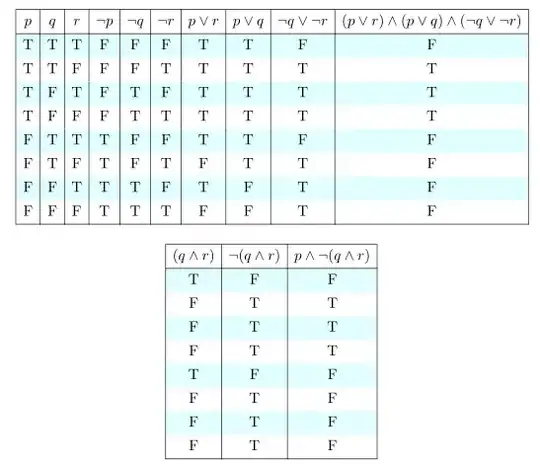
enter image description here

The such a way of "zebra" coloring of tables you can achieve at "classic" table too. Before table you only need to insert:

\rowcolors{2}{white}{Cyan}

and than remove all \rowcolor{Cyan} commands in table body.
Imran
  • 3,096
Zarko
  • 296,517