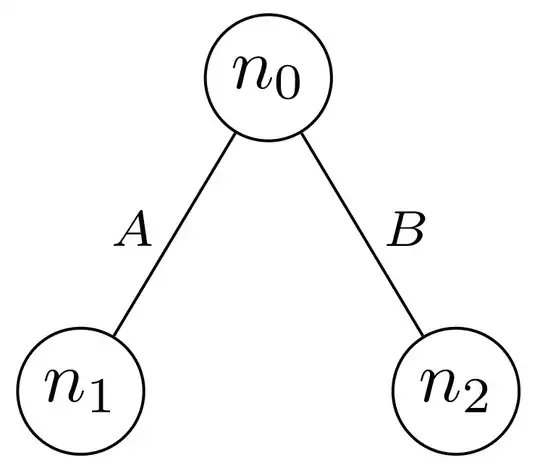
Probably you use tikz-qtree package ... unfortunately its documentation doesn't describe, how to add edge labels. But by searching on this site you can find answer on question positioning-labels-on-edges-of-tikz-qtree which can be simple adopt to your case:
\documentclass[border=3.141502]{standalone}
\usepackage{tikz}
\usepackage{tikz-qtree}
\begin{document}
\begin{tikzpicture}[every tree node/.style={draw,circle},
   level distance=1.25cm,sibling distance=1cm,
   edge from parent path={(\tikzparentnode) -- (\tikzchildnode)}
                    ]
\Tree [.$n_{0}$
        \edge node[left] {$A$};
        [.$n_{1}$ ]
           \edge node[right] {$B$};
        [.$n_{2}$ ]
    ]
\end{tikzpicture}
\end{document}

However, there is also alternative solution with use of the
forest package. Using it adding labels to edges is relatively simple:
\documentclass[border=3.141502]{standalone}
\usepackage{forest}
\begin{document}
    \begin{forest}
for tree = {
% nodes style
    circle, draw, inner sep=2pt,
    minimum size=1.2em,
    math content,
% tree style
    l sep = 9mm,
    s sep = 12mm,
/tikz/ELS/.style = {% Edge Label Style
    node font=\scriptsize, inner sep=1pt,
    pos=0.6, anchor=south #1},
EL/.style={if n=1{edge label={node[ELS=east]{$#1$}}}
                 {edge label={node[ELS=west]{$#1$}}}}
           }
[n_{0}
    [n_{1}, EL=A]
    [n_{2}, EL=B]
]
    \end{forest}
\end{document}