I don’t know whether we have the same version of the fonts, because the glyph numbers you mention don’t match what I see. But in LuaTeX, you can do this (adjust the name of the ampersand glyph to ampersand.alt2 or ampersand.alt3 if the one shown is not the one you wanted):
\documentclass[12pt]{article}
\usepackage[no-math]{fontspec}
\directlua{
  fonts.handlers.otf.addfeature{
    name = "malt",
    type = "alternate",
    data =
    {
      Q = "Q.alt",
      ["q.sc"] = "q.scalt",
      W = "W.alt",
      ["w.sc"] = "w.scalt",
      Wcircumflex = "Wcircumflex.alt",
      Wgrave = "Wgrave.alt",
      Wacute = "Wacute.alt",
      Wdieresis = "Wdieresis.alt",
      ["wacute.sc"] = "wacute.scalt",
      ["wcircumflex.sc"] = "wcircumflex.scalt",
      ["wdieresis.sc"] = "wdieresis.scalt",
      ["wgrave.sc"] = "wgrave.scalt",
      ampersand = "ampersand.alt1",
    },
  }
  fonts.handlers.otf.addfeature{
    name = "oops",
    type = "alternate",
    data =
    {
      ["ampersand.alt1"] = "ampersand.sc",
    },
  }
}
\setmainfont{Garamond Premier Pro}[RawFeature=+malt]% “malt” for “my alternates”; choose another name if you like
\begin{document}
Test: W Q \&.
Ẃ Ẁ Ŵ Ẅ
% because the font doesn’t have small cap ampersand variants:
{\addfontfeature{RawFeature=+oops}\textsc{Test: w q & ẃ ẁ ŵ ẅ}}
\end{document}
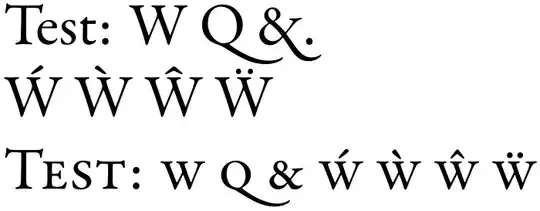
If you’d rather not need to remember to add {\addfontfeature{RawFeature=+oops}...} whenever a small caps ampersand comes into view, just invoke fontspec like this in your preamble:
\setmainfont{Garamond Premier Pro}[
  RawFeature=+malt,
  SmallCapsFeatures={RawFeature=+oops}]
See How to adjust font features in LuaTeX? for more detail. For glyphs with long tails, defining a contextual alternate is often preferable.


