Besides the circumstance that +v-preprocessing of arguments does not take care of the character code of the horizontal tab-character (^^I in TeX's ^^-notation), so that horizontal tabs even with v/+v-type-arguments usually are tokenized as explicit space-tokens of category 10(space) and character code 32 while v/+v-arguments deliberately are implemented to trigger error-messages in case of containing explicit space-tokens, I suggest not to use \exp_args:Nx because that might lead to unwanted expansion of active characters in case of using inputenc. Instead you can use a scratch-macro which reads the phrases \begin{lstlistig} and \end{lstlisting} under modified catcode-régime and then defines the non-scratch-variant.
And you might wish to have the \newline-character-mechanism neutralized, by temporarily giving \newlinechar the value of \endlinechar, while \scantokens does its writing of the fake-file—in order to make sure the lstlisting-environment and your \code-command behave in the same way even when someone played around with the \newlinechar-parameter.
\documentclass{article}
\usepackage{listings}
\usepackage{xparse}
\ExplSyntaxOn
\NewDocumentCommand{\code}{m}{
  \group_begin:
  \char_set_catcode_other:N ^^I
  \innercode{#1}
}
\group_begin:
\NewDocumentCommand{\innercode}{mmm}{
  \group_end:
  \NewDocumentCommand{\innercode}{m +v}{
    \group_end:
    \group_begin:
    % See the subtle difference between \code and the lstlisting-environment
    % when turning the following line into a comment:
    \tex_newlinechar:D=\tex_endlinechar:D
    %
    \tex_scantokens:D
    {
      #3
      #1[language=##1,numbers=none,xleftmargin=0.35cm,framesep=0mm]%
        ##2
      #2%<-here \scantokens attaches an endline-chracter=return
    }
  }
}
\use:n{
  \char_set_catcode_other:N \
  \char_set_catcode_other:N {
  \char_set_catcode_other:N }
  \char_set_catcode_group_begin:N [
  \char_set_catcode_group_end:N ]
  \innercode
}[\begin{lstlisting}][\end{lstlisting}][\endgroup~]
\ExplSyntaxOff
\begin{document}
\section{Works well}
\code{C}{
Foo bar
}
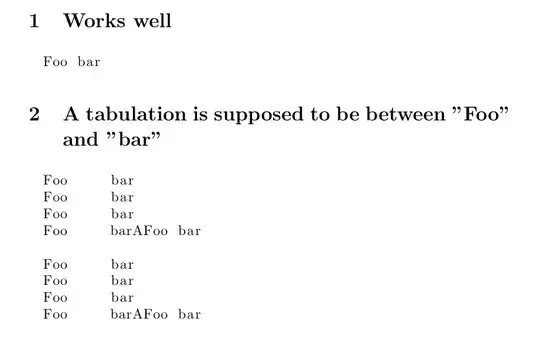
\section{A tabulation is supposed to be between "Foo" and "bar"}
\newlinechar=`\A
\code{C}{
Foo	bar
Foo	bar
Foo	bar
Foo	barAFoo  bar
}
\begin{lstlisting}[language=C,numbers=none,xleftmargin=0.35cm,framesep=0mm]
Foo	bar
Foo	bar
Foo	bar
Foo	barAFoo  bar
\end{lstlisting}
\end{document}


	and every < with<, in case you want to include a tab character in the code. It's not the main purpose of the site but can be (ab) used to do that – user202729 Apr 10 '22 at 03:34