1

Linguex only allows for 3 levels of examples, but I need to be able to reproduce this (except I do not need first level label to include chapter number or be flushed right).

  • I want to keep local referencing to subexamples, i.e. parent sublabel skipping.

  • If we want to skip the first and second levels as in (1b) instead of (28.E.1b), and if a dot is involved as a separator, the refcount package can be called, so as to use the \gobbletodot and \getrefkeybykeydefault macros

enter image description here

1 Answers1

4

It may not be ideal, but the enumitem package can certainly handle something like that.

EDIT: I've edited the answer to also include a counter for the example number that goes on the right; it's a bit hacky, and there may be more elegant solutions, especially if it were OK for those to be on the left as well. Maybe someone will have a better idea.

\documentclass{article}

\usepackage{enumitem}

\newcounter{myexample} \setcounter{myexample}{0}

\newenvironment{myexamples}{% \hbox{\smash{\raisebox{-1\baselineskip}{\parbox{\linewidth}{\hfill% \refstepcounter{myexample}(\themyexample)}}}}\nointerlineskip% \vspace*{-0.5\baselineskip}\begin{enumerate}% }{% \end{enumerate} }

\setlist{noitemsep} \setlist[1]{label=\Alph.,leftmargin=4em} \setlist[2]{label=\arabic.,leftmargin=1.5em,labelsep=0.3em, ref=\arabic{myexample}.\Alph{enumi}.\arabic} \setlist[3]{label=\alph.,leftmargin=, ref=\arabic{myexample}.\Alph{enumi}.\arabic{enumii}\alph}

\begin{document}

\begin{myexamples} \item \begin{enumerate} \item \begin{enumerate} \item John is a robber.\label{johnrobber} \item John is a thief. \end{enumerate} \item \begin{enumerate} \item John robs things. \item *John thieves things. (compare \emph{thievery}) \label{johnthievery} \end{enumerate} \end{enumerate} \end{myexamples}

As you can see in \ref{johnrobber} and \ref{johnthievery} \ldots

\end{document}
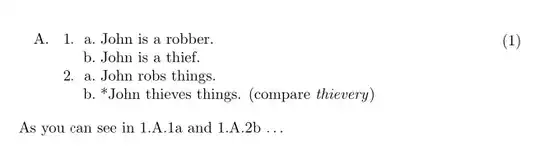
updated list output

(If you need to share the numbers with another example set, say, for linguex as is, more might need to be done.)

frabjous
  • 41,473
  • The idea is that you have to be able to refer to the example including the first level, as "cf. 2.E.b2". – Vincent Krebs Apr 14 '22 at 07:28
  • 1
    I'm a little confused by "2.E.b2", since that doesn't match the example, but with "A.1" and "1.a", I was just going by the example in the top of the first paragraph of the second page; you can make the reference tags read however you want, so, e.g., ref=\Alph{enumi}.\arabic{enumii}\alph* in \setlist[3] for "A.2b". See the package documentation. – frabjous Apr 14 '22 at 12:25
  • This is example (28) so basically you want to refer to eg (28.D.2b) The notation F.1 skips the first level, which is what you do when talking about one example. – Vincent Krebs Apr 14 '22 at 16:18
  • 1
    Oh, I see. Bit busy right now, but I'll try to make something like that work when I get a chance. – frabjous Apr 14 '22 at 16:21
  • 1
    I've made an edit to the answer that incorporates the example numbers, but it's a bit cobbled together; someone else may have something more elegant. – frabjous Apr 14 '22 at 19:35
  • Thanks to whoever downvoted, he probably has no idea how much explanation I put in my other post https://tex.stackexchange.com/questions/637164/cross-referencing-more-sublevels-and-presets – Vincent Krebs Apr 15 '22 at 08:17
  • Thank you very much! So now if, discussing the example more thoroughly, I want to skip the main level label, such as "A.1a" or even the sublevel "1a", is that possible? – Vincent Krebs Apr 15 '22 at 12:47
  • 1
    @VincentKrebs As far as I know, for that, you'd either need to do \hyperlink/\hypertargets with manual numbering, or else simplify the ref= options to use just \Alph*, \arabic, etc., and then chain together the \refs to the separately labeled components you want to include each time, which would be a little annoying I admit. (The downvote is pretty mysterious to me too!) – frabjous Apr 15 '22 at 18:22
  • I do not know how to refer to a specific part, although I know this post very well now https://tex.stackexchange.com/questions/577449/any-way-to-reference-a-particular-component-of-a-label/577464#577464 If I can know how to ref to the middle level label for example, I can create a command such as "\reftwolv[2]= \ref #1.\ref #2" – Vincent Krebs Apr 15 '22 at 18:30
  • I got it, I use \newcommand{\reftwolv}{\arabic{enumii}\alph{enumiii}}, something like that. But I don"t understand how to include the label as an argument of the command. – Vincent Krebs Apr 15 '22 at 18:42
  • 1
    I'm not sure, but think you're after something like \newcommand{\reftwolv}[2]{\ref{#1}.\ref{#2}} which would then be used like \reftwolv{outerlabel}{innerlabel}. The \arabic{enumii} stuff should be left to the ref= stuff that is put in the \setlist commands, but most likely you don't need to use enumi/enumii/enumiii at all, but just the simpler \Alph*, \arabic*, \alph* shorthands at the end of my examples: \setlist[2]{..., ref=\arabic*}, etc. (Or just leave the ref= options out so it defaults to the label= options.) – frabjous Apr 15 '22 at 19:28
  • What I never understood is how you define sublabels, i.e. labels for a precise sublevel, in your example if ref=\arabic*, this is the "innerlabel" but how do you call the "outerlabel"? – Vincent Krebs Apr 15 '22 at 20:11
  • 1
    In the code you'd need to have separate \label commands for each the levels right after the \item command for that level, e.g., \item\label{outerlabel} \begin{enumerate}\item\label{innerlabel} \begin{enumerate}\item\label{innerinnerlabel} John is a robber. – frabjous Apr 15 '22 at 20:18
  • Ok, yes it will not be that convenient. I wish I could find a way to type things such as \newcommand{\reftwolv}{\label{#1}.\sublabel{#1}}, i.e. refer to sublabels of one example. Thanks for your help anyway! – Vincent Krebs Apr 15 '22 at 21:35