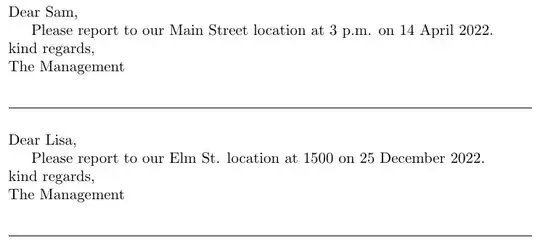
Here is a way with the listofitems package.
\documentclass{article}
\usepackage{listofitems}
\newcommand\letterdata{
Sam, Main Street, 3 p.m., 14 April 2022\\
Lisa, Elm St., 1500, 25 December 2022}
\newcommand\stencil{
\noindent Dear <data>,
Please report to our <data> location at <data> on <data>.
\noindent kind regards,\
The Management}
\setsepchar{\/,}
\readlist\letteritems{\letterdata}
\setsepchar{<data>}
\readlist\stencilitems{\stencil}
\begin{document}
\foreachitem\z\in\letteritems[]{%
  \foreachitem\zz\in\stencilitems[]{%
    \zz
    \ifnum\zzcnt<\listlen\stencilitems[]\letteritems[\zcnt,\zzcnt]\fi%
  }%
  \par\bigskip\noindent\hrulefill\par\bigskip
}
\end{document}
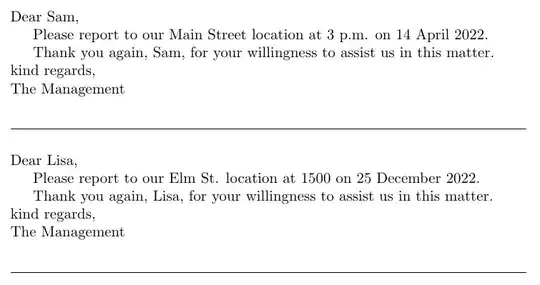
If you need to use the data items out of sequence, or repeatedly, then this variation would suffice:
\documentclass{article}
\usepackage{listofitems}
\newcommand\letterdata{
Sam, Main Street, 3 p.m., 14 April 2022\\
Lisa, Elm St., 1500, 25 December 2022}
\newcommand\stencil{%
\noindent Dear <data>{1},
Please report to our <data>{2} location at <data>{3} on <data>{4}.
Thank you again, <data>{1}, for your willingness to assist us in
  this matter.
\noindent kind regards,\
The Management}
\setsepchar{\/,}
\readlist*\letteritems{\letterdata}
\setsepchar{<data>}
\readlist\stencilitems{\stencil}
\newcommand\fillinthedata[2]{\letteritems[#1,#2]}
\newtoks\lettertoks
\newcommand\addtolettertoks[1]{%
      \lettertoks\expandafter{\the\lettertoks#1}}
\newcommand\xaddtolettertoks[1]{%
      \lettertoks\expandafter\expandafter\expandafter{\expandafter
      \the\expandafter\lettertoks#1}}
\begin{document}
\foreachitem\z\in\letteritems[]{%
  \lettertoks{}%
  \foreachitem\zz\in\stencilitems[]{%
    \xaddtolettertoks{\zz}%
    \ifnum\zzcnt<\listlen\stencilitems[]\relax
      \addtolettertoks{\fillinthedata}%
      \xaddtolettertoks{\expandafter{\zcnt}}%
    \fi%
  }%
  \the\lettertoks
  \par\bigskip\noindent\hrulefill\par\bigskip
}
\end{document}


datatoolpackage. You simply create a CSV file with the fields and then read it to print what you want. – Sigur Apr 14 '22 at 14:10