No, the to[] path command has no such an option (I am sure there is somewhere an answer adding a to-path implementing such a thing, but I can't find it... "to" isn't exactly a search-friendly word — but anyway, it's not implemented in circuitikz, so the point is moot).
You gave little details, but if you want to add poles to the line, you can use the trick that when using -| or |-, the kink is at position 0.5:
\documentclass[border=10pt]{standalone}
\usepackage{circuitikz}
\begin{document}
\begin{tikzpicture}[american]
    \draw (0,0) -| node[pos=0.5, ocirc]{} (2,1);% really pos=0.5 is the default...
\end{tikzpicture}
\end{document}
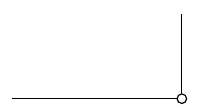
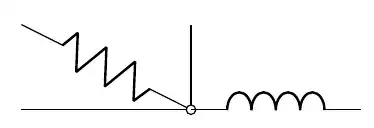
Remember that "open" poles are filled with white at the end of the path construction, so if you want to connect other elements to it using another path, you have to use the node name so that border anchors are engaged, not the bare coordinate (see the problem with the inductance!)
\documentclass[border=10pt]{standalone}
\usepackage{circuitikz}
\begin{document}
\begin{tikzpicture}[american]
    \draw (0,0) -| nodepos=0.5, ocirc{} (2,1);
    \draw (mynode) to[R] (0,1);
    \draw (0,0 -| 2,1) to[L] ++(2,0);
\end{tikzpicture}
\end{document}


toas that is intended to make smooth curves. But, you can uselooseness=2to control it and make it less curvy. Try\draw (0,0) to[out=0, in=-90, looseness=2] (1,1);and see the results. See Shorter way of obtaining curved angle with intersections. – Peter Grill Apr 15 '22 at 16:56