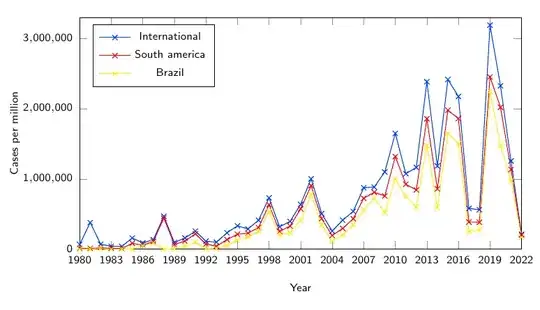
With scaled y ticks=false, the y-axis tick labels will be 1 \cdot 10^6, 2 \cdot 10^6, and 3 \cdot 10^6.
To configure the number format, you can add /pgf/number format/... options to tick label style={...}. For example,
tick label style={font=\tiny, /pgf/number format/fixed}
will change y-axis tick labels to 1,000,000, 2,000,000, and 3,000,000.
For more info, you can check pgfplots package manual, sec. 4.15.3 "Tick Scaling – Common Factors In Ticks" and sec. 4.13 "Number Formatting Options".
\documentclass[notheorems]{beamer}
\usepackage[english]{babel}
\usepackage{tikz}
\usepackage{pgfplots}
\usepackage{biblatex}
\begin{document}
\begin{frame}
  \begin{figure}
    \centering
    \begin{tikzpicture}
      \begin{axis}[
        %      title={Dengue reported cases from 1980 to 2022},
        scaled ticks=false,
        xlabel={Year},
        ylabel={Cases per million},
        xmin=1980, xmax=2022,
        ymin=0, ymax=3300000,
        xtick={1980, 1983, 1986, 1989, 1992, 1995, 1998, 2001, 2004, 2007, 2010, 2013, 2016, 2019, 2022},
        xticklabels={1980, 1983, 1986, 1989, 1992, 1995, 1998, 2001, 2004, 2007, 2010, 2013, 2016, 2019, 2022},
        legend pos=north west,
        label style={font=\tiny},
        legend style={font=\tiny},
        tick label style={font=\tiny, /pgf/number format/fixed},
        width=10cm,
        height=6cm
        ]
        \addplot[
          color=blue,
          mark=x,
          ]
          plot coordinates {
            (1980, 65523)
            (1981, 377916)
            (1982, 68892)
            (1983, 40544)
            (1984, 38904)
            (1985, 158193)
            (1986, 88093)
            (1987, 134013)
            (1988, 467386)
            (1989, 94179)
            (1990, 157662)
            (1991, 254749)
            (1992, 112567)
            (1993, 98598)
            (1994, 232051)
            (1995, 331417)
            (1996, 287519)
            (1997, 410392)
            (1998, 729425)
            (1999, 317158)
            (2000, 394857)
            (2001, 636977)
            (2002, 1001073)
            (2003, 506726)
            (2004, 257251)
            (2005, 413122)
            (2006, 537412)
            (2007, 874750)
            (2008, 884334)
            (2009, 1099742)
            (2010, 1648569)
            (2011, 1073990)
            (2012, 1164366)
            (2013, 2384803)
            (2014, 1184045)
            (2015, 2416018)
            (2016, 2175409)
            (2017, 579027)
            (2018, 561689)
            (2019, 3190778)
            (2020, 2326115)
            (2021, 1254648)
            (2022, 211882)
          };
        \addlegendentry{International}
    \addplot[
      color=red,
      mark=x,
      ]
      plot coordinates {
        (1980, 9003)
        (1981, 10861)
        (1982, 19034)
        (1983, 12925)
        (1984, 7560)
        (1985, 82273)
        (1986, 55248)
        (1987, 108955)
        (1988, 441382)
        (1989, 65803)
        (1990, 114431)
        (1991, 217077)
        (1992, 72319)
        (1993, 41250)
        (1994, 134342)
        (1995, 211396)
        (1996, 226960)
        (1997, 307625)
        (1998, 632804)
        (1999, 252762)
        (2000, 326846)
        (2001, 572876)
        (2002, 903891)
        (2003, 434264)
        (2004, 193334)
        (2005, 294943)
        (2006, 432661)
        (2007, 724077)
        (2008, 810134)
        (2009, 756755)
        (2010, 1317801)
        (2011, 923793)
        (2012, 843840)
        (2013, 1857228)
        (2014, 857983)
        (2015, 1978921)
        (2016, 1860466)
        (2017, 385076)
        (2018, 382243)
        (2019, 2453060)
        (2020, 2021272)
        (2021, 1134555)
        (2022, 199319)
      };
    \addlegendentry{South america}

    \addplot[
      color=yellow,
      mark=x,
      ]
      plot coordinates {
        (1980, 0)
        (1981, 0)
        (1982, 12000)
        (1983, 0)
        (1984, 0)
        (1985, 0)
        (1986, 47367)
        (1987, 89393)
        (1988, 190)
        (1989, 5334)
        (1990, 40642)
        (1991, 97209)
        (1992, 3501)
        (1993, 6915)
        (1994, 54453)
        (1995, 124775)
        (1996, 175749)
        (1997, 254074)
        (1998, 535283)
        (1999, 204131)
        (2000, 231412)
        (2001, 412388)
        (2002, 778037)
        (2003, 341189)
        (2004, 112851)
        (2005, 203356)
        (2006, 345922)
        (2007, 558413)
        (2008, 724427)
        (2009, 520660)
        (2010, 994158)
        (2011, 753487)
        (2012, 597450)
        (2013, 1473645)
        (2014, 591080)
        (2015, 1649008)
        (2016, 1500535)
        (2017, 252054)
        (2018, 265934)
        (2019, 2248570)
        (2020, 1467142)
        (2021, 975474)
        (2022, 167602)
      };
    \addlegendentry{Brazil}
  \end{axis}
\end{tikzpicture}
%  \caption{Dengue reported cases from 1980 to 2022~\myfootcite{PAHODengueData2022}.}

\end{figure}
\end{frame}
\end{document}
Note it's recommended to provide the complete example directly to this site, so the Q&A could be self-contained even if the link is dead.


