Math alphabets and operators form a set, so doing mix-and-match will usually require low-level adjustments of different kinds.
Having said that, there are various ways and methods to import a symbol.
(1)
The simplest way is to include the glyphs as images\PDFs, and resize etc when needed, like Griffiths does:
Code:
\documentclass{report}
\usepackage{graphicx}
\def\rcurs{{\mbox{$\resizebox{.16in}{.08in}{\includegraphics{ScriptR}}$}}}
\def\brcurs{{\mbox{$\resizebox{.16in}{.08in}{\includegraphics{BoldR}}$}}}
\def\hrcurs{{\mbox{$\hat \brcurs$}}}
\begin{document}
Here's a sample:
$\resizebox{.16in}{.08in}{\includegraphics{BoldR}}$
Can I put it into a line of type?  $\resizebox{.21in}{.11in}{\includegraphics{BoldR}}$
How about using the macro: \brcurs.
How about using the macro: \rcurs?
How about using the macro: \hrcurs?
What if it's in an equation?
\begin{equation}
{\bf E} = {1\over 4\pi\epsilon_0}\int {\rho\over \rcurs^2}{\hrcurs},d\tau.
\end{equation}
\end{document}
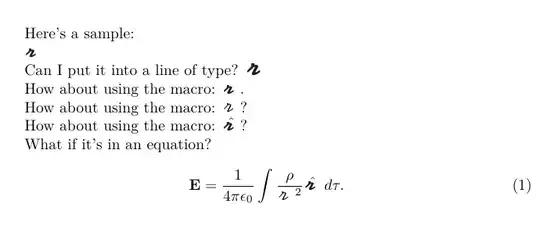
See the Griffiths zip file http://academic.reed.edu/physics/faculty/griffiths/script_r.zip, via Script-r Symbol
(2)
The next most simplest way is to use one of the \math... functions (here, \mathord): Defining a math symbol of variable sizes in XeTeX with \Umathchardef via LuaTeX: Use single symbol from other font in math mode
Here's a list of them:
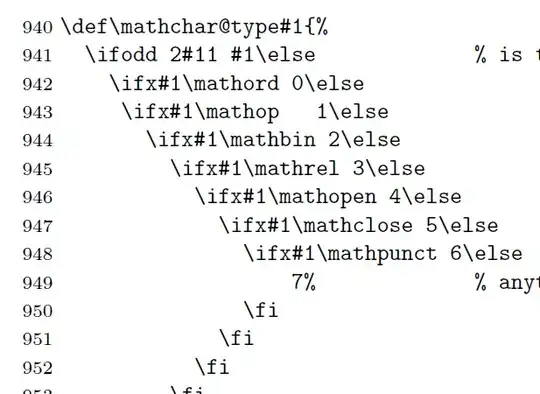
(texdoc source2e)
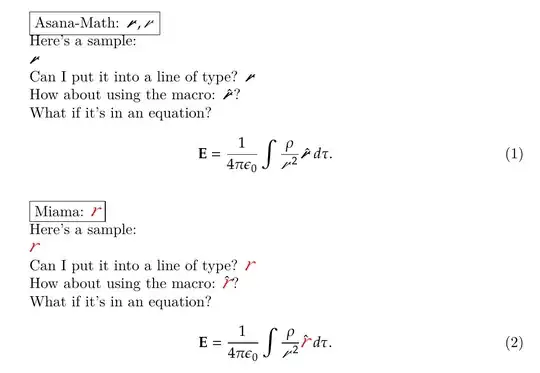
MWE
\documentclass{report}
\usepackage{xcolor}
\usepackage{unicode-math}
\setmathfont{Asana-Math}
\newfontfamily{\miama}{Miama}[Colour=red,
Scale=1.3,
Path=C:/Users/.../tl/texlive/2020/texmf-dist/fonts/opentype/public/miama/,
Extension=.otf,
UprightFont=*,
]
\DeclareRobustCommand\mysym{%
  \mathord{\text{\normalfont\miama r}}%
}
%\def\rcurs{{\mbox{$\resizebox{.16in}{.08in}{\includegraphics{ScriptR}}$}}}
%\def\brcurs{{\mbox{$\resizebox{.16in}{.08in}{\includegraphics{BoldR}}$}}}
%\def\hrcurs{{\mbox{$\hat \brcurs$}}}
\def\hrcurs{{\mbox{$\hat\mbfscrr$}}}
\begin{document}
\fbox{Asana-Math: $\mbfscrr, \mscrr $}
Here's a sample:
$\mbfscrr$
Can I put it into a line of type?  $\mbfscrr$
How about using the macro: \hrcurs?
What if it's in an equation?
\begin{equation}
\symbf{E} = {1\over 4\mitpi\mitepsilon_0}\int {\mitrho\over \mscrr^2}{\hat\mbfscrr},d\mittau.
\end{equation}
\renewcommand\mbfscrr{{\mysym}}
\def\hrcurs{{\mbox{$\hat\mbfscrr$}}}
\bigskip
\fbox{Miama: $\mysym$}
Here's a sample:
$\mysym$
Can I put it into a line of type?  $\mysym$
How about using the macro: \hrcurs?
What if it's in an equation?
\begin{equation}
\symbf{E} = {1\over 4\mitpi\mitepsilon_0}\int {\mitrho\over \mscrr^2}{\hat\mbfscrr},d\mittau.
\end{equation}
\end{document}
(2a)
Getting the accent adustments correct will require kerning etc. Here, a different non-math font avoids that issue:
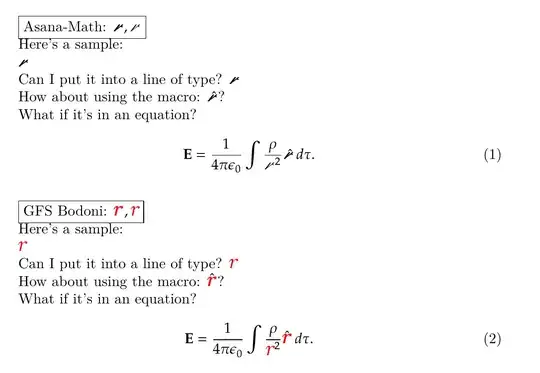
MWE
\documentclass{report}
\usepackage{xcolor}
\usepackage{unicode-math}
\setmathfont{Asana-Math}
\newfontfamily{\gfs}{GFSBodoni}[Colour=red,
Scale=1.3,
Path=C:/Users/.../tl/texlive/2020/texmf-dist/fonts/opentype/public/gfsbodoni/,
Extension=.otf,
UprightFont=*,
ItalicFont=GFSBodoniIt,
BoldFont=GFSBodoniBold,
BoldItalicFont=GFSBodoniBoldIt,
]
\DeclareRobustCommand\mysymbi{%
  \mathord{\text{\normalfont\gfs\bfseries\itshape r}}%
}
\DeclareRobustCommand\mysym{%
  \mathord{\text{\normalfont\gfs\itshape r}}%
}
\def\hrcurs{{\mbox{$\hat\mbfscrr$}}}
\begin{document}
\fbox{Asana-Math: $\mbfscrr, \mscrr $}
Here's a sample:
$\mbfscrr$
Can I put it into a line of type?  $\mbfscrr$
How about using the macro: \hrcurs?
What if it's in an equation?
\begin{equation}
\symbf{E} = {1\over 4\mitpi\mitepsilon_0}\int {\mitrho\over \mscrr^2}{\hat\mbfscrr},d\mittau.
\end{equation}
\renewcommand\mbfscrr{{\mysymbi}}
\def\hrcurs{{\mbox{$\hat\mbfscrr$}}}
\bigskip
\fbox{GFS Bodoni: $\mysymbi, \mysym$}
Here's a sample:
$\mysym$
Can I put it into a line of type?  $\mysym$
How about using the macro: \hrcurs?
What if it's in an equation?
\begin{equation}
\symbf{E} = {1\over 4\mitpi\mitepsilon_0}\int {\mitrho\over \mysym^2}{\hat\mbfscrr},d\mittau.
\end{equation}
\end{document}
(3)
Next, mapping using unicode-math package's range= font option.
Mapping from a Unicode math font:
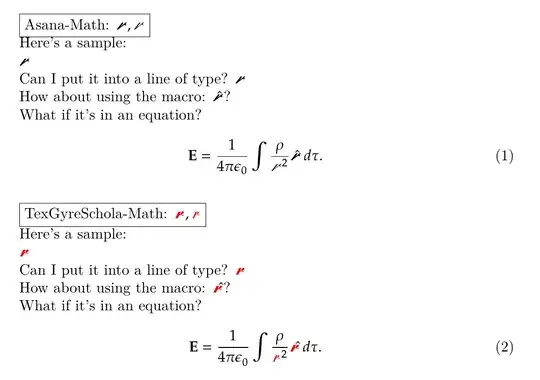
MWE
\documentclass{report}
\usepackage{xcolor}
\usepackage{unicode-math}
\setmathfont{Asana-Math}
\def\hrcurs{{\mbox{$\hat\mbfscrr$}}}
\begin{document}
\fbox{Asana-Math: $\mbfscrr,\mscrr$}
Here's a sample:
$\mbfscrr$
Can I put it into a line of type?  $\mbfscrr$
How about using the macro: \hrcurs?
What if it's in an equation?
\begin{equation}
\symbf{E} = {1\over 4\mitpi\mitepsilon_0}\int {\mitrho\over \mscrr^2}{\hat\mbfscrr},d\mittau.
\end{equation}
\setmathfont{TexGyreSchola-Math}[range={\mbfscrr,\mscrr},Colour=red]
\bigskip
\fbox{TexGyreSchola-Math: $\mbfscrr,\mscrr$}
Here's a sample:
$\mbfscrr$
Can I put it into a line of type?  $\mbfscrr$
How about using the macro: \hrcurs?
What if it's in an equation?
\begin{equation}
\symbf{E} = {1\over 4\mitpi\mitepsilon_0}\int {\mitrho\over \mscrr^2}{\hat\mbfscrr},d\mittau.
\end{equation}
\end{document}
(4)
\DeclareMathSymbol uses legacy font techniques. ttf\otf fonts can be used by assigning them an NFSS-alias via fontspec package (so xelatex or lualatex as compiler), and then going through multiple steps as per the linked question.
The option is NFSSFamily=.
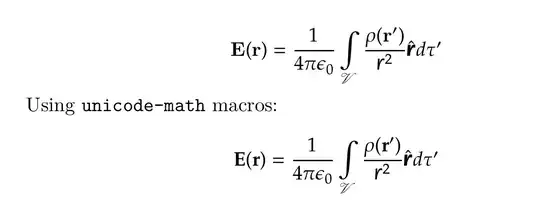
The example uses QTFloraline font (in the tex distribution)L it has a regular face and a bold face. Substitute your kaufmann files instead.
MWE
\documentclass{article}
\usepackage{xcolor}
\usepackage{unicode-math}
\setmathfont{Asana-Math}
\newfontface\ffontc{QTFloraline}[
Extension=.otf,
UprightFont=,
BoldFont=-Bold,
NFSSFamily=floraline,
]
\usepackage{bm}
\DeclareFontFamily{U}{floraline}{}
\DeclareFontShape{U}{floraline}{m}{n}{<-> QTFloraline}{}
\DeclareFontShape{U}{floraline}{b}{n}{<-> QTFloraline-Bold}{}
\DeclareSymbolFont{myfloraline}{U}{floraline}{m}{n}
\SetSymbolFont{myfloraline}{bold}{U}{floraline}{b}{n}
\DeclareMathSymbol{\rcurs}{\mathalpha}{myfloraline}{`\r}
\DeclareBoldMathCommand{\brcurs}{\rcurs}
\newcommand*\hrcurs{\hat{\brcurs}}
\begin{document}
[
  \mathbf{E}(\mathbf{r}) = \frac{1}{4 \pi \epsilon_0} \int\limits_{\mathcal{V}} \frac{\rho(\mathbf{r}')}{\rcurs^2} \hrcurs d \tau'
]
Using \texttt{unicode-math} macros:
[
  \symbfup{E}(\symbfup{r}) = \frac{1}{4 \mitpi \mitepsilon_0} \int\limits_{\symcal{V}} \frac{\mitrho(\symbfup{r}')}{\rcurs^2} \hrcurs d \mittau'
]
\end{document}
(5)
For one or two symbols, the \mathord{} method is easier, and doesn't use up a whole math alphabet either.
As it turns out, unicode-math defines two macros, \mbfscrr and \mscrr. These can just be redefined (renewcommand) via \mathord, and that's that.
The code steps through the stages of what to change, illustrating each result, reaching the final step using QTChanceryType font:
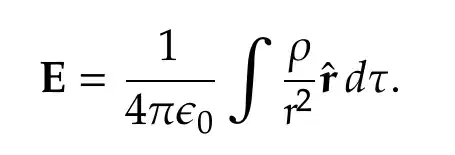
MWE
\documentclass{report}
\usepackage{xcolor}
\usepackage{unicode-math}
\setmathfont{Asana-Math}
\newfontface\bodb{BOD_BLAR.TTF}[Colour=red]
\newfontface\ffontbreg{QTChanceryType.otf}
\newfontface\ffontbbold{QTChanceryType-Bold.otf}
\DeclareRobustCommand\xmbfscrr{%
\mathord{\text{\normalfont\bodb A}}%
}
\DeclareRobustCommand\myscrr{%
\mathord{\text{\normalfont\ffontbreg r}}%
}
\DeclareRobustCommand\mybfscrr{%
\mathord{\text{\normalfont\ffontbbold r}}%
}
\begin{document}
%======================: 0: base
\fbox{Asana-Math: $\mbfscrr,\mscrr$}
\begin{equation}
\symbfup{E} = {\frac{1}{4\mitpi\mitepsilon_0}}\int {\frac{\mitrho}{\mscrr^2}}{\hat\mbfscrr},d\mittau.
\end{equation}
%======================: 1: A
\renewcommand{\mbfscrr}{A}
\bigskip
\begin{equation}
\symbfup{E} = {\frac{1}{4\mitpi\mitepsilon_0}}\int {\frac{\mitrho}{\mscrr^2}}{\hat\mbfscrr},d\mittau.
\end{equation}
%======================: 2: A from another font
\renewcommand{\mbfscrr}{{\xmbfscrr}}
\bigskip
\begin{equation}
\symbfup{E} = {\frac{1}{4\mitpi\mitepsilon_0}}\int {\frac{\mitrho}{\mscrr^2}}{\hat\mbfscrr},d\mittau.
\end{equation}
%======================:  3: r and bold r, from another font
\renewcommand{\mbfscrr}{{\mybfscrr}}
\renewcommand{\mscrr}{{\myscrr}}
\bigskip
\begin{equation}
\symbfup{E} = {\frac{1}{4\mitpi\mitepsilon_0}}\int {\frac{\mitrho}{\mscrr^2}}{\hat\mbfscrr},d\mittau.
\end{equation}
\end{document}
Addendum
To avoid ambiguity, text mode and math mode are completely different universes, in terms of fonts.

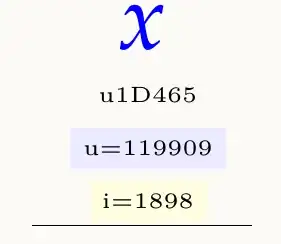
Where does the italic x () come from in a Unicode maths font, if there is just plain upright Latin and Greek in it?
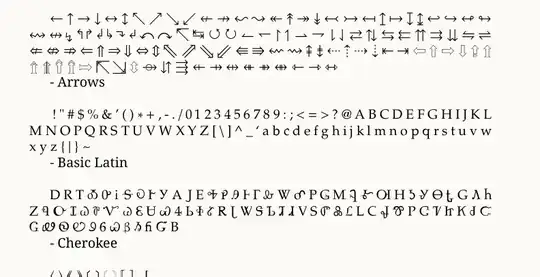
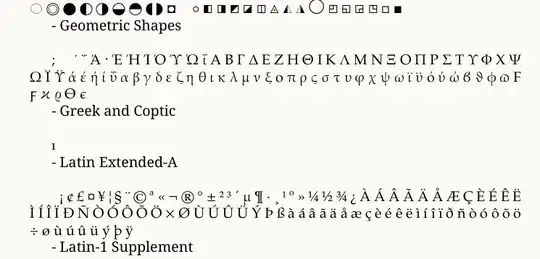
From the Mathematical Alphanumeric Symbols block:
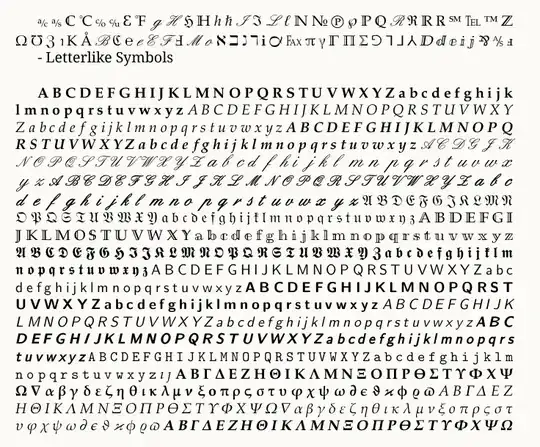
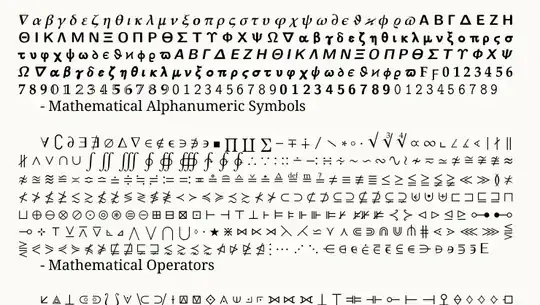
$x$ (or \mitx) will fetch the italic "version":
and $\mathbf{x}$ (more correctly, \symbfit{x}, or \mbfitx) will get the bold italic x:
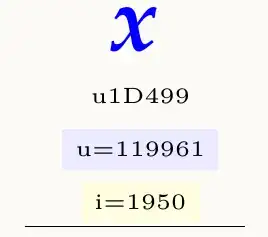
They are different glyphs, in different slots (bold, or not bold, has semantic meaning, unlike in text mode, where the x is the same slot in the regular font file, and in the bold font file.
Copy-pasting Unicode math symbols preserves the semantic meaning.
That is why, in math mode, you need to define two glyphs,


unicode-mathsolution (where therange=option is available)? – Cicada May 06 '22 at 05:21range=option does, so I guess no, but it would be nice to be aware of the limitations of the solution =) – Níckolas Alves May 06 '22 at 12:00\unimath_get_mathstyle:can be used to detect whether it's inside/outside symbf (which is documented API), while for\mathbfthe best you can do is to look at\the\fam(in my testing it's -1 for normal and 4 for mathbf, but this is probably not guaranteed). Read unicode-math docs for difference between mathbf and symbf. – user202729 May 30 '22 at 15:02