If you use Biblatex then there is a command \Textcite (with capital T) that forces the first letter of a name prefix to be in upper case. This requires the package option useprefix=true to display the prefix in the first place.
From the Biblatex manual, currently (version 3.17, 2022-02-02) section 3.9.2 Style-specific commands on page 110:
\Textcite is similar to \textcite but capitalizes the name prefix of the first name in the citation if the useprefix option is enabled, provided that there is a name prefix.
The useprefix option will also sort the name under the prefix, which is not desired - in Dutch and in several other languages that use prefixes they should not be used for sorting. You can revert this behavior by explicitly setting the sort order, as in Prefixes in author names in references and bibliography.
Similar capitalized versions exist for other cite commands, like \Autocite.
MWE (.bib file):
@phdthesis{thisauthor,
   author = {van der Waals, Johannes Diderik},
   title = {On the continuity of the gas and liquid state},
   school = {Leiden University},
   year = {1873}
}
MWE (.tex file):
\documentclass{article}
\usepackage[useprefix=true]{biblatex}
\DeclareSortingNamekeyTemplate{
  \keypart{
    \namepart{family}
  }
  \keypart{
    \namepart{prefix}
  }
  \keypart{
    \namepart{given}
  }
  \keypart{
    \namepart{suffix}
  }
}
\addbibresource{citecase.bib}
\begin{document}
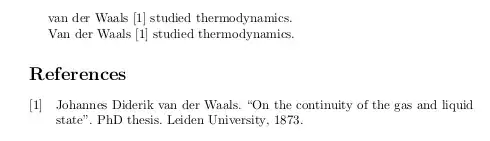
\textcite{thisauthor} studied thermodynamics.
\Textcite{thisauthor} studied thermodynamics.
\printbibliography
\end{document}
Result:
If, instead of Biblatex, you use the natbib package then there are also capitalized versions of cite commands available. From the manual, currently page 9:
2.5 Forcing Upper Cased Name
If the first author's name contains a von part, such as "della Robbia", then \citet{dRob98} produces "della Robbia (1998)", even at the beginning of a sentence. One can
force the first letter to be in upper case with the command \Citet
instead. Other upper case commands also exist.
when \citet{dRob98} ⇒ della Robbia (1998)
then
\Citet{dRob98} ⇒ Della Robbia (1998)
\Citep{dRob98} ⇒ (Della Robbia, 1998)
\Citealt{dRob98} ⇒ Della Robbia 1998
\Citealp{dRob98} ⇒ Della Robbia, 1998
\Citeauthor{dRob98} ⇒ Della Robbia
These commands also exist in starred versions for full author names.
Note: the coding for the upper casing commands is tricky and likely
buggy. It operates on the names that are stored in the \bibitem
entry, and works even if old style font commands are used; however,
LaTeX2ε commands will cause it to crash. Thus
\bibitem[{\it della Robbia}(1998)]{dRob98} is ok, but
\bibitem[\textit{della Robbia}(1998)]{dRob98} crashes.
MWE: (.tex file)
\documentclass{article}
\usepackage[round]{natbib}
\begin{document}
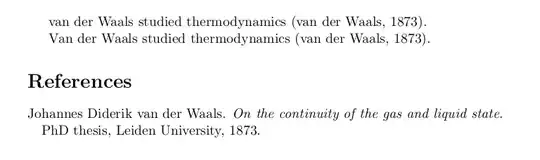
\citeauthor{thisauthor} studied thermodynamics \citep{thisauthor}.
\Citeauthor{thisauthor} studied thermodynamics \citep{thisauthor}.
\bibliographystyle{unsrtnat}
\bibliography{citecase}
\end{document}
Result:
Correct sorting in this case can be done from within the .bib file, see for example Ordering bibliography is not working.


biblatexpackage, – Mico May 09 '22 at 14:14