If you really need a constant distance, it does not work to scale the figure, but you can use the solution given here:
https://tex.stackexchange.com/a/103088/8650
The solution only works on open paths, so I close the path on one side like this:
\documentclass[tikz, border=1cm]{standalone}
\usepackage{tikz}
\usetikzlibrary{decorations}
\def\pgfdecoratedcontourdistance{0pt}
\pgfkeys{/pgf/decoration/contour distance/.code={%
    \pgfmathparse{#1}%
    \let\pgfdecoratedcontourdistance=\pgfmathresult}%
}
\pgfdeclaredecoration{contour lineto}{start}
{
    \state{start}[next state=draw, width=0pt]{
        \pgfpathmoveto{\pgfpoint{0pt}{\pgfdecoratedcontourdistance}}%
    }
    \state{draw}[next state=draw, width=\pgfdecoratedinputsegmentlength]{
        \pgfmathparse{-\pgfdecoratedcontourdistance*cot(-\pgfdecoratedangletonextinputsegment/2+90)}%
        \let\shorten=\pgfmathresult%
        \pgfpathlineto{\pgfpoint{\pgfdecoratedinputsegmentlength+\shorten}{\pgfdecoratedcontourdistance}}%
    }
    \state{final}{
        \pgfpathlineto{\pgfpoint{\pgfdecoratedinputsegmentlength}{\pgfdecoratedcontourdistance}}%
    }
}
\begin{document}
\begin{tikzpicture}
\draw [postaction={decoration={contour lineto, contour distance=-4pt}, draw, densely dashed, decorate}]
  (0,0.5) -- (0,1) -- (0.5, 1.5) -- (1,1) -- (1,0) -- (0,0) --cycle ;
\end{tikzpicture}
\end{document}
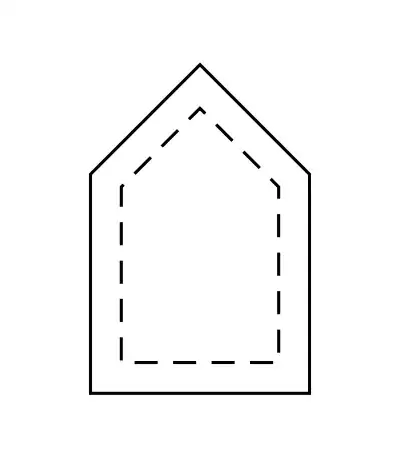
To show that the shape is not just scaled, here is the same figure with a larger distance:
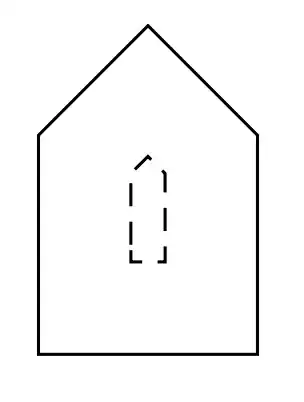
It is seen that the inner shape is not the same as the outer shape.


