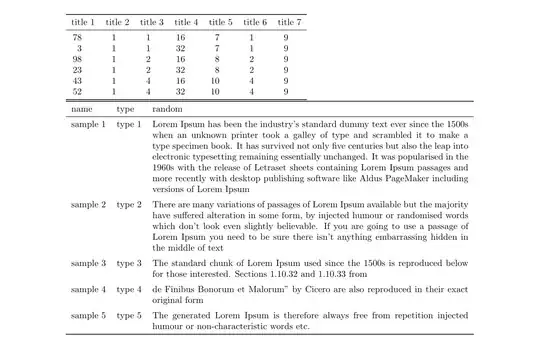
The following implements \tabgen (from scratch, using only expl3-code, no other libraries).
The macro first builds the table body completely, and then typesets the table. It has a few key=value options to customize, hopefully the comments will be enough to understand them.
\documentclass[12pt]{article}
\usepackage[a4paper, total={6.25in, 9.75in}]{geometry}
\begin{filecontents}{1.csv}
title 1,title 2,title 3,title 4,title 5,title 6,title 7
78,1,1,16,7,1,9
03,1,1,32,7,1,9
98,1,2,16,8,2,9
23,1,2,32,8,2,9
43,1,4,16,10,4,9
52,1,4,32,10,4,9
\end{filecontents}
\begin{filecontents}{2.csv}
name;type;random
sample 1;type 1;_^Lorem Ipsum has been the industry's standard dummy text ever since the 1500s when an unknown printer took a galley of type and scrambled it to make a type specimen book. It has survived not only five centuries but also the leap into electronic typesetting remaining essentially unchanged. It was popularised in the 1960s with the release of Letraset sheets containing Lorem Ipsum passages and more recently with desktop publishing software like Aldus PageMaker including versions of Lorem Ipsum
sample 2;type 2;There are many variations of passages of Lorem Ipsum available but the majority have suffered alteration in some form, by injected humour or randomised words which don't look even slightly believable. If you are going to use a passage of Lorem Ipsum you need to be sure there isn't anything embarrassing hidden in the middle of text
sample 3;type 3;The standard chunk of Lorem Ipsum used since the 1500s is reproduced below for those interested. Sections 1.10.32 and 1.10.33 from
sample 4;type 4;de Finibus Bonorum et Malorum" by Cicero are also reproduced in their exact original form
sample 5;type 5;The generated Lorem Ipsum is therefore always free from repetition injected humour or non-characteristic words etc.
\end{filecontents}
\ExplSyntaxOn
\tl_new:N \l__tabgen_body_tl
\tl_new:N \l__tabgen_line_tl
\seq_new:N \l__tabgen_line_seq
\int_new:N \l__tabgen_cols_int
\ior_new:N \l__tabgen_file_stream
\keys_define:nn { tabgen }
  {
    % environment to use
     env .tl_set:N  = \l__tabgen_env_tl
    ,env .initial:n = tabular
    % extra argument to the environment (between env and col)
    ,env-arg .tl_set:N = \l__tabgen_envarg_tl
    % column-spec to use (as mandatory argument to env)
    ,col .tl_set:N  = \l__tabgen_col_tl
    % if no explicit col is given use this for each column (if empty uses p{})
    ,auto-col .tl_set:N = \l__tabgen_autocol_tl
    % before title line
    ,top .tl_set:N  = \l__tabgen_top_tl
    % between title line and first line
    ,mid .tl_set:N  = \l__tabgen_mid_tl
    ,mid .initial:n = \
    % after last line
    ,bot .tl_set:N  = \l__tabgen_bot_tl
    % end of each normal line
    ,eol .tl_set:N  = \l__tabgen_eol_tl
    ,eol .initial:n = \
    % beginning of each normal line
    ,bol .tl_set:N  = \l__tabgen_bol_tl
    % column separator in input file
    ,sep .tl_set:N  = \l__tabgen_sep_tl
    ,sep .initial:n = {,}
    ,str .bool_set:N = \l__tabgen_str_bool
    ,replace .tl_set:N = \l__tabgen_replace_tl
  }
\cs_generate_variant:Nn \prg_replicate:nn { ne }
\cs_generate_variant:Nn \tl_replace_all:Nnn { NV }
\cs_generate_variant:Nn \seq_set_split:Nnn { NVV }
\NewDocumentCommand \tabgen { O{} m }
  {
    \group_begin:
      \keys_set:nn { tabgen } {#1}
      \tabgen_read_file:n {#2}
      \tabgen_replace:V \l__tabgen_replace_tl
      \tl_if_empty:NTF \l__tabgen_envarg_tl
        {
          \tabgen_output:VVV
            \l__tabgen_env_tl \l__tabgen_col_tl \l__tabgen_body_tl
        }
        {
          \tabgen_output:VVVV
            \l__tabgen_env_tl \l__tabgen_col_tl \l__tabgen_body_tl
            \l__tabgen_envarg_tl
        }
    \group_end:
  }
\NewDocumentCommand \tabgenSetup { m } { \keys_set:nn { tabgen } {#1} }
\cs_new:Npn \tabgenHead {}
\cs_new_protected:Npn __tabgen_autocol:
  {
    \int_set:Nn \l__tabgen_cols_int { \seq_count:N \l__tabgen_line_seq }
    \tl_set:Nx \l__tabgen_col_tl
      {
        \prg_replicate:ne \l__tabgen_cols_int
          {
            \tl_if_empty:NTF \l__tabgen_autocol_tl
              {
                p
                {
                  \dim_eval:n
                    { \linewidth / \l__tabgen_cols_int - 2 \tabcolsep }
                }
              }
              { \exp_not:V \l__tabgen_autocol_tl }
          }
      }
  }
\cs_new_protected:Npn __tabgen_head_line:
  {
    \ior_get:NN \l__tabgen_file_stream \l__tabgen_line_tl
    \seq_set_split:NVV \l__tabgen_line_seq \l__tabgen_sep_tl \l__tabgen_line_tl
    \tl_if_empty:NT \l__tabgen_col_tl { __tabgen_autocol: }
    \tl_clear:N \l__tabgen_line_tl
    \seq_map_inline:Nn \l__tabgen_line_seq
      { \tl_put_right:Nn \l__tabgen_line_tl { & {##1} } }
    \tl_set:Nx \l__tabgen_line_tl { \tl_tail:N \l__tabgen_line_tl }
    \cs_set_eq:NN \tabgenHead \l__tabgen_line_tl
  }
\cs_new_protected:Npn __tabgen_body:nN #1#2
  {
    #2 \l__tabgen_file_stream \l__tabgen_line_tl
      {
        \tl_replace_all:Nnn \l__tabgen_line_tl {#1} { & }
        \tl_put_right:Nx \l__tabgen_body_tl
          {
            \exp_not:V \l__tabgen_bol_tl
            \exp_not:V \l__tabgen_line_tl
            \exp_not:V \l__tabgen_eol_tl
          }
      }
  }
\cs_new_protected:Npn \tabgen_replace:n
  { \keyval_parse:NNn __tabgen_replace_err:n __tabgen_replace:nn }
\msg_new:nnn { tabgen } { missing-replacement }
  { Missing~ replacement~ for~ input~ #1 }
\cs_new_protected:Npn __tabgen_replace_err:n
  { \msg_error:nnn { tabgen } { missing-replacement } }
\cs_new_protected:Npn __tabgen_replace:nn
  { \tl_replace_all:Nnn \l__tabgen_body_tl }
\cs_generate_variant:Nn \tabgen_replace:n { V }
\cs_generate_variant:Nn __tabgen_body:nN { V }
\cs_generate_variant:Nn __tabgen_body:nN { e }
\cs_new_protected:Npn \tabgen_read_file:n #1
  {
    \ior_open:Nn \l__tabgen_file_stream {#1}
    __tabgen_head_line:
    \tl_set:Nx \l__tabgen_body_tl
      {
        \exp_not:V \l__tabgen_top_tl
        \exp_not:V \l__tabgen_line_tl
        \exp_not:V \l__tabgen_mid_tl
      }
    \bool_if:NTF \l__tabgen_str_bool
      {
        __tabgen_body:eN
          { \tl_to_str:N \l__tabgen_sep_tl }
          \ior_str_map_variable:NNn
      }
      { __tabgen_body:VN \l__tabgen_sep_tl \ior_map_variable:NNn }
    \ior_close:N \l__tabgen_file_stream
    \tl_put_right:NV \l__tabgen_body_tl \l__tabgen_bot_tl
  }
\cs_new_protected:Npn \tabgen_output:nnn #1#2#3
  {
    \begin {#1} {#2}
      #3
    \end{#1}
  }
\cs_generate_variant:Nn \tabgen_output:nnn { VVV }
\cs_new_protected:Npn \tabgen_output:nnnn #1#2#3#4
  {
    \begin {#1} {#4} {#2}
      #3
    \end{#1}
  }
\cs_generate_variant:Nn \tabgen_output:nnnn { VVVV }
\ExplSyntaxOff
\usepackage{booktabs}
\usepackage{siunitx}
\usepackage{tabularx}
\newcommand\gobble[1]{} % used to gobble an \addlinespace after \midrule
\tabgenSetup
  {
     top = \toprule
    ,mid = \\midrule
    ,bot = \bottomrule
  }
\begin{document}
\noindent
\tabgen[auto-col=S]{1.csv}
\noindent
\tabgen
  [
    sep=;, col=llX, env=tabularx, env-arg=\linewidth,
    mid=\\midrule\gobble, bol=\addlinespace, replace={=\,^=^{}}
  ]
  {2.csv}
\end{document}
Example usage for a typical longtable setup:
% packages longtable, siunitx, and booktabs loaded in the preamble
\tabgen
  [
     auto-col=S
    ,env=longtable
    ,top={\caption{Test 1}\\\toprule}
    ,mid=
      {
        \\\midrule\endfirsthead
        \caption[]{Test 1 (continued)}\\\toprule\tabgenHead\\\midrule\endhead
        \bottomrule\endfoot
      }
    ,bot={}
  ]{1.csv}


longtablesupport, ortabularxsupport? – Skillmon May 19 '22 at 15:53,in the text, so one column more than the others). – Skillmon May 19 '22 at 17:2012is no option of the standard classes, I guess you meant to use12pt. – Skillmon May 19 '22 at 18:02