REVISED ANSWER
My original answer still provides useful information so I leave it below. However, the OP, in revising the question would seem to like to specify the default interword space (\fontdimen2), would like there to be zero interword contraction below the threshold (\fontdimen4). It is unclear if the OP wishes to specify the amount of allowable expansion of the interword space (\fontdimen3).
These may be set to achieve the OP's aims, in the following manner:
\fontdimen2\font=2pt% What the OP calls "Threshold"
\fontdimen3\font=22pt% allowable expansion beyond "Threshold"
\fontdimen4\font=0pt% Space will never shrink below threshold
See the accepted answer at What do different \fontdimen<num> mean for more details.
ORIGINAL ANSWER
Shrinkage can potentially occur any time that the nominal width of the characters on a [full] line does not match the line width. At that point, when typesetting the paragraph, TeX will either expand or shrink gluey dimensions in an effort to both match the linewidth while maximizing the "quality" algorithm, which it does through a series of user-settable penalties.
Commands like \sloppy are merely a reset of certain penalties used by the quality-algorithm.
The current value of \fontdimen4 may be seen with \the\fontdimen4\font. Its value may be changed in a relative way with
\fontdimen4\font=\dimexpr\fontdimen4\font-1pt\relax
In all 3 cases below, the line exceeds the textwidth given by the rule. However, the amount of allowable shrinkage varies based on the setting of \fontdimen4.
\documentclass[11pt]{article}
\textwidth=.95in
\begin{document}
\noindent\rule{\textwidth}{2pt}
Test of spacing
\fontdimen4\font=0pt
Test of spacing
\fontdimen4\font=3pt
Test of spacing
\end{document}

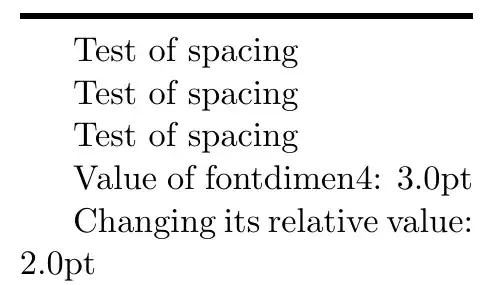
When there is no requirement for shrinkage, as when the \textwidth is set to 2in, all 3 cases are indistinguishable. Also shown is how to change \fontdimen4 relative to its current value.
\documentclass[11pt]{article}
\textwidth=2in
\begin{document}
\noindent\rule{\textwidth}{2pt}
Test of spacing
\fontdimen4\font=0pt
Test of spacing
\fontdimen4\font=3pt
Test of spacing
Value of fontdimen4:
\the\fontdimen4\font
Changing its relative value:
\fontdimen4\font=\dimexpr\fontdimen4\font-1pt\relax
\the\fontdimen4\font
\end{document}


\fontdimen4\font=0ptwill limit the shrinkage to 0pt – Steven B. Segletes May 28 '22 at 13:27