I just want to highlight something with regard to spacing. This should be considered an extended comment on the solutions above.
To avoid terms jumping around when switching frames then it is necessary to think about how things affect the spacing, in particular with regard to the line width of any highlighting path.
To understand this, it is worth digging deeper into what the inner and outer seps are, and how they interact with the line width. The boundary of a node is considered to be a rectangle that is inner sep out from the natural boundary of the node's contents (both inner sep and outer sep can be set to different values horizontally and vertically but that's not important so I'll ignore it here). If the node is drawn, then that is the path that is used (there are adjustments for other shapes, but they all start from the inner rectangle so again, I'll ignore that here). However, paths are drawn with thickness and this thickness is equally spaced either side of the "perfect" path, so a drawn node has an apparent size that is slightly bigger - by half the line width - of its actual size. The outer sep is designed to deal with this as it is added to the parts of a node's setup that might be relevant outside the node (ie anchors). By default, the outer sep is set to half the current line width. So if the line width is changed for the drawing command then the node's size will change between frames. There is a further complication in that when TikZ tells TeX how big the drawing is then it uses a different calculation depending on whether the node was drawn or not. If not drawn then it uses the exact path but if drawn then it enlarges it by half the line width. So although the outer sep may be set correctly, it doesn't have the right effect if the node is not drawn. It turns out, though, that TikZ is a bit clever and so will set the outer sep to 0pt (rather than half the line width) if the boundary is not drawn. This can be used to correct the inner sep so that the node is always the right size regardless of whether it is drawn or not.
The key question is, therefore: should the equation look like it would if written without any adornment or should space be reserved for the highlighting?
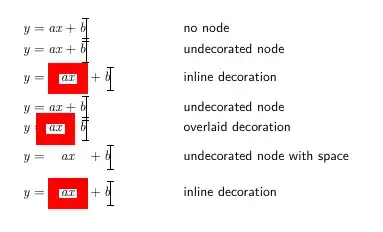
If the adornment is an overlay, then use tikzmarknode with no style and add the highlighting afterwards. The fit library can be really useful here.
If the adornment is inline, then add the styling options to the tikzmarknode but make sure that all options that affect its size are always present (in particular, line width). So only change the draw (or fill) command between frames.
The following is an example showing various combinations together with what it looks like with the jumping effect.
% Flush left all equations to make width changes more evident
\PassOptionsToPackage{fleqn}{amsmath}
\documentclass{beamer}
%\url{https://tex.stackexchange.com/q/646378/86}
\usefonttheme[onlymath]{serif}
\usepackage{tikz}
% tikzmark for positioning,
% fit for adding adornments to existing nodes
\usetikzlibrary{
  tikzmark,
  fit
}
%\setbeamercovered{transparent}
\mode<presentation> {
\usetheme{Boadilla}
}
\tikzset{
  % Beamer-aware styles
  only/.code args={<#1>#2}{%
    \only<#1>{\pgfkeysalso{#2}}
  },
  temporal/.code args={<#1>#2#3#4}{%
    \temporal<#1>{\pgfkeysalso{#2}}{\pgfkeysalso{#3}}{\pgfkeysalso{#4}} %
  },
  alt/.code args={<#1>#2#3}{%
    \alt<#1>{\pgfkeysalso{#2}}{\pgfkeysalso{#3}} %
  },
  % Shortcut for the  style
  surround/.style={
    draw=#1,
    rectangle,
    line width=3mm,
    % If draw is none, then TikZ sets the outer x/y seps to 0pt
    % meaning that this increases the inner x/y seps by half the line width
    % If draw is not none then the default outer seps are half the
    % line width so the inner seps are 2mm
    inner xsep=2mm + .5\pgflinewidth - \pgfkeysvalueof{/pgf/outer xsep},
    inner ysep=2mm + .5\pgflinewidth - \pgfkeysvalueof{/pgf/outer ysep},
    outer sep=auto
  },
  highlight/.style={
    only=<5>{surround=none},
    % braces needed as there's a comma in the overlay specification
    only={<2,6>{surround=red}}
  },
}
% Alignment marker to make the changes obvious
\NewDocumentCommand\Marker{ O{.3333} }{%
  \tikz[overlay] \draw[line width=.5pt] (0,.5ex) +(0,#1) -- +(0,-#1) +(-.1,#1) -- +(.1,#1) +(-.1,-#1) -- +(.1,-#1);%
}
\begin{document}
\begin{frame}<1-6>[t] % top-aligned to show vertical jumping
\begin{align}
y & = ax + b \Marker \
y &= \tikzmarknode[highlight]{ax-mark}{ax} + b \Marker \
\end{align}
\only<1>{Slide 1: no decoration, equations are perfectly aligned}
\only<2>{Slide 2: decoration on the tikzmarknode, adds space so that decoration does not overlap other elements}
\only<3>{Slide 3: as slide 1}
\only<4>{Slide 4: decoration added after, equations are perfectly aligned, decoration may overlap other elements}
\only<5>{Slide 5: no decoration, but outer sep adjusted so that space is reserved for decoration}
\only<6>{Slide 6: as slide 2, showing no jump from slide 5}
% Overlaid highlighting visible on slide 4
\tikz[overlay, remember picture]
\node[fit=(ax-mark),only=<4>{surround=red}] {};
\end{frame}
\end{document}
Here's a flattened version of the above:
Note: I've assumed that you're wanting to drawn round the term you wish to highlight which is consistent with what the others have gone with. If you wish to highlight by filling then a lot of the issues with spacing adjustments go away as a filled path has no width. But then that brings additional considerations with whether the filled region should be behind the text or in front of it. If that is something you want to consider, leave a comment clarifying.


overlayoption. It's required to draw the shape on top, without interfering the text (otherwise, node becomes part of the text, you can experiment by removing this option). So withoverlayyou'd want to move the shape so thataxbecomes inside of it.(6pt, 2pt)means that the node is being shifted by6ptto the right and2ptto the top. – antshar Jun 01 '22 at 13:06