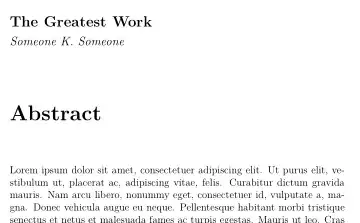
Here's an implementation based on using the titling package's \thetitle and \theauthor commands (set by \title and \author) to make a new command \abstracttitleandname for printing the title and name above the abstract title.
We also introduce a conditional \ifabstract, set to true by \abstracttitleandname and redefine \chapter/\chapter* commands to check whether it is true. If it is, it won't start the heading on a new page, since \abstractittleandname has already done that. It is then switched back to false.
If the conditional creates problems for you, you could switch from using primitive TeX booleans to one of the more elaborate packages that handle conditionals, but that's probably not necessary for your use case.
\documentclass[12pt,a4paper]{book}
\usepackage{lipsum}
\usepackage[parfill]{parskip}
\usepackage{titling}
\makeatletter
% define new boolean conditional switch for whether
% the abstract is being typeset
\newif\ifabstract
\abstractfalse
% redefine \chapter so it only starts a new page if not typesetting
% the abstract; sets abstract conditional to false after doing so
\renewcommand\chapter{\ifabstract\relax\else%
                    \if@openright\cleardoublepage\else\clearpage\fi%
                    \fi
                    \abstractfalse%
                    \thispagestyle{plain}%
                    \global@topnum\z@
                    @afterindentfalse
                    \secdef@chapter@schapter}
% command for putting the title and name above the abstract; switches
% abstact boolean to true for next \chapter* command...
\newcommand{\abstracttitleandname}{%
 \if@openright\cleardoublepage\else\clearpage\fi
\textbf{\Large{\thetitle}}\par
\emph{\large{\theauthor}}\par
\abstracttrue}
\makeatother
\author{Someone K. Someone}
\title{The Greatest Work}
\begin{document}
\abstracttitleandname
\chapter*{Abstract}
\lipsum[1]
\chapter{New chapter}
\lipsum[2]
\end{document}


MWEfrom\documentclassto\end{document}– MadyYuvi Jun 14 '22 at 14:44\chapterand/or\chapter*headings, or just the abstract? Is\maketitleused differently elsewhere, or could/should this be implemented as the\maketitlecommand? – frabjous Jun 14 '22 at 15:40\chapter*{Abstract}. I don't currently use the\maketitlecommand, so it is not a requirement to implement it as such. – User Jun 14 '22 at 16:31