If you wish to change the definition of a macro like \currfileabsdir
so that explicit backslash-characters of category 12(other) are replaced by (forward) slash-characters of category 12(other), you can try something like this:
\documentclass{article}
\usepackage[abspath]{currfile}
\ExplSyntaxOn
\cs_set:Npn \ReplaceBackslashesWithForwardSlashesInMacro #1
{
  \exp_args:Nno \use:n { \str_set:Nn \l_tmpa_str} {#1}
  \regex_replace_all:nnN{\}{/} \l_tmpa_str
  \exp_args:NnV \use:n {\cs_gset:Npn #1 } \l_tmpa_str
}
\ExplSyntaxOff
\begin{document}
Before patching \verb|\currfileabsdir|:
\texttt{\currfileabsdir}
\ReplaceBackslashesWithForwardSlashesInMacro{\currfileabsdir}
After patching \verb|\currfileabsdir|:
\texttt{\currfileabsdir}
\bigskip\hrule\bigskip
%%%%%%%%%%%%%%%%%%%%%%%%%%%%%%%%%%%%%%%%%%%%%%%%%%%%%%%%%%%%%%%%%%%%%%
% Let's define some other macro whose expansion contains backslashes:
\begingroup
\catcode\/=0 \catcode\=12
/gdef/SomeMacroWithBackslashes{\home\knoppix\Desktop\Zu Sichern\LaTeX Code}
/endgroup
%%%%%%%%%%%%%%%%%%%%%%%%%%%%%%%%%%%%%%%%%%%%%%%%%%%%%%%%%%%%%%%%%%%%%%
Before patching \verb|\SomeMacroWithBackslashes|:
\texttt{\SomeMacroWithBackslashes}
\ReplaceBackslashesWithForwardSlashesInMacro{\SomeMacroWithBackslashes}
After patching \verb|\SomeMacroWithBackslashes|:
\texttt{\SomeMacroWithBackslashes}
\end{document}
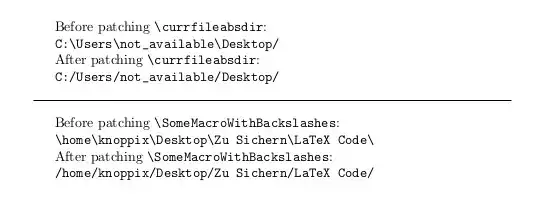
You say you use MiKTeX on Windows - thus I doubt that the mixture of slashes and backslashes is the only source of your problems:
Section "Canonicalize separators" of the Microsoft .NET article "File path formats on Windows systems", url: https://docs.microsoft.com/en-us/dotnet/standard/io/file-path-formats, says:
"All forward slashes (/) are converted into the standard Windows separator, the back slash (\). If they are present, a series of slashes that follow the first two slashes are collapsed into a single slash."
So a mixture of slashes and backslashes should be possible in many situations with recent Windows platforms on the side of routines belonging to Windows' Advanced Programmer Interfaces.
But I don't know how LaTeX's macros/routines for parsing/splitting directory paths and file names handle backslashes... (In the past I used to delve into such details, but over time so many things were changed and nowadays I am sort of tired of keeping myself up to date. When I really need to know the current state of the art, then I research which of the many documentations actually gives information and try to look things up - here is a list with a few links:
Kpathsea manual,
source2e.pdf,
source3.pdf,
interface3.pdf,
TeXBook/source,
tex.web/Computers & Typesetting Volume B, TeX: The Program ,
TDS,
e-TeX-manual,
XeTeX reference guide,
XeTeX companion,
LuaTeX reference manual,
pdfTeX user manual,
ISO 32000 (PDF),
Web2C manual,
xparse-manual,
MiKTeX manual,
The TeX Live Guide .)
I wrote "Many situations" because with some Windows platforms there are situations where a mixture of slashes and backslashes doesn't work. E.g., I experienced problems on the command prompt under old legacy platforms like MS-DOS/Windows 3.1, Windows 95 and Windows 98. E.g., Chris Hoffman mentions in the section "How does it Matter?" of the article "Why Windows Uses Backslashes and Everything Else Uses Forward Slashes", url: https://www.howtogeek.com/181774/why-windows-uses-backslashes-and-everything-else-uses-forward-slashes/, which was updated in July 31, 2018, that paths with slashes instead of backslashes don't work out within the "Open" dialogue. That article comes along with a nice screenshot of how with this dialogue the error-message "The file name is invalid" is displayed on a Windows 7 machine.
Section "4 Absolute paths" of the manual of the package currfile says:
The information which ends up in the definiton of the macro \currfileabsdir is retrieved from a file \jobname.fls.
If a file \jobname.fls is not available for reading during the LaTeX-run, the expansion of \currfileabsdir yields emptiness.
In order to have the file \jobname.fls created, the TeX-engine needs to be invoked with the compiler-option -recorder.
With MiKTeX, however, there is another peculiarity: With MiKTeX in the current LaTeX-run information is retrieved from the file \jobname.fls created during the previous LaTeX-run before having that destroyed and created anew.
This implies: During the first LaTeX-run there is no file \jobname.fls coming from a previous LaTeX-run available for reading. Thus during the first LaTeX-run in MiKTeX expanding \currfileabsdir yields emptiness, thus in MiKTeX during the first LaTeX-run \input{\currfileabsdir-AnotherFile} is like \input{-AnotherFile}. Probably this circumstance is a source for problems.
So rather than replacing backslashes by (forward) slashes, you might need a routine for finding out if the current latex-run is the first latex-run and in this case providing defaults for the definitions of \currfileabsdir. This might be done, e.g., via writing directives for defining a macro to .aux-file and checking whether the macro in question is defined: During the first LaTeX-run there is no .aux-file yet, thus directives for defining macros coming from the .aux-file cannot be carried out. In subsequent LaTeX-runs directives are carried out and macros are defined.
Alternatively checking whether the expansion of \currfileabsdir yields emptiness and, if this is the case, overriding the empty definition of \currfileabsdir etc with some defaults might be a viable option, too.
Yet another approach could be checking right at the start, even before \documentclass, via \IfFileExists if \jobname.fls already exists and is available for reading, and setting a flag accordingly. In the preamble, if the flag is set accordingly, have the empty definition of \currfileabsdir etc overridden with some defaults.


\currfileabsdirto\input{\currfileabsdir-AnotherFile}. – JeT Jun 17 '22 at 07:36\input{\currfileabsdir/../test.tex}worked fine. I seem to remember thatMikTeXcan use Unix style paths with slashes and doesn't require backslashes. – Ingmar Jun 17 '22 at 07:54backslashbut none if I change manually the path with/. – JeT Jun 17 '22 at 08:09/works? (even after taking the catcode into account here.) I don't have Windows though. Should look deeper...) – user202729 Jun 17 '22 at 08:12\currfile/for a reason I ignore, the last separator is aslash, the previous one is a backslash. – JeT Jun 17 '22 at 08:16/) are converted into the standard Windows separator, the back slash (\\). If they are present, a series of slashes that follow the first two slashes are collapsed into a single slash.", so a mixture of slashes and backslashes should be possible in many situations with recent Windows platforms. – Ulrich Diez Jun 17 '22 at 09:18\input{\currfileabsdir/../test.tex}Seems\currfileabsdiralready delivers a trailing (forward) slash, thus it should probably be\input{\currfileabsdir../test.tex}. – Ulrich Diez Jun 17 '22 at 09:32-recorderis needed in order to have\currfileabsdiravailable via\jobname.flsand that with MiKTeX\jobname.flsalways stems from the previous latex-run so that with MiKTeX during the first latex-run where\jobname.flsfrom a previous latex-run does not yet exist expansion of\currfileabsdirin any case yields emptiness. Could that be a reason for error-messages/problems? – Ulrich Diez Jun 17 '22 at 09:45-recorderoption – JeT Jun 17 '22 at 09:51\input{\currfileabsdir-AnotherFile}: According to section "4 Absolute paths" of the manual of the package currfile, with MiKTeX during the first latex-run the expansion of\currfileabsdiris empty because info for\currfileabsdiris retrieved from a file\jobname.flswhich under MiKTeX is not available for reading during the first latex-run. (With subsequent latex-runs the file stemming from previous latex-runs is available for reading.) So under MiKTeX during the 1st latex-run this is like\input{-AnotherFile}. Probably this circumstance is a source for problems. – Ulrich Diez Jun 17 '22 at 10:09\input{-AnotherFile}. – JeT Jun 17 '22 at 10:16