1

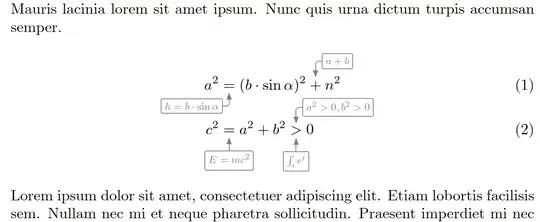
Is there any way to combine the helpful syntax of align environments with the graphical options of tikz? I am looking to reproduce equations that look like this picture:

How to reproduce this in LaTeX?

First equation:

\begin{align*}
    a^2=\Big(b\cdot \sin(\alpha)\Big)^2+n^2
\end{align*}

Second equation (the cloud one):

\begin{align*}
    h=b\cdot \sin(\alpha)
\end{align*}

Obviously it is rather hard to produce the exact same result. I would also be happy with an equation in a box with an arrow pointing to the =.

Do you have a good idea how to do it? With nodes it turned out pretty bad.

Bernard
  • 271,350
curies
  • 199
  • What have you tried? With tikzmark you can do basically whatever you like. For example https://tex.stackexchange.com/questions/375032/use-tikz-to-draw-highlighted-irregular-shape-around-part-of-fraction – Rmano Jun 17 '22 at 12:00
  • 1
    BTW, why do you have align* without alignment points? – Rmano Jun 17 '22 at 12:01
  • You could use the eforms package (and possibly others) to create pop-up notes. – John Kormylo Jun 17 '22 at 13:39

2 Answers2

2

Here's a TikZ solution without tikzmark that uses amsmath's \overset/\underset/\overunderset.

While this doesn't produce a nice cloud yet it is the base of further customization, for example, like the one by Heiko Oberdiek.

For now, I settled on a rounded rectangle, gray color and smaller text. By default, amsmath sets the over- and undersets in \scriptstyle which we could do, too, but I don't think it looks good.

Code

\documentclass{article}
\usepackage{amsmath}
\usepackage{tikz}
\usetikzlibrary{arrows.meta}
\tikzset{
  cloud eq/.cd,
  edge/.style={rounded corners=+2pt, arrows=Latex[round]-},
  c/.style={cloud eq/edge,anchor=north,to path={--++( +0pt,+-2ex)\tikztonodes}},
  l/.style={cloud eq/edge,anchor=east, to path={|-++(+-1ex,+-2ex)\tikztonodes}},
  r/.style={cloud eq/edge,anchor=west, to path={|-++( +1ex,+-2ex)\tikztonodes}},
  node/.style={at end, draw, rounded corners=+1pt}
}
\newcommand*\tikzoverunderInternal[3]{%
  \tikz[trim left=+0pt, trim right=+0pt]
  \draw[cloud eq/#1, #2] (0,0) to node[cloud eq/node] {$#3$}();}
\NewDocumentCommand\tikzUnderset{ O{l} m }{
  \underset{\tikzoverunderInternal{#1}{}{#2}}}
\NewDocumentCommand\tikzOverset { O{l} m }{
  \overset{\tikzoverunderInternal{#1}{yscale=-1.2}{#2}}}
\NewDocumentCommand\tikzOverUnder {O{l} m O{r} m}{
  \overunderset{
    \tikzoverunderInternal{#3}{yscale=-1.2}{#4}}{
    \tikzoverunderInternal{#1}{}{#2}}}
\usepackage{blindtext}

\tikzset{ cloud eq/node/.append style={scale=.7}, cloud eq/edge/.append style=gray} \begin{document} \blindtext \begin{align} a^2 & \tikzUnderset{h = b \cdot \sin\alpha}{=} (b \cdot \sin \alpha)^2 \tikzOverset[r]{a+b}{+} n^2 \ c^2 & \tikzUnderset[c]{\vphantom{\int_i} E=mc^2}{=} a^2 + b^2 \tikzOverUnder[c]{\int_i e^i} [r, overlay]{a^2 >0, b^2>0}{>} 0 \end{align} \blindtext \end{document}

Output
enter image description here

Qrrbrbirlbel
  • 119,821
0

You could use this command I made using some code that someone help mi eith in one question I made Math notes between equations

This is the command I made out of the post:

\NewDocumentCommand{\umathnote}{ mm }
   {
     \overset % ❶
        {% The annotation goes above
          \textcolor{black!20!white}{\hbox to 0pt{\hss % ❷
             $ % return to math mode
               \begin{array}{c} % ❸
                   \displaystyle #2\\ % ❹
                   \Big\downarrow % ❺
               \end{array}
             $
          \hss}
          }
        }
        {#1} % 
   }

\NewDocumentCommand{\dmathnote}{ mm } { \underset % ❶ {% The annotation goes above \textcolor{black!20!white}{\hbox to 0pt{\hss % ❷ $ % return to math mode \begin{array}{c} % ❸ \Big\uparrow\ % ❹ \displaystyle #2 % ❺ \end{array} $ \hss} } } {#1} % }

You can see the results here: math note command

alvarito mendez
  • 329
  • 1
  • 9
  • This looks like it could indeed be useful - you can improve the answer further by actually applying it to the situation asked about in the question and adding a screenshot of the result, to see how close it is to what the asker wanted. – Marijn Oct 03 '22 at 07:29