0

I'd like to be able to write a command that essentially takes two arguments, the number of rows and the number of columns, creates an array of the specified dimensions, and then allows for a variable number of arguments as entries in the array.

I have tried to write such a command myself simply using nested conditionals, but quickly realized that I don't have a strong enough understanding of LaTeX yet to know if variable argument commands are even possible. Thus, I certainly don't understand how to build one yet.

It's possible this might be a silly task, but at the very least I'd like to try to build such a thing or know why it cannot be done.

  • Try hard to understand but still not quite sure what you looking for. Better to show some code about what you have tried or some concept of what can be achieved by this command. – Tom Jun 25 '22 at 03:00
  • Usually most things are possible. Nevertheless learning to program in TeX is a difficult task, if you are serious about it I suggest starting with package writing - Where do I start LaTeX programming? - TeX - LaTeX Stack Exchange. Alternatively you describe what you want exactly and maybe someone would be generous and write a function for you (in the latter case it's usually difficult for you to understand the solution/modify it/debug it when something goes wrong, however.). – user202729 Jun 25 '22 at 05:41
  • why do you need to pre-specify the numbers? an ams matrix takes any number of rows and columns. In general a latex command taking an arbitrary number of arguments would use a , separated list, but for arrays it's easier to use & You could iterate over a , list replacing them with &, but why? – David Carlisle Jun 25 '22 at 07:56
  • Take a look at the sagetex answer in this post. It avoids complicated coding by having a CAS do the work. – DJP Jun 25 '22 at 23:03
  • Apologies for the late response. Basically what I want to do is be able to control the number of entries and the spacing of my arrays. The reason for this is that I often use them to compactly write problem sets with many subproblems. (Think "Exercise 1" of a calculus homework with nine subexercises consisting of different integrals.) These are some good suggestions it sounds like. I will have to go through each of them then. – H. Pecoraro Aug 20 '22 at 18:38

2 Answers2

1

This not use any macro and need compilation with knitr, but it is relatively simple to type and have the advantage that make R matrices form any sequence (vector) or a data frame is very easy.

mwe


Example.Rnw file:


\documentclass{article}
\begin{document}

<<echo=F>>= library(xtable) @

<<printmatrix,include=FALSE>>= M <- function(x=c(1,2,3),y=1){ z <- xtableMatharray(matrix(x,nrow=y), digits = 2, auto = F) print(z) } W <- M() @

Default matrix:

[A_{1\times 3}=\left[\Sexpr{W}\right]]

Custom matrices:

<<foo,include=FALSE>>= W <- M(x=c(1.348,2,3.555,4.7800,5,6,7,8),y=2) @

[A_{2\times 4}=\left[\Sexpr{W}\right]]

<<bah,include=FALSE>>= W <- M(x=rnorm(25,2,1),y=5) @

[A_{5\times 5}=\left[\Sexpr{W}\right]]

<<baz,include=FALSE>>= W <- M(x=c("foo","bar","baz","end"),y=2) @

[A_{2\times 2}=\left[\Sexpr{W}\right]]

\end{document}

Fran
  • 80,769
1

Do you really want to say something like the following?

\makematrix{2}{5}{1}{3}{7}{-1}{2}{0}{-3}{3}{4}{5}

According to your question this should be the input style you want. Maybe it could be improved by using line breaks

\makematrix{2}{5}
  {1}{3}{7}{-1}{2}
  {0}{-3}{3}{4}{5}

but I don't think it's a great improvement over

\begin{bmatrix}
  1 &  3 & 7 & -1 & 2 \\
  0 & -3 & 3 &  4 & 5
\end{bmatrix}

Do you?

OK, it's not the style CAS software uses. Can we do as follows?

\makematrix{1,3,7,-1,2;0,-3,3,4,5}

Certainly so. The optional argument to \makematrix sets the delimiters (default b; change it if you like p by default); the mandatory argument contains the matrix entries, rows separated by semicolons, entries in the same row by commas.

\documentclass{article}
\usepackage{amsmath}

\ExplSyntaxOn

\NewDocumentCommand{\makematrix}{O{b}m} { \hpecoraro_matrix_make:nn { #1 } { #2 } }

\seq_new:N \l__hpecoraro_matrix_rows_seq

\cs_new_protected:Nn \hpecoraro_matrix_make:nn { \seq_set_split:Nnn \l__hpecoraro_matrix_rows_seq { ; } { #2 } \begin{#1matrix} \seq_map_function:NN \l__hpecoraro_matrix_rows_seq __hpecoraro_matrix_dorow:n \end{#1matrix} }

\cs_new_protected:Nn __hpecoraro_matrix_dorow:n { \clist_use:nn { #1 } { & } \ }

\ExplSyntaxOff

\begin{document}

Brackets [ \makematrix{1,3,7,-1,2;0,-3,3,4,5} ]

Parentheses [ \makematrix[p]{1,3,7,-1,2;0,-3,3,4,5} ]

\end{document}
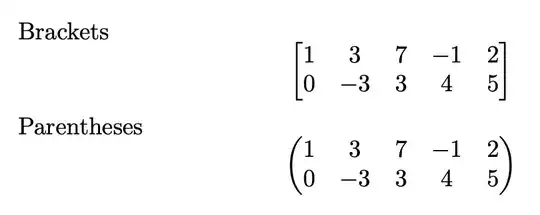
enter image description here

egreg
  • 1,121,712
  • There's also the seq_set_split_keep_spaces variant which keeps the spaces around delimiters (nevertheless spaces are ignored in math mode & since the relevant macros are all protected something like * or [] in the content cannot be mis-interpreted as argument to \\) – user202729 Jun 26 '22 at 00:27
  • Does the \makematrix solution allow me to control the spacing of the entries? Essentially what I have been using is a segment of code that begins a group where I reset the row and column spacing for an array whose columns I need to specify. – H. Pecoraro Aug 20 '22 at 18:43
  • @H.Pecoraro You can still use a group around \makematrix. – egreg Aug 20 '22 at 21:26
  • Wonderful, this seems to be a workable option for now. I'll have to spend some time exploring all of the other options I've been given here as well. Thank you for the answer. – H. Pecoraro Aug 21 '22 at 03:42