As David Carlisle pointed out in his comment:
"It is never safe to use \globaldefs anywhere, unless you have reviewed every line of code in its scope, and you personally maintain
that code, so you can be sure a change won't invalidate the global
definitions."
So let's focus on finding another approach:
The problem you seem to wish to circumvent via setting \globaldefs is that setting keys is restricted to the current table-cell.
More recent TeX-engines bring along the expandable primitive \expanded. That might be of interest to you so you can probably do without modifying \globaldefs:
\documentclass{article}
\usepackage{pgfkeys}
\newcommand*\showstatus{%
    (level: \the\currentgrouplevel\ --
     globaldefs: \the\globaldefs\ --
     foo: \pgfkeysvalueof{/rpath/tpath/var3} --
     bar: \pgfkeysvalueof{/rpath/tpath/var4})%
}
\newcommand*\customvarset{\pgfqkeys{/rpath}}
\newenvironment{customenvtab}{%
    \newcommand\resetvarsettab{%
        \customvarset{%
                      tpath/.cd,%
                      var3/.initial=var3 tbd,%
                      var4/.initial=var4 tbd
        }%
    }%
    \resetvarsettab
    \newcommand\tabval[1]{\pgfkeysvalueof{/rpath/tpath/##1}}%
    \newcommand\cmdtab[1]{%
        \customvarset{tpath/.cd, ##1}%
        {\let\protect\noexpand\expandafter}%
        \expandafter\resetvarsettab
        \expanded{bold value: \textbf{\tabval{var3}} & italic value: \textit{\tabval{var4}}}%
    }%
    \begin{tabular}{c|c}%
}{%
    \end{tabular}%
}
\begin{document}
\section{Now Working}
%\showstatus
\begin{customenvtab}
\cmdtab{}\
\cmdtab{var3=test var3}\
\cmdtab{var4=test var4}\
\cmdtab{var3=blo, var4=bli}
\end{customenvtab}
%\showstatus
\end{document}
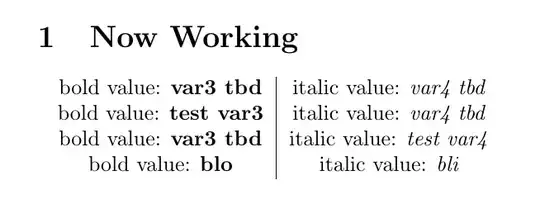
If you wish fine-grained expansion-control be aware that \tabval requires four expansion-steps to deliver the result:
Step 1 delivers \pgfkeysvalueof.
Step 2 delivers \csname...\endcsname.
Step 3 delivers the control-sequence-token.
Step 4 delivers the toplevel-expansion of the control-sequence token.
Four expansion-steps in turn imply 24-1=15 \expandafter ...
If you are not familiar with \expandafter and expansion-trickery you might be interested in the question How can I know the number of expandafters when appending to a csname macro? and its answers.
\expandafter affects the next and the next but one token:
The toplevel-expansion of \expandafter is the token next to \expandafter and
- if the next-but one token is expandable: the toplevel-expansion of the next-but one token.
- if tthe next-but one token is not expandable: the next-but one token.
\documentclass{article}
\usepackage{pgfkeys}
\newcommand*\showstatus{%
    (level: \the\currentgrouplevel\ --
     globaldefs: \the\globaldefs\ --
     foo: \pgfkeysvalueof{/rpath/tpath/var3} --
     bar: \pgfkeysvalueof{/rpath/tpath/var4})%
}
\newcommand*\customvarset{\pgfqkeys{/rpath}}
\chardef\stopromannumeral=`^^00
\newcommand\exchange[2]{#2#1}
\newcommand\passfirsttosecond[2]{#2{#1}}
\newcommand\obtaintabvalandexchange[3]{%
  % #1 <tokens to prepend to brace-nested value of pgf-"variable">
  % #2 pgf-"variable"
  % #3 <stuff to prepend>
  % yields
  % <stuff to prepend><tokens to prepend to brace-nested value of pgf-"variable">{<value of pgf-"variable">}
  \expandafter\exchange\expandafter{\romannumeral
     \expandafter\passfirsttosecond\expandafter{%
       \romannumeral
       \expandafter\expandafter\expandafter\expandafter\expandafter\expandafter\expandafter
       \expandafter\expandafter\expandafter\expandafter\expandafter\expandafter\expandafter
       \expandafter\stopromannumeral
       \tabval{#2}%
     }{\stopromannumeral#1}%
  }{#3}%
}%
\newenvironment{customenvtab}{%
    \newcommand\resetvarsettab{%
        \customvarset{%
                      tpath/.cd,%
                      var3/.initial=var3 tbd,%
                      var4/.initial=var4 tbd
        }%
    }%
    \resetvarsettab
    \newcommand\tabval[1]{\pgfkeysvalueof{/rpath/tpath/##1}}%
    \newcommand\cmdtab[1]{%
        \customvarset{tpath/.cd, ##1}%
        \obtaintabvalandexchange{italic value: \textit}{var4}{%
           % You can nest \obtaintabvalandexchange in
           % \obtaintabvalandexchange's 3rd argument.
           % The last nesting-level then denotes the value in the
           % leftmost table-cell.
           \obtaintabvalandexchange{bold value: \textbf}{var3}{\resetvarsettab} &
        }%
    }%
    \begin{tabular}{c|c}%
}{%
    \end{tabular}%
}
\begin{document}
\section{Now Working}
%\showstatus
\begin{customenvtab}
\cmdtab{}\
\cmdtab{var3=test var3}\
\cmdtab{var4=test var4}\
\cmdtab{var3=blo, var4=bli}
\end{customenvtab}
%\showstatus
\end{document}


\globaldefsanywhere, unless you have reviewed every line of code in its scope, and you personally maintain that code, so you can be sure a change won't invalidate the global definitions. Reviewing the tikz path parser or pgf key settings sounds like more work than is reasonable. – David Carlisle Jun 30 '22 at 09:14pgfkeysfor your code? If you need global assignments, why not use a key=value package that supports global assignments? Or use one of the possibilities to smuggle values out of a group. And if you have any questions about one of my answers, feel free to ask, I'll try to explain what you don't understand. – Skillmon Jun 30 '22 at 15:57