From a comment on the related question one option is to use the Chemobabel package.
MWE below, showing both Chemfig and Chemobabel output. Note that LaTeX needs to be run with -shell-escape for Chemobabel.
\documentclass{article}
\usepackage{chemobabel}
\usepackage{chemfig}
\begin{document}
\noindent Chemfig\\[5mm]
\chemfig{*6 (-=-=-=)}\\[1cm]
Chemobabel\\[5mm]
\smilesobabel{c1ccccc1}{}
\end{document}
Result:
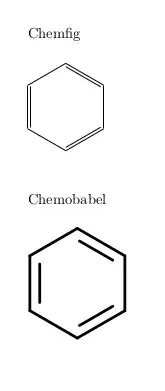
There are some further options to control the size of the output and various Open Babel options to control how the molecules are drawn.
The installation of Chemobabel takes a few steps. You need to download the package from https://github.com/aminophen/chemobabel/blob/master/chemobabel.sty. The package uses Open Babel for conversion to SVG and then either Inkscape or rsvg-convert to convert from SVG to PDF (or EPS if required), so you need to install Open Babel and one of the two SVG tools.
The remarks below apply to older versions of Chemobabel, and are no longer needed for the current version on Github. They are left here to provide context for the comment below and the discussion on the Github issue.
If you use Inkscape then you need to modify chemobabel.sty, because the command line options for Inkscape used in Chemobabel no longer work (see https://github.com/aminophen/chemobabel/issues/2). The fix is very simple, as described in the Github issue. Specifically, change line 42 to:
\newcommand\chemob@bel@inkscapecmd[2]{inkscape #1.svg --export-type=#2}
The default output of Open Babel has a rather large margin, which does not look good in a document. A further enhancement therefore is to use pdfcrop before including the output. This requires another couple of lines in chemobabel.sty. Specifically, change the option handling near the end of the file:
% define the image extension
\DeclareOption{pdf}{\def\chemob@belimgExt{pdf}\def\chemob@bel@cropcmd#1{pdfcrop #1 #1}}
\DeclareOption{eps}{\def\chemob@belimgExt{eps}\let\chemob@bel@cropcmd\@undefined}
And call the crop command from within \smilesobabel (from line 81):
\newcommand\@smilesobabel[2]{%
  \endgroup
  \chemob@bel@exec{%
    \smilesob@bel@obabelcmd{#1}{#2} 2>\smilesob@belGetName.log
    && \chemob@bel@svgtoimgcmd{\smilesob@belGetName}{\chemob@belimgExt} 2>>\smilesob@belGetName.log
    || rm -f \smilesob@belGetName.\chemob@belimgExt}%
  \ifcsname chemob@bel@cropcmd\endcsname%
  \chemob@bel@exec{\chemob@bel@cropcmd{\smilesob@belGetName.pdf}}\fi%
  \chemob@bel@common@maybeimg{\smilesobabel@next}{\smilesob@belGetName}{SMILES string}%
  \addtocounter{smilesob@belCounter}{1}% select next name
}


