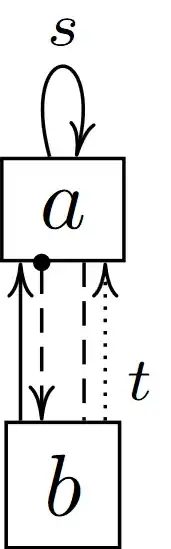
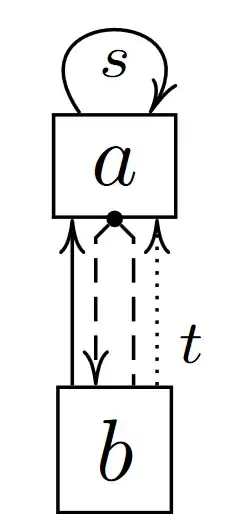
Here's the same diagram with the tikzcd package/library.
The key shift left and shift right can be used to shift the arrows orthogonally to their direction. I'll introduce the keys shl and shr that act as a factorized version of these.
The TikZ key /tikz/dot places the filled circle at the bottom of the cell. The TikZ-CD key /tikz/commutative diagrams/dot only sets the starting arrow tip (here a circle of diameter 2pt with a sep of -1pt so that it doesn't just touch the starting point).
I'm setting the default arrow tip of TikZ-CD to a thinner longer version since the original Computer Modern tip is rather wide, thanks to the bending library it can also bend to the path.
The first example uses the original loop above from TikZ which by default places the label above the line.
The second example uses la (loop above) which draws a wider loop but placed the label inside it.
Code
\documentclass[tikz]{standalone}
\usetikzlibrary{
  cd,     % https://ctan.org/pkg/tikz-cd
  bending % for bended arrow tips
}
\tikzset{
  la/.style={swap,out=125,in=55,loop,looseness=5},
  dot/.style={append after command={
    node[circle,fill,inner sep=+0pt,minimum size=+1.5pt,name=\tikzlastnode-dot]
      at(\tikzlastnode.south){}}}}
\tikzcdset{
  shl/.style={shift left={(#1)*.56ex}}, shl/.default=1,
  shr/.style={shift right={(#1)*.56ex}}, shr/.default=1,
  dot/.code=\pgfsetarrowsstart{Circle[sep=-1pt,length=2pt]},
  tikzcd to/.tip={cm to[width=3pt, length=4pt, bend]},
  vh/.style={to path={|-(\tikztotarget)\tikztonodes}},
  hv/.style={to path={-|(\tikztotarget)\tikztonodes}},
  from dot leftdown/.style={from dot, start anchor=south west,
    end anchor={[xshift=-.5ex]}, yslant=1, hv},
  from dot rightdown/.style={from dot, start anchor=south east,
    end anchor={[xshift=.5ex]}, yslant=-1, hv},
}
\makeatletter
\tikzcdset{
  from dot/.style={from/.expanded=\tikzcd@ar@start-dot},
  to dot/.style={to/.expanded=\tikzcd@ar@target-dot}}
\makeatother
\begin{document}
\begin{tikzcd}[cells={nodes=draw}]
a \ar[loop above, "s"]
 \dar[dash, dashed, shl]
 \dar[dot,  dashed, shr] \\
b \uar[shl=2]
  \uar[shr=2, densely dotted, swap, "t" near start]
\end{tikzcd}
\begin{tikzcd}[cells={nodes=draw}]
|[dot]| a \ar[la, "s"]
         \dar[dashrightarrow, from dot leftdown]
         \dar[dash, dashed, from dot rightdown]
         \
b \uar[shl=2]
  \uar[shr=2, densely dotted, swap, "t" near start]
\end{tikzcd}
\end{document}
Output