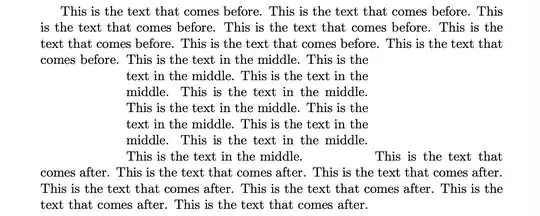
I'm not sure if this is what you want. The baseline of the first line of a minipage is to be aligned with the preceding text, but the last line of the minipage is to be aligned with the text that follows.
This is accomplished using the package tikzpagenodes, which has a built-in node called current page text area. So after the preceding text, we construct a path (not drawn) from the end of the current line to the left text area.
Then a new paragraph starts with that path from to properly indent a minipage, which has the [b] option to align its last line with the text that follows. The minipage is shifted up to align with the previous line of text.
This is all wrapped into a macro called that takes two arguments:
\tbminipage{<width>}{<content>}
You have to compile this twice.
\documentclass{article}
\usepackage{tikzpagenodes}
\newcommand{\tbminipage}[2]{\tikz[remember picture,overlay]
    {\coordinate(a)at(0,0);\path (a) to (a-|current page text area.west);}
    \par\vspace{-.66\baselineskip}\noindent\tikz{\path (a) to (a-|current page text area.west);}%
    \begin{minipage}[b]{#1}#2\end{minipage}}
\begin{document}
This is the text that comes before. This is the text that comes before.
This is the text that comes before. This is the text that comes before.
This is the text that comes before. This is the text that comes before.
This is the text that comes before.
\tbminipage{2.5in}{This is the text in the middle. This is the text in the middle.
This is the text in the middle. This is the text in the middle.
This is the text in the middle. This is the text in the middle.
This is the text in the middle. This is the text in the middle.
This is the text in the middle.}
This is the text that comes after. This is the text that comes after.
This is the text that comes after. This is the text that comes after.
This is the text that comes after. This is the text that comes after.
\end{document}


