(I added a second solution after the OP posted a follow-up request)
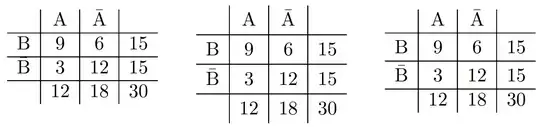
First solution: Increase the value of \arraystretch. This affects the height of all rows.
My main suggestion would be to execute \renewcommand\arraystretch{1.25}. (The default value of this parameter is 1.0.) Additionally, I'd like to suggest that you (a) employ an array environment instead of a tabular environment (saving you from having to type lots of $ characters) and (b) replace \overline with \bar. Finally, I'd usse \mathrminstead of\text`.
Second solution: insert typographic "struts" to increase the height and depth of selected rows.
Note the use of \TBstrut in the third array environment in the following screenshot.
\documentclass{article} % or some other suitable document class
\usepackage{array}
% Define typographic "struts", as suggested by Claudio Beccari
% in a piece published in TeX and TUG News, Vol. 2, 1993.
\newcommand\Tstrut{\rule{0pt}{2.4ex}}       % "top" strut
\newcommand\Bstrut{\rule[-0.9ex]{0pt}{0pt}} % "bottom" strut
\newcommand{\TBstrut}{\Tstrut\Bstrut} % top&bottom struts
\begin{document}
% default setup
[
\begin{array}[t]{c|c|c|c}
& \mathrm{A} & \bar{\mathrm{A}} & \
\hline
\mathrm{B}      &9& 6&15 \

\hline
\bar{\mathrm{B}}&3&12&15 \

\hline
& 12 & 18 & 30
\end{array}
\qquad
% 1st solution: increase value of \arraystretch
\renewcommand\arraystretch{1.25} % <-- new
\begin{array}[t]{c|c|c|c}
& \mathrm{A} & \bar{\mathrm{A}} & \
\hline
\mathrm{B}      &9& 6&15  \
\hline
\bar{\mathrm{B}}&3&12&15  \
\hline
& 12 & 18 & 30
\end{array}
\qquad
% 2nd solution: insert typographic struts in rows 2 and 3
\renewcommand\arraystretch{1} % <-- reset to default
\begin{array}[t]{c|c|c|c}
& \mathrm{A} & \bar{\mathrm{A}} & \
\hline
\mathrm{B}      &9& 6&15 \TBstrut \ % <-- note \TBstrut
\hline
\bar{\mathrm{B}}&3&12&15 \TBstrut \ % <-- note \TBstrut
\hline
& 12 & 18 & 30
\end{array}
]
\end{document}


