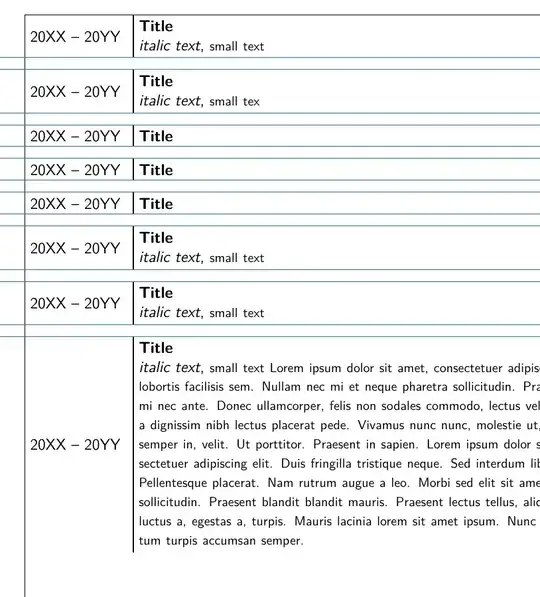
Here an alternative approach is proposed.
Instead of dealing with the cumbersome vertical spacing (see schtandard answer) of minipages, it is proposed to use the tikz package for precise positioning and alignment.
The tikz macro consists of three lines:
(1) the node named dates is typeset;
(2) the node named title is typeset some distance to the right of dates, with its content left-aligned and within a 0.75\linewidth box; and
(3) a vertical line is drawn on the left ("west") side of title.
Finally the paragraph is ended and an optional vertical space might be added.
As can be seen, all the distances between the ends of the consecutive vertical lines are equal.
Note: \footnotesize is not an environment or a command, but a declaration, like a switch: will put the following text in this size.
\documentclass[
12pt,
parskip=half,
]{scrartcl}
\usepackage[
a4paper,
left=25mm,
right=20mm,
top=25mm,
bottom=30mm,
showframe,
]{geometry}
\usepackage{blindtext}
% Font
\usepackage{inconsolata}
\usepackage[T1]{fontenc}
\renewcommand*\familydefault{\sfdefault} %% Only if the base font of the document is to be sans serif
% ***************************************  changed
\usepackage{tikz}
\usetikzlibrary{positioning}
\newcommand\dateentry[2]{%
\begin{tikzpicture}
    \node(dates) {#1};
    \node(title)[right=0.2cm of dates, align=left, text width=0.75\linewidth]{#2};
    \draw[thick] (title.south west)--(title.north west);
\end{tikzpicture}
\par% end of previous paragraph
%\vspace{1ex}% optional vertical  space in between
}
%********************************************************
\begin{document}
\dateentry{20XX -- 20YY}{
\textbf{Title} \\
\textit{italic text},  \footnotesize small text

}
    \dateentry{20XX -- 20YY}{
        \textbf{Title} \
        \textit{italic text},  \footnotesize small tex
    }
    \dateentry{20XX -- 20YY}{
        \textbf{Title} \
    }
    \dateentry{20XX -- 20YY}{
        \textbf{Title}\
    }
    \dateentry{20XX -- 20YY}{
        \textbf{Title}\
    }
    \dateentry{20XX -- 20YY}{
        \textbf{Title} \
        \textit{italic text},  \footnotesize small text
    }
    \dateentry{20XX -- 20YY}{
        \textbf{Title} \
        \textit{italic text},  \footnotesize small text
    }
    \dateentry{20XX -- 20YY}{
        \textbf{Title} \
        \textit{italic text},  \footnotesize small text \blindtext
    }
\end{document}
UPDATE after follow-up question
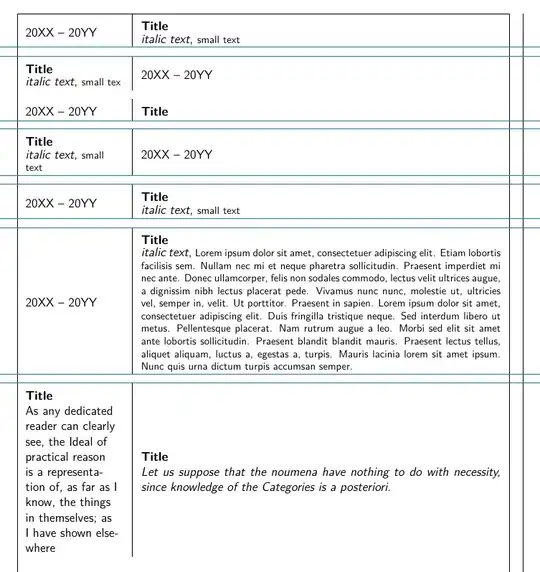
A tabularx will handle a situation with cells of different sizes, right of left column. The line will take the height of the tallest cell.
\documentclass[
12pt,
parskip=half,
]{scrartcl}
\usepackage[
a4paper,
left=25mm,
right=20mm,
top=25mm,
bottom=30mm,
showframe,
]{geometry}
\usepackage{blindtext}
% Font
\usepackage{inconsolata}
\usepackage[T1]{fontenc}
\renewcommand*\familydefault{\sfdefault} %% Only if the base font of the document is to be sans serif
%**************************************** added <<<<<<<<<<<<<<<<<<<<<
\usepackage{ragged2e}
\usepackage{tabularx}
\newcolumntype{P}[1]{>{\RaggedRight}m{#1}}
\renewcommand{\tabularxcolumn}[1]{m{#1} }
\setlength{\extrarowheight}{6pt} % add extra space between rows
\setlength{\tabcolsep}{8pt} % twice the space before and after the column
\newcommand\dateentry[2]{% *********  changed <<<<<<<<<<<<
\begin{tabularx}{\textwidth}{P{0.2\textwidth}|X}

#1& #2 \
\end{tabularx}
\par% end of previous paragraph
%   \vspace{1ex}% optional vertical  space in between
}
%********************************************************
\begin{document}
\dateentry{20XX -- 20YY}{\textbf{Title} \newline \textit{italic text},  \footnotesize small text}
\dateentry{\textbf{Title} \newline \textit{italic text},  \footnotesize small tex}{20XX -- 20YY}
\dateentry{20XX -- 20YY}{\textbf{Title}}
\dateentry{\textbf{Title} \newline  \textit{italic text},  \footnotesize small text }{  20XX -- 20YY}
\dateentry{20XX -- 20YY}{   \textbf{Title} \newline \textit{italic text},  \footnotesize small text }
\dateentry{20XX -- 20YY}{   \textbf{Title} \newline \textit{italic text},  \footnotesize    \blindtext  }
\dateentry{\textbf{Title} \newline  As any dedicated reader can clearly see, the Ideal of
    practical reason is a representation of, as far as I know, the things
    in themselves; as I have shown elsewhere}{\textbf{Title} \newline \itshape  Let us suppose that the noumena have nothing to do
    with necessity, since knowledge of the Categories is a
    posteriori.
}


\end{document}