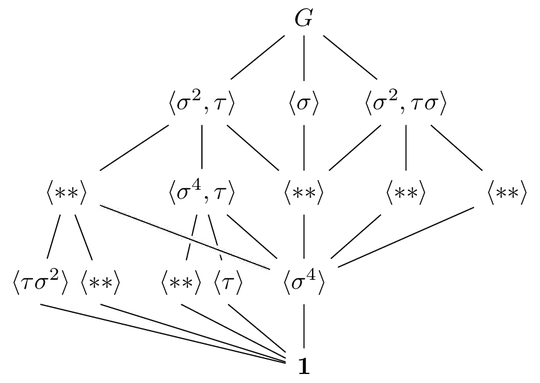
Here's a solution with \subnode from the tikzmark package/library. This will need the remember picture key and will write some lines to the .aux file. (There's a solution to do this without all this but with labels but tikzmark makes this pretty straight forward and easily adaptable for more than two subnodes.)
With the macro \twoparts one node is typeset but the tikzmark library creates pseudo nodes around both parts (named the same as the actual node but with suffix -l and -r). These names can be referenced later by using from left/from right/to left/to right without having to explicit give those nodes custom name (or figure out in which cell they actually are).
The parts are seperated by a space (note the ~) but this can anything you want it to be. Maybe a \quad is better to distinguish both parts properly.
This all means we can still use the normal \ar target specification with ldru but only have to specify if we want the left or the right one of the source's or the target's cell.
To specify these arrows a bit easier I have defined a few keys:
to left/to right,from left/from right,to Left is the same as to left but chooses the south anchor. Same for to Right. (I don't think it's necessary to the same when the edges coming from the top.) These are specific for this use-case since the angles are a bit unfortunate for these connections (and the source image does it too).
I've also defined \ar shortcuts since you always need edges to both subnodes.
\tolr adds edges *to` both subnodes,\toLR adds edges to both subnodes but choose the south anchor at these subnodes.
Unrelated to the \subnode business but I've also added \ldrar to draw edges to both the left, middle and right “child” of the source cell.
I'm using the proper LaTeX macro \mathbf instead of \bf for the 1.
Code
\documentclass[tikz]{standalone}
\usetikzlibrary{cd,tikzmark}
\def\<#1\>{\langle#1\rangle}% I guess …
\newcommand*{\twoparts}[3][]{%
  \subnode[#1]{\tikzmatrixname-\the\pgfmatrixcurrentrow-\the\pgfmatrixcurrentcolumn-l}{#2}~%
  \subnode[#1]{\tikzmatrixname-\the\pgfmatrixcurrentrow-\the\pgfmatrixcurrentcolumn-r}{#3}}
\makeatletter
\tikzcdset{
  from left/.style={from/.expanded=\tikzcd@ar@start-l},
  from right/.style={from/.expanded=\tikzcd@ar@start-r},
  to left/.style={to/.expanded=\tikzcd@ar@target-l},
  to right/.style={to/.expanded=\tikzcd@ar@target-r},
}
\makeatother
\tikzcdset{
  to Left/.style={to left, end anchor=south},
  to Right/.style={to right, end anchor=south},
  install my shortcuts/.code={%
    \newcommand*\ldrar{\dlar\dar\drar}%
    \newcommand*\tolr[1][]{\ar[##1,to left]\ar[##1,to right]}%
    \newcommand*\toLR[1][]{\ar[##1,to Left]\ar[##1,to Right]}%
  }
}
\begin{document}
\begin{tikzcd}[
  remember picture,
  column sep = tiny,
  arrows=-, crossing over clearance=3pt,
  install my shortcuts]
  & & G \ldrar \\
  & \<\sigma^2, \tau\> \ldrar
    & \<\sigma\>  \dar
      & \<\sigma^2, \tau\sigma\> \ldrar  \\
\<**\> \tolr[d]
  & \<\sigma^4, \tau\> \tolr[d]\drar
    & \<**\> \dar
      & \<**\>  \dlar
        & \<**\> \ar[dll] \\
\twoparts{\<\tau \sigma^2\>}{\<**\>}
  & \twoparts{\<**\>}{\<\tau\>}
    & \<\sigma^4\> \dar  \ar[ull, crossing over] \\
  & & \mathbf{1} \toLR[ul]\toLR[ull]
\end{tikzcd}
\end{document}
Output