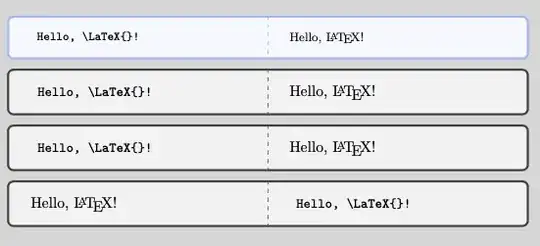
Here is an example using tcolorbox and your choice of listings or minted. There are many, many configuration options available and I haven't attempted to address all of them here. See the tcolorbox documentation.
If you use minted you need the line at top invoking --shell-escape and note that this may be a security risk; use it at your own discretion. You can delete that line if you use listings.
Also note that I use TeXShop and its lualatexmk engine.
I show dispExample* since it is what I use in my own package documentation, but tcblisting seems to have more configuration options. It may be the case those same options, or at least a subset thereof, can also be used with dispExample* but I have not explored that.
% !TEX program = lualatexmk
% !TEX parameter = --shell-escape % req. for minted
% !TEX encoding = UTF-8 Unicode
\documentclass{article}
% Choose ONE of the following two lines.
\usepackage[listings,documentation]{tcolorbox}
%\usepackage[minted,documentation]{tcolorbox}
\begin{document}
\begin{dispExample}{sidebyside}
 Hello, \LaTeX{}!
\end{dispExample}
% Use this block if you use minted.
%\begin{tcblisting}{listing engine=minted, sidebyside,
%  minted language=latex}
% Hello, \LaTeX{}!
%\end{tcblisting}
%\begin{tcblisting}{listing engine=minted, sidebyside,
%  minted language=latex, text side listing}
% Hello, \LaTeX{}!
%\end{tcblisting}
%\begin{tcblisting}{listing engine=minted, sidebyside,
%  minted language=latex, listing side text}
% Hello, \LaTeX{}!
%\end{tcblisting}
% Use this block if you use listings.
\begin{tcblisting}{listing engine=listings, listing style=tcblatex, sidebyside}
 Hello, \LaTeX{}!
\end{tcblisting}
\begin{tcblisting}{listing engine=listings, listing style=tcblatex, sidebyside, listing side text}
 Hello, \LaTeX{}!
\end{tcblisting}
\begin{tcblisting}{listing engine=listings, listing style=tcblatex, sidebyside, text side listing}
 Hello, \LaTeX{}!
\end{tcblisting}
\end{document}


listingsforsiunitx, for example, butpgfI think is coded directly. If you want to use thepgfmanualstyle, I'd suggest starting by reading how they do it – Joseph Wright Oct 09 '22 at 09:44tcolorboxpackage haslistinganddocumentlibraries (e.g. usingmintedpackage) with many options. More generally, see doc-supp and syntax highlighting pages on CTAN. – Cicada Oct 09 '22 at 16:13tcolorboxand its associateddocumentationlibrary for documenting your code and for typesetting examples. I use it for my own packages. – LaTeXereXeTaL Oct 09 '22 at 18:32