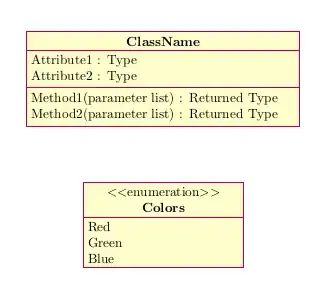
The custom style https://github.com/jcb/these-jcb/blob/master/custom_pgf-umlcd.sty linked by the OP in a comment contains an implementation of enum nodes. This file also contains the original code from pgf-umlcd, so it could be used as a replacement (i.e., \usepackage{custom_pgf-umlcd} instead of \usepackage{pgf-umlcd}) that offers the original functionality of pgf-umlcd together with the additional features like enum nodes. However, the file is based on a version of pgf-umlcd from 2014, so it lacks recent developments to the package. Therefore it is better to load pgf-umlcd normally and copy only the code related to enum classes from the modified package.
The enum functionality consists of a tikzstyle and an environment. In the MWE below these are copied. The environment is used like a normal class, and the enumeration items are listed using \attribute{} (one for each item).
MWE:
\documentclass{article}
\usepackage{pgf-umlcd}
% enum style and environment from
% https://github.com/jcb/these-jcb/blob/master/custom_pgf-umlcd.sty
% Author: Jean-Christophe Bach
\tikzstyle{umlcd style enum}=[rectangle split, rectangle split parts=2,
every text node part/.style={text centered},
draw, minimum height=2em, umlcolor, minimum width=2cm, text width=4cm,
minimum height=1cm, node distance=2cm]
\newenvironment{enum}[3][]%
{
\begin{classAndInterfaceCommon}{#1}{#2}{#3}
}%
{\node[umlcd style enum, anchor=north] (\umlcdClassName) at (\umlcdClassPos)
    {$<<$enumeration$>>$ \\ \textbf{\umlcdClassName}
\nodepart{second}
\umlcdClassAttributes
};
\end{classAndInterfaceCommon}
}
\begin{document}
\begin{tikzpicture}
    \begin{class}[text width=7cm]{ClassName}{0,4}
        \attribute{Attribute1 : Type}
        \attribute{Attribute2 : Type}
        \operation{Method1(parameter list) : Returned Type }
        \operation{Method2(parameter list) : Returned Type }
     \end{class}
     \begin{enum}[text width=7cm]{Colors}{0,0}
     \attribute{Red}
     \attribute{Green}
     \attribute{Blue}
     \end{enum}

\end{tikzpicture}
\end{document}
Result: