I produced a small example (it was not so difficult ...) that I think shows the problem (if I understood correctly) and the solution I proposed in the comments. Let's start with this:
\documentclass[border=10pt]{standalone}
\usepackage[T1]{fontenc}
\usepackage{lmodern}
\usepackage{tikz}
\begin{document}
\begin{tikzpicture}[every node/.style={draw, thick},
    ]
    \node  at (0,0) {First};
    \node  at (100,100) {One Meter away};
    \node  at (500,500) {Five Meter away};
    \node  at (600,600) {In outer space};
\end{tikzpicture}
\end{document}
This gives the error, because the node "In outer space" is outside TeX's universe. If you remove the last node, it works, and it gives in the upper right corner this thing:
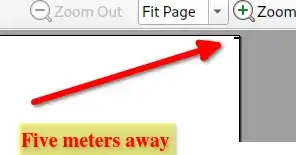
The only way out is to make the picture smaller. I tried scale and transform canvas, but they don't work --- maybe they scale after building the picture. Changing the base vectors, which by default are 1 cm, do work, though:
\documentclass[border=10pt]{standalone}
\usepackage[T1]{fontenc}
\usepackage{lmodern}
\usepackage{tikz}
\begin{document}
\begin{tikzpicture}[every node/.style={draw, thick},
    x=1mm, y=1mm,
    % scale=0.1, transform shape        % doesn't work
    % transform canvas={scale=0.1},     % neither
    ]
    \node  at (0,0) {First};
    \node  at (100,100) {One Meter away};
    \node  at (500,500) {Five Meter away};
    \node  at (600,600) {In outer space};
\end{tikzpicture}
\end{document}
But now the same corner is like that:
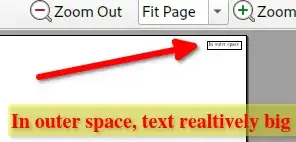
where the font is (comparatively) much bigger.
So, reduce the font size. Be sure to use a scalable font (there are details here --- font shapes, in good fonts, change a bit for such a small size, but the idea is this).
\documentclass[border=10pt]{standalone}
\usepackage[T1]{fontenc}
\usepackage{lmodern}
\usepackage{tikz}
\begin{document}
\fontsize{1pt}{1.2pt}\selectfont
\begin{tikzpicture}[every node/.style={draw, thick},
    x=1mm, y=1mm,
    % scale=0.1, transform shape        % doesn't work
    % transform canvas={scale=0.1},     % neither
    ]
    \node  at (0,0) {First};
    \node  at (100,100) {One Meter away};
    \node  at (500,500) {Five Meter away};
    \node  at (600,600) {In outer space};
\end{tikzpicture}
\end{document}
Now the upper right corner (zoomed 50 times!) is
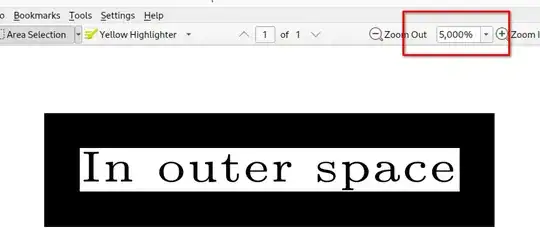
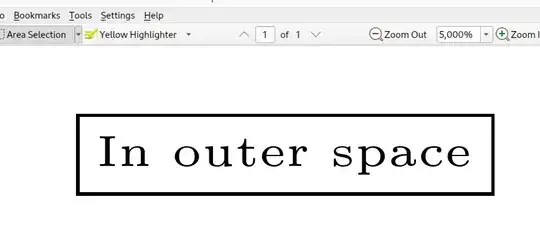
Clearly, the line thickness did not scale. Using the nice solution proposed by @Tiuri to change line thickness, now you have:
\documentclass[border=10pt]{standalone}
\usepackage[T1]{fontenc}
\usepackage{lmodern}
\usepackage{tikz}
\begin{document}
\fontsize{1pt}{1.2pt}\selectfont
\newlength\mylinewidth
\setlength\mylinewidth{0.04pt}
\tikzset{
    ultra thin/.style= {line width=0.25\mylinewidth},
    very thin/.style=  {line width=0.5\mylinewidth},
    thin/.style=       {line width=\mylinewidth},
    semithick/.style=  {line width=1.5\mylinewidth},
    thick/.style=      {line width=2\mylinewidth},
    very thick/.style= {line width=3\mylinewidth},
    ultra thick/.style={line width=4\mylinewidth},
    every picture/.style={semithick}
}
\begin{tikzpicture}[every node/.style={draw, thick},
    x=1mm, y=1mm,
    % scale=0.1, transform shape        % doesn't work
    % transform canvas={scale=0.1},     % neither
    ]
    \node  at (0,0) {First};
    \node  at (100,100) {One Meter away};
    \node  at (500,500) {Five Meter away};
    \node  at (600,600) {In outer space};
\end{tikzpicture}
\end{document}
and the upper right corner is


tikzpicturesame answer. Unless your diagram is bigger than 5.7 metres in size it is not the diagram but an internal calculation that is overflowing. – David Carlisle Oct 20 '22 at 22:39\smallto change font size which kind of works. – user202729 Oct 21 '22 at 06:30x=1mm, y=1mmmay help. You can try to make an example with just a couple of nodes wildly apart... – Rmano Oct 21 '22 at 06:38transform canvas, but if it's done after the building of the picture, it will not work. – Rmano Oct 21 '22 at 06:40