There are dozens of ways to draw a line in TikZ, there are also dozens of ways to not draw a line. Using opacity = 0 (and text opacity=1 or opacity = 1 for the node to reactivate it for the node) is one but I don't think it is the proper way to not draw a line here.
The edge operation is a special operation in TikZ because it creates an extra \path after the one it is used one (which is usually otherwise empty). It is best to be used to connect nodes (hence the name).
Two things are a bit different:
A new edge will start at the previous start position. This means
\path (a) edge (b)
          edge (c)
          edge (d);
will connect a to b, a to c and a to d (and not b to c and c to d).
It uses the every edge style that is initialized by TikZ with draw. (Because we usually want to connect two nodes by a line if we want to visualize a connection between them.)
The latter is the reason why an edge will be drawn even if you say
\path [draw=none] (a) edge (b);
This draw=none (which is usually not needed because unless the every path style is changed \path will not draw something) will be passed down to the edge (as will -> in \path[->] (a) edge (b);)
but it will be overruled by the every edge style.
This is why you will need
\path[myarc] (either) edge[draw=none] node {2} (xray);
to not draw that edge or
\path[myarc, every edge/.style=] (either) edge node {2} (xray);
to reset every edge to an empty style.
If you need this often, I'd suggest defining an alias for those by adding
\tikzset{
  no edges/.style={every edge/.style=},
  no edge/.style ={draw=none}
}
to your preamble, then you can just say
\path[myarc]           (either) edge[no edge] node {2} (xray);
% or
\path[myarc, no edges] (either) edge          node {2} (xray);
Of course, if you only need one edge to not be drawn you could use the edge-less version by doing
\path (either) -- node {2} (xray);
which will usually not draw a line.
(With the calc library, there's also ($(either)!.5!(xray)$) which will calculate the halfway between the nodes' center – whereas the node placed along a line will be placed halfway between the nodes' borders. You also lose the ability of automatic placement and the sloped functionality.)
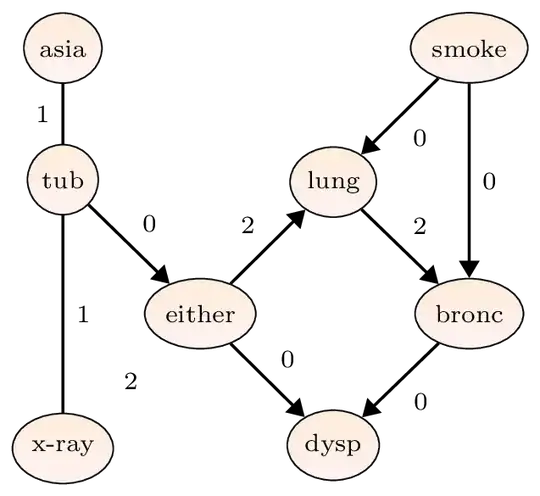
I've taken the liberty to place your nodes with a \matrix and the matrix of nodes style which makes it very easy to place the nodes in a grid like manner without auxilliary nodes or overlapping of the nodes. The matrix of nodes settings allows us to give any options that would be allowed between \node and {<text of node>} to be placed between two | at the start of a cell.
I've used edgeto its full effect. I've also added a no edge style (which is just a speaking name for draw=none) that also includes auto=false so that the 2 will placed more between the nodes and not besides an non-existing line.
There's also the tikz-cd package which could have been used here (it uses a \matrix internally) even though your diagram is not commutative.
The graphs library can also make life easier when connection a bunch of nodes but one needs to learn a new but shorter syntax.
Code
\documentclass{article}
\usepackage{tikz}
\usetikzlibrary{arrows.meta, shapes.geometric, matrix}
\tikzset{
  no edges/.style={every edge/.style=},
  no edge/.style ={draw=none, auto=false}
}
\begin{document}
\begin{tikzpicture}[
  auto,
  mynode/.style= {ellipse, draw, bottom color = red!5, top color = orange!15,
    black, text = black, inner sep=0.4mm, minimum size=7mm, font=\scriptsize},
  myedge/.style= {thick, -,              font=\scriptsize},
  myarc/.style = {thick, ->, >=Triangle, font=\scriptsize}]
\matrix[matrix of nodes, nodes=mynode, row sep=6mm, column sep=3mm] {
  |(asia)| asia  &                   &                & |(smoke)| smoke \
  |(tub)|  tub   &                   & |(lung)| lung                    \
                 & |(either)| either &                & |(bronc)| bronc \
  |(xray)| x-ray &                   & |(dysp)| dysp                    \
};
\path[myedge] (tub) edge        node {1} (asia)
                    edge        node {1} (xray)
                    edge[myarc] node {0} (either);
\path[myarc] (either) edge          node {2} (lung)
                      edge          node {0} (dysp)
                      edge[no edge] node {2} (xray)
              (smoke) edge          node {0} (bronc)
                      edge          node {0} (lung)
              (lung)  edge          node {2} (bronc)
              (bronc) edge          node {0} (dysp);
\end{tikzpicture}
\end{document}
Output


@Qrrbrbirlbel, thanks for your answer. I tried
– Korpi Oct 21 '22 at 12:46\draw[draw=none]and\draw[myarc, draw=none], but the edge doesn't disappear. I don't know how to usemove to, I didn't find any entry in the tikzpgf Manual.\path (either) -- (xray) node[myarc, midway]{2};See also[pos=0.5]. – John Kormylo Oct 21 '22 at 12:48\draw[myarc, opacity=0] (asia) edge node[opacity=1]{2} (tub);works very well, thank you @John Kormylo ! – Korpi Oct 21 '22 at 12:49