Depending on your definition of "not possible":
Swap to lualatex and use lua-ul package.
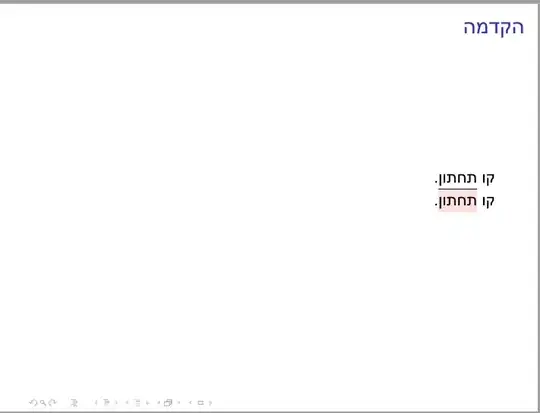
MWE
% !TEX TS-program = lualatex
\documentclass{beamer}
%\usepackage{xcolor,soul}
%\setul{0.2ex}{0.1ex}
%\setulcolor{red}
\usepackage{xcolor,luacolor}
\usepackage[soul]{lua-ul}
\LuaULSetHighLightColor{red!12}
\usepackage{polyglossia}
\setdefaultlanguage{hebrew}
\setotherlanguage{english}
\newfontfamily\englishfontsf{Latin Modern Roman}[Script=Latin,Language=English]
\newfontfamily\englishfont{Latin Modern Roman}[Script=Latin,Language=English]
\newfontfamily\hebrewfont{Arial}[Script=Hebrew]
\newfontfamily\hebrewfontsf{Arial}[Script=Hebrew]
\newfontfamily\opensansH{Noto Sans Hebrew}[Script=Hebrew]
\begin{document}
\begin{frame}{הקדמה}
קו \ul{תחתון}.
קו \highLight{תחתון}.
\end{frame}
\end{document}
I'll have to read the doc to see how to get a red underline.
Attempt:
Using \newunderlinetype, but I do not know enough about bezier curves at the moment.
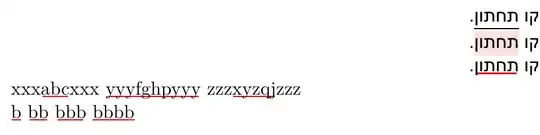
MWE
% !TEX TS-program = lualatex
\documentclass{beamer}
%\usepackage{xcolor,soul}
%\setul{0.2ex}{0.1ex}
%\setulcolor{red}
\usepackage{xcolor,luacolor}
\usepackage[soul]{lua-ul}
\LuaULSetHighLightColor{red!12}
\usepackage{polyglossia}
\setdefaultlanguage{hebrew}
\setotherlanguage{english}
\newfontfamily\englishfontsf{Latin Modern Roman}[Script=Latin,Language=English]
\newfontfamily\englishfont{Latin Modern Roman}[Script=Latin,Language=English]
\newfontfamily\hebrewfont{Arial}[Script=Hebrew]
\newfontfamily\hebrewfontsf{Arial}[Script=Hebrew]
\newfontfamily\opensansH{Noto Sans Hebrew}[Script=Hebrew]
\newunderlinetype\myunderlinered{\cleaders\hbox{%
    \setlength\unitlength{.2ex}%
    \begin{picture}(5,0)(0,1)
      \thicklines
      \color{red}%
      \qbezier(0,0)(0,0)(5,0)%(0,0)(0.5,0)(1,0)
    \end{picture}%
}}
\newcommand\underLineR[1]{{\myunderlinered{#1}}}
\begin{document}
\begin{frame}{הקדמה}
קו \ul{תחתון}.
קו \highLight{תחתון}.
קו \underLineR{תחתון}.
\selectlanguage{english}
xxx\underLineR{abc}xxx yyy\underLineR{fghp}yyy zzz\underLineR{xyzqj}zzz
\underLineR{b} \underLineR{bb} \underLineR{bbb} \underLineR{bbbb}
\end{frame}
\end{document}
Addition based on the comments
Illustrating \rule method:
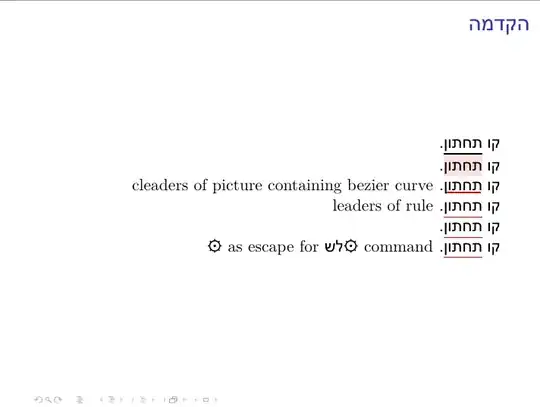
MWE
% !TEX TS-program = lualatex
\documentclass{beamer}
\usepackage{xcolor,luacolor}
\usepackage[soul]{lua-ul}
\LuaULSetHighLightColor{red!12}
\usepackage{polyglossia}
\setdefaultlanguage{hebrew}
\setotherlanguage{english}
\newfontfamily\englishfontsf{Latin Modern Roman}[Script=Latin,Language=English]
\newfontfamily\englishfont{Latin Modern Roman}[Script=Latin,Language=English]
\newfontfamily\hebrewfont{Arial}[Script=Hebrew]
\newfontfamily\hebrewfontsf{Arial}[Script=Hebrew]
\newfontfamily\opensansH{Noto Sans Hebrew}[Script=Hebrew]
\newfontface\fsym{Noto Sans Symbols}
%
\newunderlinetype\myunderlinered{\cleaders\hbox{%
    \setlength\unitlength{.2ex}%
    \begin{picture}(5,0)(0,1)
      \thicklines
      \color{red}%
      \qbezier(0,0)(0,0)(5,0)%(0,0)(0.5,0)(1,0)
    \end{picture}%
}}
\newcommand\underLineR[1]{{\myunderlinered{#1}}}
%
\newunderlinetype\myunderlineredb{\color{red}\leaders \vrule height -.65ex depth .75ex}
\newcommand\underLineRb[1]{{\myunderlineredb{#1}}}
%
%\newcommand\underLineRc[1]{\underLine[color=red]{#1}}
\newcommand\underLineRc[1]{{\myunderlineredb{#1}}}
% ⚙ = 9881
%adapted from unisugar package:
%make ⚙ an escape character
\catcode⚙=11%catcode for letter (unisugar package assigns a unicode char here) \edef\⚙{⚙} \catcode⚙=0%escape character and control sequence
%◇ 9671 begin group
%◈ 9672 end group
\catcode◇=1% 9671 begin group \catcode◈=2% 9672 end group
% underline
% לָשִׂים דָגֵשׁ
%
\newcommand⚙לש{\underLineRc}
\begin{document}
\begin{frame}{הקדמה}
קו \ul{תחתון}.
קו \highLight{תחתון}.
קו \underLineR{תחתון}.
\textenglish{cleaders of picture containing bezier curve}
קו \underLineRb{תחתון}.
\textenglish{leaders of vrule}
קו ⚙לש{תחתון}.
קו ⚙לש◇תחתון◈.
\textenglish{{\fsym \⚙} as escape for \texthebrew{{\fsym \⚙}לש} command}
\end{frame}
\end{document}
For input, it is easier to define a direction-neutral control sequence escape character (here, ⚙), begin group (◇) and end group (◈), and a command ⚙לש which does
\newcommand⚙לש{\underLineRc}
and type קו ⚙לש◇תחתון◈., instead of double-directioned material like
קו \underLineRb{תחתון}.
(Code is OK in TeXWorks; the browser is doing its own interpretation of RTL.)


