0

I know this is a weird and stupid question, but I really need to achieve this.
I have a file containing some characters like "#", "_". For example, the file is:

abc_def#gh

And I need to input (or display the file in to the pdf) to latex without using external packages like verbatim. Achieve this just using build in latex.

I need some kind of function to replace the special character or display it in \verb style without any error.

Some limitations

  • I Can't Run Bash script inside latex as well. Because of -no-shell-escape.
  • Can't Use external packages by \usepackage command
dexteritas
  • 9,161

4 Answers4

5

If you don't want to use LaTeX packages then the following solution needn't LaTeX at all. Only TeX primitives and Plain TeX basic macros are used here. But the solution works in LaTeX too, because the mentioned Plain TeX macros \dospecials, \obeylines and \obeyspaces are implemented in LaTeX kernel too.

\def\inputverbatim #1{\bgroup
  \def\do##1{\catcode`##1=12 }\dospecials
  \def\par{\endgraf\noindent\null}\obeylines\obeyspaces
  \tt \noindent
  \input{#1}
  \egroup
}

%%% test: \inputverbatim {file.txt}

wipet
  • 74,238
  • There's much more than \dospecials, \obeyspaces and \obeylines to get a working verbatim framework. Breaking ligatures, just as an example. – egreg Oct 27 '22 at 07:21
  • ligatures in \tt font? – wipet Oct 27 '22 at 10:29
  • I'm sure you are able to read the output of tftopl cmtt10 to see (LIGTABLE (LABEL O 41) (LIG O 140 O 16) (STOP) (LABEL O 77) (LIG O 140 O 17) (STOP) ) The situation is even worse when using T1 encoded fonts. – egreg Oct 27 '22 at 11:40
  • Now, 2022, somebody are using such archaic fonts? – wipet Oct 27 '22 at 11:49
  • OpenType fonts usually have much more ligatures than those two. – egreg Oct 27 '22 at 12:34
  • This depends on the configuration of text shaping routine which can be set individually for each font (so called font features). We (of course) disable ligatures for \tt fonts used in verbatim, so we needn't to solve this problem at macro level (which is not good place for solving such problems). You did mention a ligature ?``. This is similar obscurity like using {\it\$} to get £. They are features of a diluvial TeX. – wipet Oct 27 '22 at 14:26
  • The wheel has been invented millennia ago, but people continue to use it nonetheless. – egreg Oct 27 '22 at 14:30
3

enter image description here

It is hard to see why you could not use \verbatiminput

but if myfile2 has

line 1
   abc_def#gh
line 3
   $$$$$$
line 5

then

\documentclass{article}

\makeatletter \edef\qqq#1{% \noexpand\begin{verbatim} \noexpand\input{#1}% @backslashchar end\string{verbatim\string}} \makeatother

\begin{document}

\qqq{myfile2}

\end{document}

However if verbatim.sty is not available to be used,article.cls should not be available either, both are part of the core latex release. So I do not see how any latex document could work.

David Carlisle
  • 757,742
0

I suggest listingsutf8 package and use it like following:

\lstinputlisting[inputencoding=utf8/cp1250,frame=hnone,numbers=none,extendedchars=true]{source.txt}

The second option is to use \detokenize command like

\detokenize{abc_def\#gh}

But as you see, # must be quoted with backslash.

  • listings package is Ok but doesn't answer the question which (for some strange reason) asks for no packages to be used – David Carlisle Oct 26 '22 at 17:56
  • It would be painful to achieve this without external package. At least the author can provide package files in the same directory as LaTeX source. – user12425014 Oct 26 '22 at 17:57
  • but you posted this after another answer which did as requested in 4 lines of code, so not that painful. – David Carlisle Oct 26 '22 at 18:12
  • \detokenize appends space-tokens behind control-word-tokens, e.g., \detokenize{\relax\relax} yields \relax␣\relax␣. \detokenize doubles hashes/explicit character-tokens of category 6(parameter). With \detokenize the result depends on the value of the integer-parameter \escapechar. How to combine \detokenize with \input? – Ulrich Diez Oct 26 '22 at 22:03
0

This is how I might go at it:

%-----------------------------------------------------------------
% Let's create an external text file  SomeFile.tex  which is to be 
% input verbatim:
%-----------------------------------------------------------------
\begin{filecontents*}{SomeFile.tex}
Line 1: abc_def#gh
Line 2: $$$_def#gh
Line 3: %%%_def#gh

\end{verbatim}

Line 7: bla~~~bla \end{filecontents*} %-----------------------------------------------------------------

\documentclass{article}

\newcommand\Exchange[2]{#2#1}

\begin{document}

Text

\Exchange{\input{SomeFile.tex}}{\begin{verbatim}}\end{verbatim}

Text

\end{document}
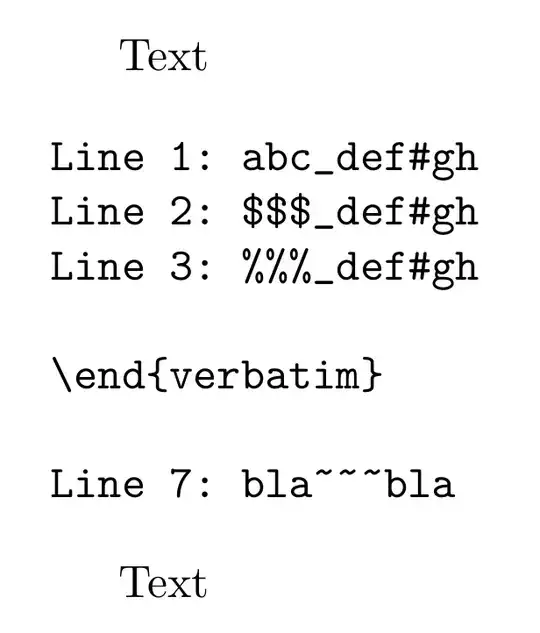
enter image description here


If you don't wish things to be typeset in typewriter-mode and just wish TeX to treat special characters like ordinary characters that shall occur within the text while typesetting as usual, you can try s.th. like this:

%-----------------------------------------------------------------
% Let's create an external text file  SomeFile.tex  which is to be 
% input:
%-----------------------------------------------------------------
\begin{filecontents*}{SomeFile.tex}
Line 1: $&#^_~%\{}
Line 2: $&#^_~%\{}
\end{filecontents*}
%-----------------------------------------------------------------

\documentclass{article}

\makeatletter @ifdefinable\secondwhentypesetting{\protected\def\secondwhentypesetting#1#2{#2}} \newcommand\unexpandedwhennottypesetting[1]{\noexpand\unexpandedwhennottypesetting{\unexpanded{#1}}} \DeclareRobustCommand\myactivateasnospecial{@dblarg@myactivateasnospecial}% \newcommand@myactivateasnospecial[2][]{% \begingroup\lccode\~=#2\relax \lowercase{\endgroup\def~}{\secondwhentypesetting\unexpandedwhennottypesetting{#1}}% \catcode`#2=13\relax }% \makeatother

\DeclareRobustCommand\TypesetFileWithSpecialsAsOrdinaryCharacters[1]{% \begingroup % switch special characters %%%%%%%%%%%%%%%%%%%%%%%%%%%%%%% \let\do=\myactivateasnospecial \do$% \do&% \do#% \do[\ifmmode\hat{}\else\textasciicircum\fi]^% \do[\ifmmode_\else\textunderscore\fi]_% \do[\ifmmode\sim\else\textasciitilde\fi]~% \do%% \do[\csname\ifmmode\else text\fi backslash\endcsname]\% \do{% \do}% %%%%%%%%%%%%%%%%%%%%%%%%%%%%%%%%%%%%%%%%%%%%%%%%%%%%%%%%%%% \input{#1}% \endgroup }%

\begin{document}

\TypesetFileWithSpecialsAsOrdinaryCharacters{SomeFile.tex}

$$\TypesetFileWithSpecialsAsOrdinaryCharacters{SomeFile.tex}$$

\end{document}

enter image description here

Ulrich Diez
  • 28,770