Like this?

Edit:
Deleted is use of preview package which is used to see only equation with tikzcd diagrams. It seems that this trick is not known to OP, so it is better to remove it. Now compilation result is seen on top of whole page. Hopefully that now proposed solutions are more clear.
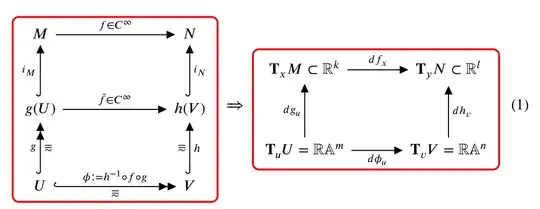
Rectangles are draw as fit nodes in execute at end picture:
\documentclass{article}
\usepackage{stix}
\usepackage[bb=ams]{mathalpha}
\usepackage{mathtools}
\newcommand{\R}{\mathbb R}
\newcommand{\A}{\mathbb A}
\usepackage{tikz-cd}
\usetikzlibrary{arrows.meta,
                fit,
                patterns.meta}
\tikzcdset{
arrow style=tikz,
>={Triangle[length=2mm]},
cells={nodes={inner sep=2mm}},
        }
\tikzset{
every matrix/.append style = {name=m},
F/.style = {draw=red, very thick, rounded corners, inner sep=5pt, fit=#1}
        }
\begin{document}
\begin{equation}
    \begin{tikzcd}[column sep=24mm, row sep=12mm,
execute at end picture = { % <----
    \node[F = (m-1-1) (m-3-2) ] {};
                        }% end of execute at end picture
                    ]
M \rar["f\in C^\infty"] & N     \
g(U) \uar[hook, "i_M"] \rar["\bar{f}\in C^\infty"]
                        & h(V)\uar[hook, "i_N"']   \
U \uar[hook, two heads, "g", "\eqqsim"']
  \rar[hook, two heads, "\phi\coloneqq h^{-1}\circ f\circ g","\eqqsim"']
                        & V \uar[hook, "h"', "\eqqsim"]
    \end{tikzcd}
  \implies
    \begin{tikzcd}[sep=12mm,
execute at end picture = {% <----
    \node[F = (m-1-1) (m-2-2) ] {};
                        }% end of execute at end picture
                    ]
\textbf{T}_xM\subset\R^k \rar["df_x"]
                        & \textbf{T}_yN \subset\R^l \
\textbf{T}_uU=\R\A^m \rar["d\phi_u"']
                     \uar["dg_u"]
                        & \textbf{T}_vV=\R\A^n \uar["dh_v"']
    \end{tikzcd}
\end{equation}
\end{document}
Addendum:
- Without defining common
\tikzset for node style. Style is now defined in node.
- Naming of matrix by
every matrix/.append style = {name=m} is replaced by use of tikz@f@... for diagram name:
\documentclass{article}
\usepackage{stix}
\usepackage[bb=ams]{mathalpha}
\usepackage{mathtools}
\newcommand{\R}{\mathbb R}
\newcommand{\A}{\mathbb A}
\usepackage{tikz-cd}
\usetikzlibrary{arrows.meta,
                fit,
                patterns.meta}
\tikzcdset{
arrow style=tikz,
>={Triangle[length=2mm]},
          }
\begin{document}
\begin{preview}
\begin{equation}
    \begin{tikzcd}[column sep=24mm, row sep=12mm,
execute at end picture = { % <----
    \node[draw=red, very thick, rounded corners, fit=(tikz@f@1)] {}; % first diagram
                        }% end of execute at end picture
                    ]
M \rar["f\in C^\infty"] & N     \
g(U) \uar[hook, "i_M"] \rar["\bar{f}\in C^\infty"]
                        & h(V)\uar[hook, "i_N"']   \
U \uar[hook, two heads, "g", "\eqqsim"']
  \rar[hook, two heads, "\phi\coloneqq h^{-1}\circ f\circ g","\eqqsim"']
                        & V \uar[hook, "h"', "\eqqsim"]
    \end{tikzcd}
  \implies
    \begin{tikzcd}[sep=12mm,
execute at end picture = {% <----
    \node[draw=red, very thick, rounded corners, fit=(tikz@f@2)] {}; % second diagram
                         }% end of execute at end picture
                  ]
\mathbf{T}_xM\subset\R^k \rar["df_x"]
                        & \mathbf{T}_yN \subset\R^l \
\mathbf{T}_uU=\R\A^m \rar["d\phi_u"']
                     \uar["dg_u"]
                        & \mathbf{T}_vV=\R\A^n \uar["dh_v"']
    \end{tikzcd}
\end{equation}
\end{preview}
\end{document}
- As suggested @Qrrbrbirlbel in his comment, name of diagram as
\tikzcdmatrixname is available at the end of the diagram (when execute at end picture is executed. So nodes code can be changed to:
...
    \begin{tikzcd}[...,
execute at end picture = {% <---- at each tikzcd diagram
    \node[draw=red, very thick, rounded corners, fit=(\tikzcdmatrixname)] {};
                         }% end of execute at end picture
...
Compilation result is similar as before:


preview-environment used in the Zarko's version. I can accept any other answer. I thank you all. – Puck Nov 04 '22 at 14:14previewpackage/environment is only there to extract a nice picture for the answer. It's not necessary for the answer. (But I'd argue its to convulated in the present form.) CarLaTeX is a great solution (but see my comment there) but will not take arrows or labels in consideration that go outside the matrix's boundary. My answer will and could be made without thebackgroundslibrary unless you want to fill the background of your diagram. They can all made into a short-named style that gets applied to thetikzcdenvironment or theevery diagramstyle. – Qrrbrbirlbel Nov 04 '22 at 15:29