This is basically the same problem as this one with forest.
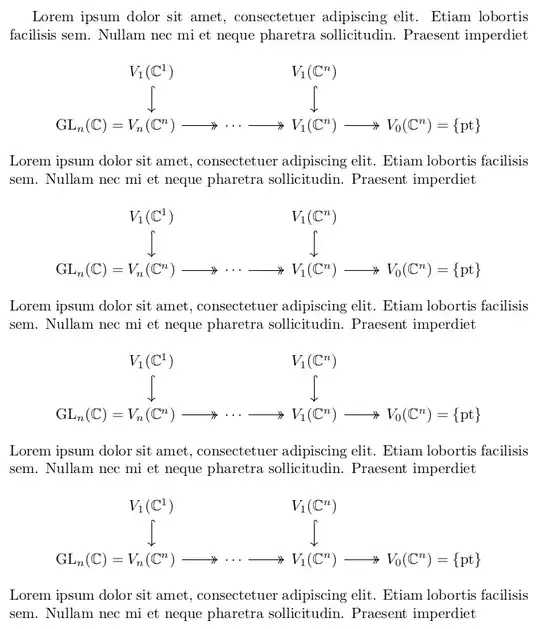
And the possible solutions (apart from manually fiddling around) are these:
Eliminating the column separation so that the two columns are directly together.
However, settings the column sep to zero isn't enough since the nodes have an inner xsep padding around them. (Though, we could set the inner xsep to zero and the outer xsep to its value …)
Thus, either
- the
column sep has to be set to twice the negative inner xsep (via the no csep style that accepts a \foreach list of columns) or
- the
no_csep function that is to be used with the &-macro (which can only be done in the first row).
\mathllap and \mathrlap from the mathtools package.
These are similar to the text-mode \llap and \rlap macros, these don't update the bounding box of the underlying TikZ picture and the content will not be inside the node.
For (unfilled, undrawn) nodes that lie at the left or right side of the diagram that may be centered on a line of its own, this is not the worst thing – but it does change the horizontal placement of the diagram.
This actually can be worked around by adding a path of that width to the diagram again with \mllap and \mrlap (which are only defined inside a TikZ-CD diagram).
Using a second node inside the same column.
This is done with a label with the extra anchor text right (take a look into the forest-related answer which explains what that does. I did use that before in a answer which I've used in a TikZ-CD answer for the very same reason basically.
A multi-part “uncentered rectangle” whose center anchors (the ones that are used to place the node as well as connect it to lines) is not the real center but the one of the main part of the node (here the V_… part).
Unfortunately, due to a bug of TikZ we need to fix a bit to disable math-mode for the node with the multiple parts. (The fixing code is taken straight from the manual.)
In all examples, I've used the same solution also for the = {pt} part even though you only use a horizontal arrow and it is strictly not necessary.
As an aside, it would also be possible to put two nodes into one cell where the main node is placed first and then the other one is placed in relation to that but we'd need to manually name the main node again to be usable with TikZ-CD and a label is just that, a second node!
Code
\documentclass{article}
\usepackage{amsmath, amssymb}
\usepackage{tikz-cd}
\DeclareMathOperator{\GL}{GL}
\newcommand*\pt{\mathrm{pt}}
\newcommand*\C{\mathbb{C}}
%%% 1. no column sep
\tikzset{declare function={% for &[no csep]
    no_csep=-\pgfmatrixcolumnsep-2(\pgfkeysvalueof{/pgf/inner xsep});}}
\tikzcdset{% for use in the options of the environment
  no csep/.style={/utils/temp/.style={/tikz/column ##1/.append style={
    column sep=-2(\pgfkeysvalueof{/pgf/inner xsep})}},/utils/temp/.list={#1}}}
%%% 2. \mathllap and \mathrlap
\usepackage{mathtools}
\tikzcdset{
  every diagram/.append code=%
    \def\mllap##1{\mathllap{##1}\arrow[path only,start anchor=west,
      /utils/exec=\pgfmathwidth{"$##1$"},
      to path={--++(left:\pgfmathresult pt)}]}%
    \def\mrlap##1{\mathrlap{##1}\arrow[path only,start anchor=east,
      /utils/exec=\pgfmathwidth{"$##1$"},
      to path={--++(right:\pgfmathresult pt)}]}}
%%% 3. label with extra anchor
\makeatletter
\pgfdeclaregenericanchor{text right}{%
  \pgf@sh@reanchor{#1}{base}%
  \multiply\pgf@x by 2 }
\makeatother
\tikzset{
  llap/.style={label={[anchor=text right]text:#1{}}},
  rlap/.style={label={[anchor=text]text right:{}#1}}}
%%% 4. uncentered rectangle
\usetikzlibrary{ext.shapes.uncenteredrectangle}
\makeatletter
\tikzcdset{every diagram/.append style={/pgf/uncentered rectangle center=text,
  /tikz/math align/.style={shape=uncentered rectangle,
    /pgf/uncentered rectangle center yshift=axis_height,
    commutative diagrams/math mode=false,
    /utils/exec={\def\maleft####1=####2;{$####2$\nodepart{left}$####1={}$},
                \def\maright####1=####2;{$####1$\nodepart{right}${}=####2$}}},
    /tikz/matrix of math nodes/.style={matrix of nodes,nodes={
      execute at begin node=\iftikzcd@mathmode$\fi,
      execute at end node =\iftikzcd@mathmode$\fi}}}}
\makeatother
\begin{document}
Lorem ipsum dolor sit amet, consectetuer adipiscing elit. Etiam lobortis
facilisis sem. Nullam nec mi et neque pharetra sollicitudin. Praesent imperdiet
[ % 1. Eliminating the column seperation.
\begin{tikzcd}[no csep=5]
  &[no_csep] % or this but not both at the same column
    V_1(\C^1) \arrow[d, hook]
  &
  & V_1(\C^n)          \arrow[d, hook] \
  \GL_n(\C)={}
  & V_n(\C^n)          \arrow[r, two heads]
  & \cdots             \arrow[r, two heads]
  & V_1(\C^n)          \arrow[r, two heads]
  & V_0(\C^n)
  & {}= { \pt }
\end{tikzcd}
]
Lorem ipsum dolor sit amet, consectetuer adipiscing elit. Etiam lobortis
facilisis sem. Nullam nec mi et neque pharetra sollicitudin. Praesent imperdiet
[ % 2. mathllap and mathrlap from mathtools with an extra invisible arrow
\begin{tikzcd}
    V_1(\C^1)          \arrow[d, hook]
  &
  & V_1(\C^n)          \arrow[d, hook] \
    \mllap{\GL_n(\C)={}} V_n(\C^n)
                       \arrow[r, two heads]
  & \cdots             \arrow[r, two heads]
  & V_1(\C^n)          \arrow[r, two heads]
  & V_0(\C^n) \mrlap{{}= { \pt }}
\end{tikzcd}
]
Lorem ipsum dolor sit amet, consectetuer adipiscing elit. Etiam lobortis
facilisis sem. Nullam nec mi et neque pharetra sollicitudin. Praesent imperdiet
[% 3. Second node inside the same column.
\begin{tikzcd}
    V_1(\C^1)          \arrow[d, hook]
  &
  & V_1(\C^n)          \arrow[d, hook] \
    |[llap={\GL_n(\C)=}]| V_n(\C^n)
                       \arrow[r, two heads]
  & \cdots             \arrow[r, two heads]
  & V_1(\C^n)          \arrow[r, two heads]
  & |[rlap={= { \pt }}]| V_0(\C^n)
\end{tikzcd}
]
Lorem ipsum dolor sit amet, consectetuer adipiscing elit. Etiam lobortis
facilisis sem. Nullam nec mi et neque pharetra sollicitudin. Praesent imperdiet
[% 4. Uncentered rectangle shape.
\begin{tikzcd}
          V_1(\C^1)    \arrow[d, hook]
        &
        & V_1(\C^n)    \arrow[d, hook] \
          |[math align]|  \maleft \GL_n(\C) = V_n(\C^n);
                       \arrow[r, two heads]
        & \cdots       \arrow[r, two heads]
        & V_1(\C^n)    \arrow[r, two heads]
        & |[math align]| \maright V_0(\C^n) = { \pt };
\end{tikzcd}
]
Lorem ipsum dolor sit amet, consectetuer adipiscing elit. Etiam lobortis
facilisis sem. Nullam nec mi et neque pharetra sollicitudin. Praesent imperdiet
\end{document}
Output


mlabelkey, just swap around the anchors, i e.[anchor=text right]text:…. Or theuncentered rectangleshape from another answer of mine but that needs patching oftikz-cdto work properly. (Or\mathllapif the horizontal placement of the diagram isn't that important.) – Qrrbrbirlbel Nov 07 '22 at 19:03