0

I'm writing a paper for conference and I got stuck: Somehow bib.file is not recognized. The error always saying citation not defined. I don't know how to fix it. Please tell me.

From this template, I coded like this

\documentclass[12pt]{l4dc2023}
\usepackage{times}

\begin{document}

\cite{vonHamburg13}

\bibliographystyle{unsrt} \bibliography{sample}

\end{document}

and Bib file sample.bib like this

@InProceedings{vonHamburg13,
    title = {Handling Prefixes and Suffixes in Names},
    author = {von Hamburg, Hans and van der Petersburg, Pieter and de Gier, Willhelm and Hirst, Jr, Peter},
    pages = {27-41},
    abstract = {We demonstrate the ability of scripts to parse names containing prefixes such as 'van der' or 'von'. As a further extension, we consider suffices to names such as 'Jr' and 'III'.}
}
SpaceTAKA
  • 149
  • Can you please give us some more information? Did the issue also happen with a standard class? How do you see, that the file is not recognized? Did you get some error message or warning messages from the LaTeX run or the BibTeX run? Can you show a copy of those messages from the log resp. blg file? Did you already run LaTeX + BiBTeX + LaTeX + LaTeX? Note also, that sample.bib is not a good file name, because it is very generic and so sometime BibTeX uses the wrong file. – cabohah Nov 15 '22 at 07:40
  • If you use a template not available from CTAN, please always post a direct link to the template or the page with the template, not only a link to the root page of the publisher or organization that provides the template somewhere. This would help us to find the template and answer quickly. – cabohah Nov 15 '22 at 09:20

1 Answers1

1

The BibTeX run of your example results in the error:

Illegal, another \bibstyle command---line 18 of file mysample.aux
 : \bibstyle
 :          {unsrt}

This is, because class l4dc2023 loads class jmlr and class jmlr already contains

\bibliographystyle{plainnat}

in line 173.

Each \bibliographystyle command writes a \bibstyle command to the aux file. And BibTeX allows only one \bibstyle.

Because of this, command \bibliographystyle can be used only once per document. So you cannot use another bibliography style than the one already selected by the class. More exactly: You cannot use any \bibliographystyle command in your document, because the class already uses one. And because of this, the original sample file l4dc2023-sample.tex from this template does not have a \bibliographystyle command.

After removing the command from your example:

\begin{filecontents*}{\jobname.bib}
@InProceedings{vonHamburg13,
    title = {Handling Prefixes and Suffixes in Names},
    author = {von Hamburg, Hans and van der Petersburg, Pieter and de Gier, Willhelm and Hirst, Jr, Peter},
    pages = {27-41},
    abstract = {We demonstrate the ability of scripts to parse names containing prefixes such as 'van der' or 'von'. As a further extension, we consider suffices to names such as 'Jr' and 'III'.}
}
\end{filecontents*}

\documentclass[12pt]{l4dc2023} \usepackage{times}

\begin{document}

\cite{vonHamburg13}

\bibliography{\jobname}

\end{document}

There are no more error messages (only some warnings) and the result is:
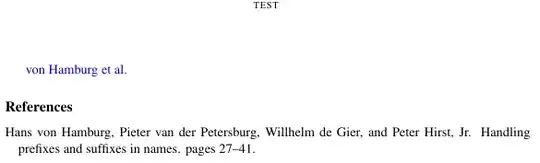
page contents with bibliography resp. references

Note: If you name the shown example tex file cabohahsniceexample.tex, you have to run pdflatex cabohahsniceexample, bibtex cabohahsniceexample, pdflatex cabohahsniceexample, pdflatex cabohahsniceexample to get the shown result. Instead of pdflatex you can use lualatex or xelatex alternatively. If you name the bib file different, you still have to do the same runs, because bibtex has to be run always with the name of the aux-file not the bib-file. So the parameter of the bibtex run is independent from the name of the bib-file. See, e.g., “Question mark or bold citation key instead of citation number” for more information.

Note also: I've used filecontents environment to generate a bib file with a defined file name. So the example will work independent on the file names used, when someone copies the code. However, you always can remove the filecontents environment and edit the bibliography database in any file with extension bib. However in this case, you have also to adapt the argument of the \bibliography command.

cabohah
  • 11,455
  • Brilliant! Could I ask a couple of questions? So you are saying that, the error is occurring because I technically call \bibliographystyle twice – SpaceTAKA Nov 15 '22 at 09:43
  • Thank you for your kind and prompt reply! But in my Atom editor, even when I run your code, only question mark appears on – SpaceTAKA Nov 15 '22 at 09:51
  • Thank you! Sorry if I’m wrong cuz I’m such a beginner but let me make it clear:
    1. I have .bib file named jobname ( cuz sample.bib is confusing ) . jobname includes @InProceedings
    – SpaceTAKA Nov 15 '22 at 10:16
  • I have and run your latex code but it does not work. According to your kind advice, this is because I do not run the Bibtex
  • – SpaceTAKA Nov 15 '22 at 10:16
  • To run Bibtex, I have to run the followings in command line :
  • bibtex jobname
    latex  l4dc2023-sample
    latex  l4dc2023-sample```
    
    – SpaceTAKA Nov 15 '22 at 10:16
  • Thank you! Changing all jobname into l4dc2023-sample worked correctly! You helped me a lot:} How could I add reference? Do I need to add the information to either bib and tex? – SpaceTAKA Nov 15 '22 at 10:26
  • @SpaceTAKA Please, if you have a new question or a following-up question, ask a new question. – cabohah Nov 15 '22 at 10:27
  • @SpaceTAKA I've added several notes for absolute beginners and deleted several comments, that should not be needed any longer. – cabohah Nov 15 '22 at 11:16