11

wrapfig is a LaTeX package designed to make it possible to let text flow around images. I am acquainted with the documentation, which was written with the needs of an end user in mind. But how does wrapfig work internally?

The basic procedure (make whitespace for the image, use the driver to place it) is conceptually clear to me. But I am curious:

  1. What is the "big picture" of wrapfig's low-level method of operation?
  2. (How) Does wrapfig somehow determine the hyphenation points at which the floating text shall break?
  3. Is it correct that wrapfig currently is not able to have text on both sides, such that the text continues on the other side? (Think of the image placed in the middle of a column.)

Sadly, I am way too bad in TeX to be able to answer my questions myself using wrapfig's source code and "Random implementation notes" within the documentation.

  • The big deal with wrapfig is its ability to wrap more than one paragraph, for which it uses \everypar. If you only need to wrap one paragraph, there are many different ways to do it, including shapepar which can put a gap into the center. – John Kormylo Nov 16 '22 at 18:07

1 Answers1

17

TeX has a \parshape primitive that specifies a number of special lines before a paragraph then for each line, a pair of (left margin, line width) pairs. The last pair is used on all following lines, so

\documentclass{article}

\setlength\textwidth{6cm} \begin{document} \newlength\shortline \shortline=\dimexpr\textwidth-2cm

\parshape 4 0pt \shortline 0pt \shortline 0pt \shortline 0pt \textwidth One two three four five six seven. Red blue green yellow white black. One two three four five six seven. Red blue green yellow white black. One two three four five six seven. Red blue green yellow white black.

\end{document}

Produces
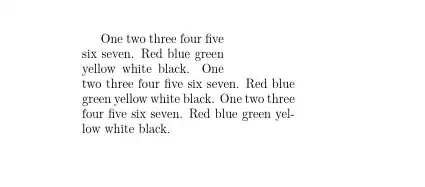
enter image description here

So basically wrapfig sets the figure in a box to find the default length to cut and the number of lines to cut so as to produce the above, then it drops in the figure in the space:

\documentclass{article}

\setlength\textwidth{6cm} \newlength\shortline

\begin{document}

\shortline=\dimexpr\textwidth-2cm

\parshape 4 0pt \shortline 0pt \shortline 0pt \shortline 0pt \textwidth \noindent\smash{\rlap{\hspace{\textwidth}\llap{% \hspace{2mm}% \rule[-.8cm]{1.8cm}{1cm}}}}% \indent One two three four five six seven. Red blue green yellow white black. One two three four five six seven. Red blue green yellow white black. One two three four five six seven. Red blue green yellow white black.

\end{document}

Producing
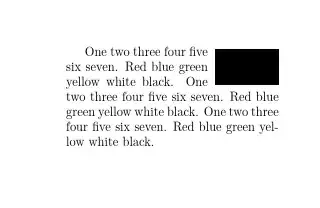
enter image description here

The clever part of the package is detecting if you need more than one paragraph and if so constructing a new shorter \parshape for the later ones.

\documentclass{article}

\setlength\textwidth{6cm} \newlength\shortline

\begin{document} \sloppy

\shortline=\dimexpr\textwidth-2cm

\parshape 4 0pt \shortline 0pt \shortline 0pt \shortline 0pt \textwidth \noindent\smash{\rlap{\hspace{\textwidth}\llap{% \hspace{2mm}% \rule[-.8cm]{1.8cm}{1cm}}}}% \indent One two three four five six seven. Red blue green

\parshape 2 0pt \shortline 0pt \textwidth Yellow white black. One two three four five six seven. Red blue green yellow white black. One two three four five six seven. Red blue green yellow white black.

\end{document}
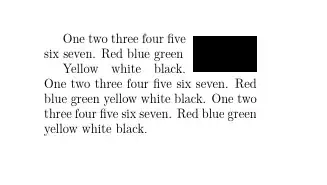
enter image description here

David Carlisle
  • 757,742
  • 2
    Thanks for this. I've been using LaTeX for sometime now and there's so many things I still don't know. I guess it's going to be forever ongoing process since it's begun. – Celdor Nov 16 '22 at 15:20
  • Is the machinery that extends \parshape to multiple paragraphs available outside of wrapfig, for arbitrary paragraph shapes? Sounds like it would make a nice package on its own.. – schtandard Nov 16 '22 at 22:49
  • 1
    @schtandard not as far as I know. I looked at it in detail once for a question on this site which merged it with the parshape for a lettrine drop-cap \parshape – David Carlisle Nov 16 '22 at 22:52
  • 1
    @schtandard https://tex.stackexchange.com/questions/119688/lettrine-and-wrapfig/121555#121555 – David Carlisle Nov 16 '22 at 22:55
  • Too bad. Thanks for the link. – schtandard Nov 16 '22 at 22:58