Here is a possibility using nicematrix. Note that you must compile it twice.
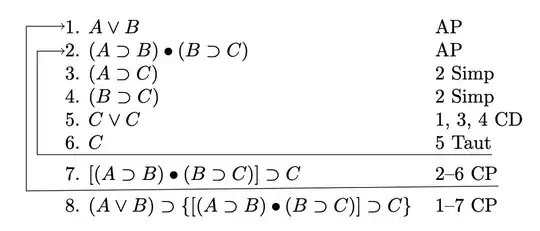
Define a new command \surr that takes three arguments, one optional:
\surr[<nest level>]{<from row>}{<to row>}
The nest level is 1 by default. The \surr commands should be used in the \CodeAfter. Additional vertical space for the arrows is created by adding [1ex] to the relevant lines. Omit or change if you wish.
To make spacing adjustments in sthe \surr command:
-3pt is the distance below the current row that the line is drawn.2mm is the space between nested vertical lines.3mm is the additional space for the first nest level.
If you want to automate the row numbering, there are several solutions on TeX.SX, for example here.
\documentclass{article}
\usepackage{nicematrix, tikz}
\newcommand{\surr}[3][1]{\tikz{
\draw[->]([shift={(0,-3pt)}]#2-2.south east)--([shift={({#1*-2mm-3mm},-3pt)}]#2-1.south west)|-(#3-1.west);
}}
\begin{document}
\begin{NiceTabular}{ll}
- $A\lor B$ & AP\
- $(A\supset B)\bullet(B\supset C)$ & AP\
- $(A\supset C)$ & 2 Simp\
- $(B\supset C)$ & 2 Simp\
- $C\lor C$ & 1, 3, 4 CD\
- $C$ & 5 Taut\[1ex]
- $[(A\supset B)\bullet(B\supset C)]\supset C$ & 2--6 CP\[1ex]
- $(A\lor B)\supset{[(A\supset B)\bullet(B\supset C)]\supset C}$ & 1--7 CP
\CodeAfter
\surr{6}{2}
\surr[2]{7}{1}
\end{NiceTabular}
\end{document}


