Does this satisfy-- you could define a third coordinate C with the help of
\draw [red, thick, name path=line2] (B)--++(\angle+90:3)coordinate[label=0:C](C);
the coordinate can be labelled C with the help of [label=0:C] where 0 is the angle of the label and C is the text of the label
MWE
\documentclass[tikz,border=10pt]{standalone}
\usepackage{tkz-euclide}
\usetikzlibrary{calc,intersections}
\newcommand{\pgfextractangle}[3]{%
    \pgfmathanglebetweenpoints{\pgfpointanchor{#2}{center}}
    {\pgfpointanchor{#3}{center}}
    \global\let#1\pgfmathresult
}
\begin{document}
    \begin{tikzpicture}
        \tkzDefPoint(0,0){A}
        \tkzDefPoint(2,1.4){B}
        \tkzLabelPoints(A)
        \tkzLabelPoints(B)
    \tkzDrawSegment[name path=line1](A,B)
    \pgfextractangle{\angle}{A}{B}

    % Draw the line further from B by a set distance
    \draw [red, thick, name path=line2] (B)--++(\angle+90:3)coordinate[label=0:C](C);
    \tkzDrawSegment[blue, thick, name path=line3](A,C)
\end{tikzpicture}

\end{document}
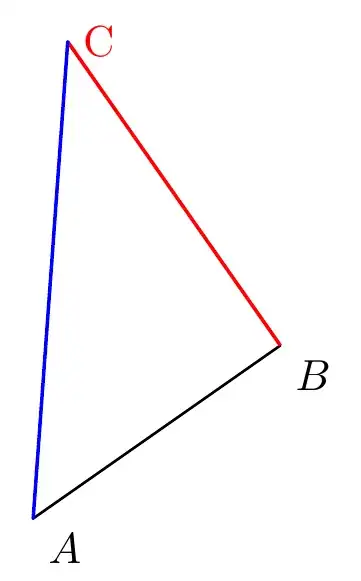
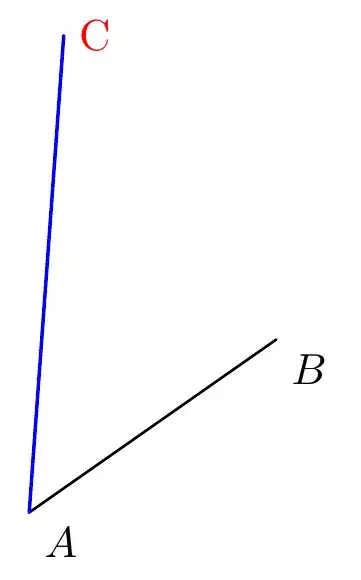
Alternatively if you do not want the line B--C to be seen replace draw with path as below
\path [red, thick, name path=line2] (B)--++(\angle+90:3)coordinate[label=0:C](C);
In case you do not want any label on the coordinate C simply remove the [label=0:C] option
MWE
\documentclass[tikz,border=10pt]{standalone}
\usepackage{tkz-euclide}
\usetikzlibrary{calc,intersections}
\newcommand{\pgfextractangle}[3]{%
    \pgfmathanglebetweenpoints{\pgfpointanchor{#2}{center}}
    {\pgfpointanchor{#3}{center}}
    \global\let#1\pgfmathresult
}
\begin{document}
    \begin{tikzpicture}
        \tkzDefPoint(0,0){A}
        \tkzDefPoint(2,1.4){B}
        \tkzLabelPoints(A)
        \tkzLabelPoints(B)
    \tkzDrawSegment[name path=line1](A,B)
    \pgfextractangle{\angle}{A}{B}

    % Draw the line further from B by a set distance
    \path [red, thick, name path=line2] (B)--++(\angle+90:3)coordinate[label=0:C](C);
    \tkzDrawSegment[blue, thick, name path=line3](A,C)
\end{tikzpicture}

\end{document}
Simply rinse and repeat for any number of extended coordinates
The lines have been numbered here for help in defining intersections(which have not been used here) -- please see https://tex.stackexchange.com/a/476785/197451
EDIT
Further elaboration of extending coordinate B at other angles and different distances
\documentclass[tikz,border=10pt]{standalone}
\usepackage{tkz-euclide}
\usetikzlibrary{calc,intersections}
\newcommand{\pgfextractangle}[3]{%
    \pgfmathanglebetweenpoints{\pgfpointanchor{#2}{center}}
    {\pgfpointanchor{#3}{center}}
    \global\let#1\pgfmathresult
}
\begin{document}
    \begin{tikzpicture}
        \tkzDefPoint(0,0){A}
        \tkzDefPoint(2,1.4){B}
        \tkzLabelPoints(A)
        \tkzLabelPoints(B)
    \tkzDrawSegment[name path=line1](A,B)
    \pgfextractangle{\angle}{A}{B}

    % Draw the line further from B by a set distance
    \path[] (B)-- ++(\angle:4cm) coordinate (b) node[pos=1.02,anchor=west]{\tiny $(\angle:4cm)$};
    \path[] (B)-- ++(20:1cm) coordinate (x) node[pos=1.02,anchor=west]{\tiny$(20:1cm)$};
    \path[] (B)-- ++(60:2cm) coordinate (y) node[pos=1.02,anchor=west]{\tiny $(60:2cm)$};
    \path[] (B)-- ++(90:3cm) coordinate (z) node[pos=1.02,anchor=west]{\tiny $(90:3cm)$};

    \tkzDrawSegment[blue, thick](A,b)
    \tkzDrawSegment[blue, thick](A,x)
    \tkzDrawSegment[blue, thick](A,y)
    \tkzDrawSegment[blue, thick](A,z)

    \tkzDrawSegment[red, dashed](B,b)
    \tkzDrawSegment[red, dashed](B,x)
    \tkzDrawSegment[red, dashed](B,y)
    \tkzDrawSegment[red, dashed](B,z)
\end{tikzpicture}

\end{document}
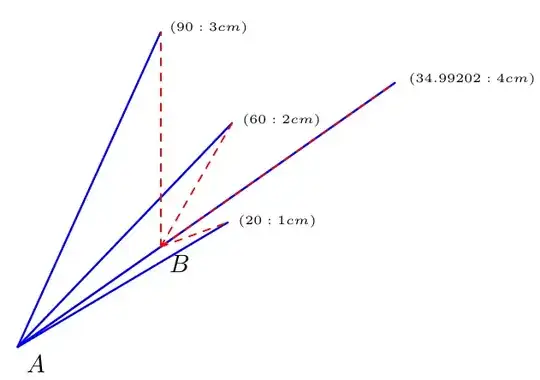


\draw (A)--(B)--([turn]0:1)means drawing a segment fromA' toB, and drawing1`cm more in the direction of A--B – Black Mild Nov 27 '22 at 17:00Bat other angles and distances – js bibra Nov 28 '22 at 03:08