I'd like to propose a little bit more advanced solution including both caption spacing adjustment and caption format customization.
To be short, goals are:
- identical spacing between caption, table body and adjacent paragraph text;
- identical caption format (i.e. sequence and contents of caption lines);
- transparent LoT control.
And the challenge is of:
- different types of tables (for example
tblr and talltblr);
- usage of a few different packages affecting same document structures (for example
tabularray and caption both can add items to LoT);
- different packages have different ways of specifying caption formatting parameters.
The MWE
To illustrate my solution, I have prepared a MWE. And here it is:
\documentclass{article}
\usepackage[a5paper]{geometry}                  % a5 paper
\usepackage[utf8]{inputenc}                     % input encoding
\usepackage[english]{babel}                     % localization
\usepackage{caption}                            % caption control
\usepackage{tabularray}                         % tabularray package
\usepackage[unicode=true,                       % unicode encoded pdf strings
            colorlinks=true,                    % use colored links
            linkcolor=black,                    % color of links
           ]{hyperref}
\captionsetup[table]
             {labelsep=period,                  % caption separation for tables
              position=t,                       % caption position for tables
              justification=raggedright,        % caption alignment for tables
              singlelinecheck=off,              % don't center single line table captions
              aboveskip=2em}                    % above skip for table captions
\ExplSyntaxOn
% Tabularray theme using \captionof macro
\NewTblrTheme { captionof }
  {
    \DefTblrTemplate { caption } { default }
      {
        \addtocounter { table } { -1 }
        \tl_if_empty:NTF \lTblrEntryTl
          {
            \captionof { table }
              { \InsertTblrText { caption } }
          }
          {
            \captionof { table }
              [ \InsertTblrText { entry } ]
              { \InsertTblrText { caption } }
          }
        \vspace{ -\abovecaptionskip }
      }
    \SetTblrTemplate { caption-lot } { empty }
  }
\ExplSyntaxOff
\begin{document}
\pagestyle{empty}
\noindent
\textcolor{red}{\rule{\textwidth}{2pt}}
\textcolor{red}{Paragraph text.}
\begin{table}[!h]
 \begin{talltblr}
       [theme = captionof,
        headsep = \abovecaptionskip,
        caption = {Simple floating three part table (\texttt{captionof} theme)},
        entry = {Floating \texttt{talltblr} with \texttt{captionof} theme},
        label = {tab:table-simple-captionof},
        note{1} = {The first note text. And a long line of dummy text.},
        note{2} = {The second note text. And a long line of dummy text.}]
       {colspec = {ccc},
        row{1} = {font=\bfseries},
        hline{1,2,Z} = {1pt},
        vline{2-Y} = {1pt}}
  Head:A    & Head:B    & Head:C    \
  A1        & B1        & C1        \
  A2        & B2        & C2        \
  A3        & B3        & C3        \
 \end{talltblr}
\end{table}
\textcolor{red}{Paragraph text.}
\listoftables
\end{document}
For the first, let the caption be ragged right (left-aligned without hyphenation) and consists of following elements:
- object type defined by localization rules (currently it is "Table" word);
- en-length space;
- object number;
- period;
- the caption text.
The layout is:
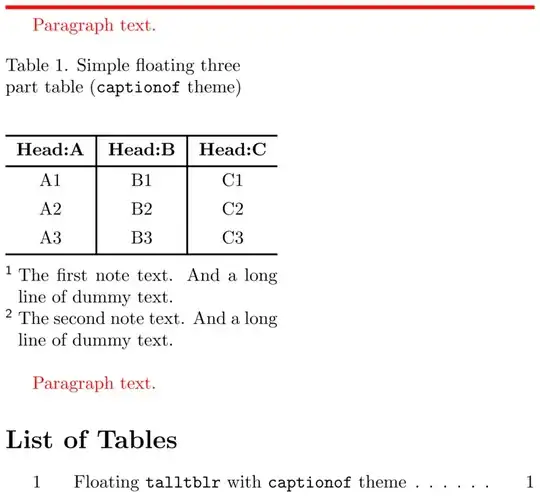
The horizontal rule shows the full width of the text column. A paragraph before the table and paragraph after the table are used to show spacing between the table and adjacent paragraph. Below there is a List of Tables and in consists of single item, just as it should be.
The first two lines of the table's outer spec select tblr theme and set the spacing between the table body and its caption (generated by talltblr environment). The \abovecaptionskip length is calculated by caption package depending on float type (currently it is table). Spacing around float is default (see also answer about corresponding lengths).
This piece of code defines captionof theme for talltblr environment:
\NewTblrTheme { captionof }
  {
    \DefTblrTemplate { caption } { default }
      {
        \addtocounter { table } { -1 }
        \tl_if_empty:NTF \lTblrEntryTl
          {
            \captionof { table }
              { \InsertTblrText { caption } }
          }
          {
            \captionof { table }
              [ \InsertTblrText { entry } ]
              { \InsertTblrText { caption } }
          }
        \vspace{ -\abovecaptionskip }
      }
    \SetTblrTemplate { caption-lot } { empty }
  }
In general captionof theme consists of two parts (see this answer):
- the first part is for definition of
caption element of tblr table template;
- the second consists of line which set
caption-lot template element to empty.
Setting caption-lot to empty is needed to prevent tabularray from adding of item to a List of Tables. Other lines overload default template of caption element. The text of caption is composed by caption package (when using \captionof macro). Running \captionof macro increase table counter by 1 and adds vertical spacing after caption paragraph, so it needs to decrease table counter before running \captionof and remove vertical spacing just after by insertion of negative spacing. If the short caption (entry element) in talltblr environment is not specified (is empty) \captionof is called without optional argument, otherwise the text value of the entry element is passed as optional argument. The original solution does not have spacing fixup:
\ExplSyntaxOn
\prg_generate_conditional_variant:Nnn \tl_if_empty:n { e } { TF }
\let \IfTokenListEmpty = \tl_if_empty:eTF
\ExplSyntaxOff
% modifying the captions of tabularray
\DefTblrTemplate{firsthead}{default}{%
  \addtocounter{table}{-1}%
  \IfTokenListEmpty{\InsertTblrText{entry}}{%
    \captionof{table}{\InsertTblrText{caption}}%
  }{%
    \captionof{table}[\InsertTblrText{entry}]{\InsertTblrText{caption}}%
  }%
}
Hence, the tasks are distributed between the packages as follows:
caption package composes the text of a caption and adds an item to the List of Tables,- for
talltblr environments (which is styled by captionof theme) tabularray package provides spacing of a caption and pass outer specification parameters.
In addition, there is a similar solution that does not check for short captions.
The full example
To explain my motivation of separating tasks the way above, i have prepared an example:
\documentclass{article}
\usepackage[a5paper]{geometry}                  % a5 paper
\usepackage[utf8]{inputenc}                     % input encoding
\usepackage[english]{babel}                     % localization
\usepackage{caption}                            % caption control
\usepackage{indentfirst}                        % first line indent
\usepackage{tabularray}                         % tabularray package
\usepackage[unicode=true,                       % unicode encoded pdf strings
            colorlinks=true,                    % use colored links
            linkcolor=black,                    % color of links
           ]{hyperref}
\captionsetup[table]
             {labelsep=period,                  % caption separation for tables
              position=t,                       % caption position for tables
              justification=raggedright,        % caption alignment for tables
              singlelinecheck=off,              % don't center single line table captions
              aboveskip=2em}                    % above skip for table captions
\UseTblrLibrary{functional}                     % to evaluate \tblrcontents
\newcommand{\normalparindent}{5ex}
\parindent=\normalparindent
\newcommand{\dummytext}{And a long line of dummy text.}
\newcommand{\nfirsttext}{The first note text. \dummytext}
\newcommand{\nsecondtext}{The second note text. \dummytext}
\newcommand{\parbot}{\par\textcolor{red}{Paragraph text.}}
\newcommand{\partop}
           {\clearpage
            \par\noindent\textcolor{red}{\rule{\textwidth}{2pt}}\parbot}
\ExplSyntaxOn
% Contents of the table
\prgNewFunction \tblrcontents {}
{
  \prgReturn
    {
      Head:A    & Head:B    & Head:C    \
      A1        & B1        & C1        \
      A2        & B2        & C2        \
      A3        & B3        & C3        \
    }
}
% Period separator
\DefTblrTemplate { caption-sep } { mycapsep } { .\enskip }
% My own version of the simple caption template
\DefTblrTemplate { caption } { mysimple }
  {
    \UseTblrAlign { caption }
    \UseTblrIndent { caption }
    \UseTblrHang { caption }
    \leavevmode
    \strut
    \UseTblrTemplate { caption-tag } { default }
    \UseTblrTemplate { caption-sep } { mycapsep }
    \UseTblrTemplate { caption-text } { default }
    \strut
    \par
  }
% My own caption template
\DefTblrTemplate { caption } { mycaption }
  {
    \UseTblrAlign { caption }
    \UseTblrIndent { caption }
    \UseTblrHang { caption }
    \leavevmode
    \makebox [ \linewidth ] [ l ]
      {
        \parbox { \textwidth }
          {
            \raggedright
            \strut
            \UseTblrTemplate { caption-tag } { default }
            \UseTblrTemplate { caption-sep } { mycapsep }
            \UseTblrTemplate { caption-text } { default }
            \strut
          }
      }
  }
% Tabularray theme using mysimple template
\NewTblrTheme { mysimpletheme }
  {
    \SetTblrTemplate { caption } { mysimple }
    \SetTblrStyle { caption } { halign=l }
  }
% Tabularray theme using mycaption template
\NewTblrTheme { mycaptiontheme }
  {
    \SetTblrTemplate { caption } { mycaption }
  }
% Tabularray theme using \captionof macro
\NewTblrTheme { captionof }
  {
    \DefTblrTemplate { caption } { default }
      {
        \addtocounter { table } { -1 }
        \tl_if_empty:NTF \lTblrEntryTl
          {
            \captionof { table }
              { \InsertTblrText { caption } }
          }
          {
            \captionof { table }
              [ \InsertTblrText { entry } ]
              { \InsertTblrText { caption } }
          }
        \vspace{ -\abovecaptionskip }
      }
    \SetTblrTemplate { caption-lot } { empty }
  }
\ExplSyntaxOff
\begin{document}
\pagestyle{empty}
\SetTblrInner[tblr, talltblr]
             {colspec = {ccc},
              row{1} = {font=\bfseries},
              hline{1,2,Z} = {1pt},
              vline{2-Y} = {1pt}}
\SetTblrOuter[tblr, talltblr]
             {evaluate=\tblrcontents}
\SetTblrOuter[talltblr]
             {headsep = \abovecaptionskip,
              note{1} = {\nfirsttext},
              note{2} = {\nsecondtext}}
\partop
\begin{table}[!h]
 \caption{Simple floating table}
 \label{tab:table-simple-floating}
 \begin{tblr}{}
  \tblrcontents
 \end{tblr}
\end{table}
\parbot\partop
\begin{table}[!h]
 \begin{talltblr}
       [caption = {Simple floating three part table (\texttt{default} theme)},
        entry = {Floating \texttt{talltblr} with \texttt{default} theme},
        label = {tab:table-simple-default}]{}
  \tblrcontents
 \end{talltblr}
\end{table}
\parbot\partop
\begin{table}[!h]
 \begin{talltblr}
       [theme = captionof,
        caption = {Simple floating three part table (\texttt{captionof} theme)},
        entry = {Floating \texttt{talltblr} with \texttt{captionof} theme},
        label = {tab:table-simple-captionof}]{}
  \tblrcontents
 \end{talltblr}
\end{table}
\parbot\partop
\begin{table}[!h]
 \begin{talltblr}
       [theme = captionof,
        caption = {Simple floating three part table (\texttt{captionof} theme)},
        label = {tab:table-simple-captionof-longcap}]{}
  \tblrcontents
 \end{talltblr}
\end{table}
\parbot\partop
\begin{table}[!h]
 \begin{talltblr}
       [theme = mysimpletheme,
        caption = {Simple floating three part table (\texttt{mysimpletheme} theme)},
        entry = {Floating \texttt{talltblr} \texttt{mysimpletheme} theme},
        label = {tab:table-simple-simple}]{}
  \tblrcontents
 \end{talltblr}
\end{table}
\parbot\partop
\begin{table}[!h]
 \begin{talltblr}
       [theme = mysimpletheme,
        caption = {Simple floating three part table (\texttt{mysimpletheme} theme)},
        label = {tab:table-simple-simple-longcap}]{}
  \tblrcontents
 \end{talltblr}
\end{table}
\parbot\partop
\begin{table}[!h]
 \begin{talltblr}
       [theme = mycaptiontheme,
        caption = {Simple floating three part table
                   (\texttt{mycaptiontheme} theme with \texttt{simple}-like caption template,
                    \texttt{\char\\makebox} and \texttt{\char\parbox})},
        entry = {Floating \texttt{talltblr} \texttt{mycaptiontheme} theme},
        label = {tab:table-simple-mycaption}]{}
  \tblrcontents
 \end{talltblr}
\end{table}
\parbot
\clearpage
\listoftables
\end{document}
A very basic example
This is the layout of a simplified version of the previous table, but it is made with tblr environment nested in table float:
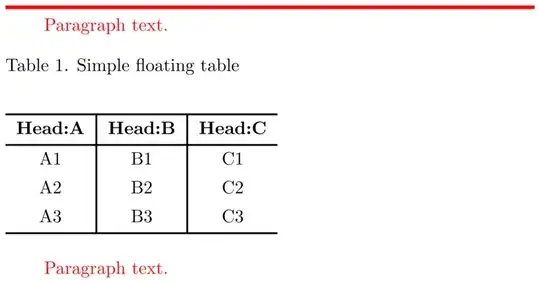
Looking ahead, i'd say the caption shown on the figure is spread across the full width of text, nor only the width of a table. This behavior is quite necessary sometime.
The part of code producing this layout is:
\partop
\begin{table}[!h]
 \caption{Simple floating table}
 \label{tab:table-simple-floating}
 \begin{tblr}{}
  \tblrcontents
 \end{tblr}
\end{table}
\parbot
\parbot and \partop macros are used to produce one paragraph before the table and one after. These paragraphs are used to show spacing between the floating table and adjacent paragraph. \partop macro also provides page breaking and draws a rule showing the full width of the text column. Contents of the table are provided by \tblrcontents macro, which is defined in expl3-style:
\prgNewFunction \tblrcontents {}
{
  \prgReturn
    {
      Head:A    & Head:B    & Head:C    \\
      A1        & B1        & C1        \\
      A2        & B2        & C2        \\
      A3        & B3        & C3        \\
    }
}
To get the last working, it also needs to allow evaluation of the macro (see tabularray manual, sec. "Outer key evaluate in action"):
\UseTblrLibrary{functional} % to evaluate \tblrcontents
and
\SetTblrOuter[tblr, talltblr]
             {evaluate=\tblrcontents}
The visual style of all tables is provided by following lines:
\SetTblrInner[tblr, talltblr]
             {colspec = {ccc},
              row{1} = {font=\bfseries},
              hline{1,2,Z} = {1pt},
              vline{2-Y} = {1pt}}
The whole picture of this table illustrates the default vertical spacing around the float and the vertical spacing around the table's caption defined by caption parameters (aboveskip is set to 2em intentionally):
\captionsetup[table]
             {labelsep=period,                  % caption separation for tables
              position=t,                       % caption position for tables
              justification=raggedright,        % caption alignment for tables
              singlelinecheck=off,              % don't center single line table captions
              aboveskip=2em}                    % above skip for table captions
A table with default theme
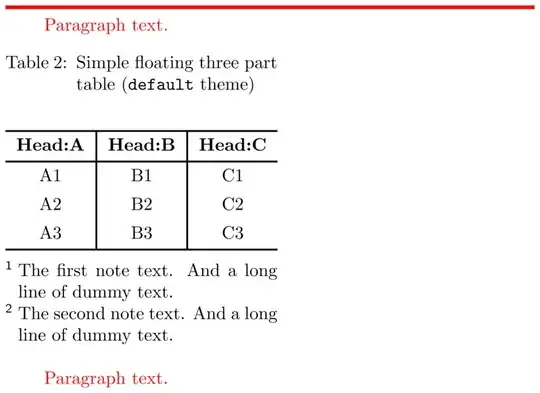
Let's take a look at the layout of the next table:
and at it's code:
\partop
\begin{table}[!h]
 \begin{talltblr}
       [caption = {Simple floating three part table (\texttt{default} theme)},
        entry = {Floating \texttt{talltblr} with \texttt{default} theme},
        label = {tab:table-simple-default}]{}
  \tblrcontents
 \end{talltblr}
\end{table}
\parbot
This table is typeset using talltblr environment. Let's say that i need to typeset a table with notes, so i have to use talltblr for a floating table. Dummy text for two table notes is defined as:
\newcommand{\dummytext}{And a long line of dummy text.}
\newcommand{\nfirsttext}{The first note text. \dummytext}
\newcommand{\nsecondtext}{The second note text. \dummytext}
And these notes are added to all talltblr tables by specifying outer parameters:
\SetTblrOuter[talltblr]
             {headsep = \abovecaptionskip,
              note{1} = {\nfirsttext},
              note{2} = {\nsecondtext}}
The macro above also specifies the spacing between the caption paragraph and the table body. Overall typesetting of the table is made by tabularray package, no functions of caption package used. The caption paragraph appearance is default for tabularray package:
- a text of the paragraph is justified,
- the prefix is indented with hanging,
- the separator is a colon.
It is hard to notice, but the distance between caption text baseline and top horizontal line of this table is a little smaller than it takes in the previous table. This caused by no strut inserted at the end of a text last line. This issue is not a deal with the next table, which is a variant of the very first table (see MWE).
A table with captionof theme again
This is the layout of the table mentioned in MWE, but it is typeset the other way:
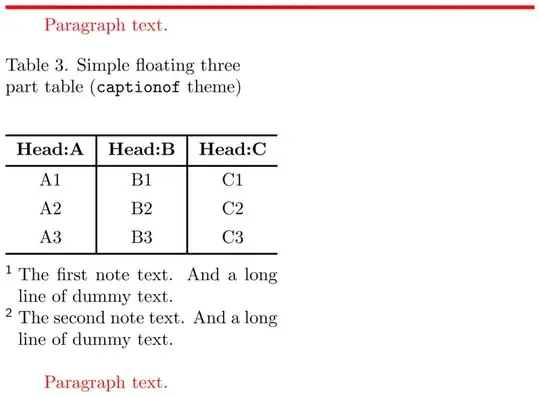
The piece of code is (it is less verbose, isn't it?):
\partop
\begin{table}[!h]
 \begin{talltblr}
       [theme = captionof,
        caption = {Simple floating three part table (\texttt{captionof} theme)},
        entry = {Floating \texttt{talltblr} with \texttt{captionof} theme},
        label = {tab:table-simple-captionof}]{}
  \tblrcontents
 \end{talltblr}
\end{table}
\parbot
The captionof theme is defined just as in MWE, so layout is identical. By the way, this table is used in the example once again, but without short caption. Here is the code:
\partop
\begin{table}[!h]
 \begin{talltblr}
       [theme = captionof,
        caption = {Simple floating three part table (\texttt{captionof} theme)},
        label = {tab:table-simple-captionof-longcap}]{}
  \tblrcontents
 \end{talltblr}
\end{table}
\parbot
Let's look at the List of Tables to see how table 3 and table 4 are mentioned:

A table with mysimpletheme theme
Theme of the next table is inspired by this answer about how to align the caption to the left. The layout:
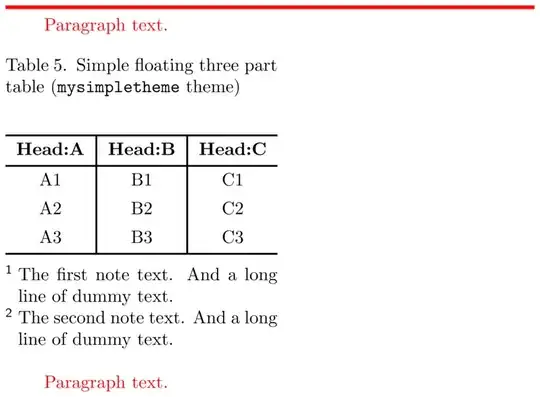
and the code:
\partop
\begin{table}[!h]
 \begin{talltblr}
       [theme = mysimpletheme,
        caption = {Simple floating three part table (\texttt{mysimpletheme} theme)},
        entry = {Floating \texttt{talltblr} \texttt{mysimpletheme} theme},
        label = {tab:table-simple-simple}]{}
  \tblrcontents
 \end{talltblr}
\end{table}
\parbot
Theme called mysimpletheme is defined by this code:
\NewTblrTheme { mysimpletheme }
  {
    \SetTblrTemplate { caption } { mysimple }
    \SetTblrStyle { caption } { halign=l }
  }
And mentioned mysimple caption template is defined by:
\DefTblrTemplate { caption } { mysimple }
  {
    \UseTblrAlign { caption }
    \UseTblrIndent { caption }
    \UseTblrHang { caption }
    \leavevmode
    \strut
    \UseTblrTemplate { caption-tag } { default }
    \UseTblrTemplate { caption-sep } { mycapsep }
    \UseTblrTemplate { caption-text } { default }
    \strut
    \par
  }
This template is based on simple template from tabularray, but it use struts at both ends of a text and separator defined by my own with following line:
\DefTblrTemplate { caption-sep } { mycapsep } { .\enskip }
So, spacing of the caption is correct, the caption format is correct, and the caption alignment is corresponding to my requirements.
This table also have a variant without short caption.
A table with mycaptiontheme theme
The last one is a table with a theme called mycaptiontheme. Here comes the layout:
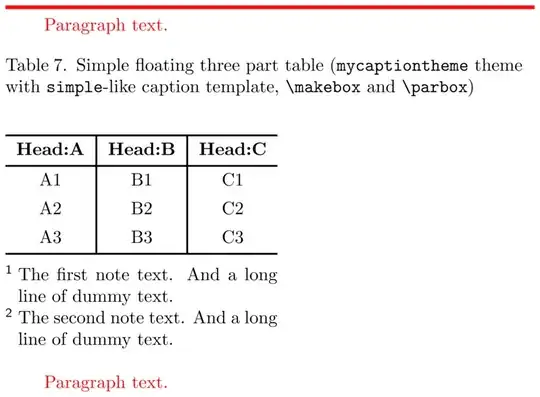
And the code:
\partop
\begin{table}[!h]
 \begin{talltblr}
       [theme = mycaptiontheme,
        caption = {Simple floating three part table
                   (\texttt{mycaptiontheme} theme with \texttt{simple}-like caption template,
                    \texttt{\char\\makebox} and \texttt{\char\parbox})},
        entry = {Floating \texttt{talltblr} \texttt{mycaptiontheme} theme},
        label = {tab:table-simple-mycaption}]{}
  \tblrcontents
 \end{talltblr}
\end{table}
\parbot
mycaptiontheme is defined by:
\NewTblrTheme { mycaptiontheme }
  {
    \SetTblrTemplate { caption } { mycaption }
  }
And mycaption template is defined by:
\DefTblrTemplate { caption } { mycaption }
  {
    \UseTblrAlign { caption }
    \UseTblrIndent { caption }
    \UseTblrHang { caption }
    \leavevmode
    \makebox [ \linewidth ] [ l ]
      {
        \parbox { \textwidth }
          {
            \raggedright
            \strut
            \UseTblrTemplate { caption-tag } { default }
            \UseTblrTemplate { caption-sep } { mycapsep }
            \UseTblrTemplate { caption-text } { default }
            \strut
          }
      }
  }
As it can be seen, the definition differs a little from one for mysimple caption template. The text of a caption is typeset in a \parbox which is nested in a box by \makebox. This is done to achieve caption alignment that is close to one in example with tblr environment, i.s. the caption paragraph should be spread across the whole width of the text column. Since the mentioned paragraph should be nested in the width of a table provided by talltblr environment (currently it is less than width of the text column), it should be placed inside a box of legal width (currently it is \linewidth).
This table meets the following requirements:
- spacing of the caption is correct,
- the caption format is correct,
- the caption alignment is correct,
- the width of a caption paragraph is correct.
Conclusion
- The spacing between the table body and the caption paragraph can be controlled by
aboveskip=2em (caption package parameter) for a table caption, whether it was provided by caption package or talltblr environment. It is so in case of a simple tblr environment and in case of themed talltblr environments, except for the default theme.
- The format of a caption can be controlled in two ways:
- label separator can be set with the
labelsep (caption package parameter) and it can be reused by captionof theme for talltblr environment;
- content elements for a caption text composition can be adjusted separately — with
\captionsetup[table] macro for caption package, and with a corresponding theme (mysimpletheme or mycaptiontheme fits) for talltblr environment.
- For now i havn't implemented the paragraph justification for a caption. The way i define it is not a generic.
- The paragraph width of a caption typeset by
talltblr environment with mycaptiontheme theme can be similar to one typeset by caption package. But i'm not sure about \textwidth usage in mycaption template.
- Patches are welcome.


