IMHO the problem is the resulting bounding box of the tikzpicture not an incompatibility. You could fix this using \useasboundingbox:
\documentclass{article}
\usepackage{circuitikz}
\usetikzlibrary{decorations.markings}
\usetikzlibrary{backgrounds}
\usetikzlibrary{external}
\tikzexternalize
\begin{document}
\begin{tikzpicture}% circuitikz is also a tikzpicture
%  \begin{circuitikz}% but only tikzpicture is externalized.
    \draw (0,0) node (N5){}
    to short,o-
    toshort,*-
    toD
    toD
    toshort,-* node (N1){}
    toshort,-o node (O){};
    \draw (4,0)
    toshort,*-
    toD
    toD
    toshort,-*;
    \draw (2,0)
    toTnpn,n=q2 node(N2){}
    toTnpn,n=q1;
    \draw (8,0)
    toshort,*- node(N4){}
    toTnpn,n=q4,mirror
    toTnpn,n=q3,mirror
    toshort,-*;
    \draw
    (q1.B) toshort,-o node[left]{$Q_1$}
    (q2.B) toshort,-o node[left]{$Q_2$}
    (q3.B) toshort,-o node[right]{$Q_3$}
    (q4.B) toshort,-o node[right]{$Q_4$};
    \draw (2,2) toshort,- toTelmech=M toshort,- node(N3){};
    % adding current
    \begin{scope}[on background layer, very thick,decoration = {
        markings,
        mark = at position 0.05 with {\arrow{>}}}
    ]
    \draw[line width = 3pt, red!40, postaction = {decorate}] (O.north)
    -- node[above, red]{$i$} (N1.north east) |- (N3.north west) |-
    (N5.north);
    \end{scope}
    % adding voltage
    \draw[line width = 3pt, red!40, ->] (N5) to[out = 150, in = 210]
    (O) node[left, red]{$V$};
  \useasboundingbox(0,0) rectangle (12,4);% not needed any longer after commenting circuitikz but sometimes useful
%  \end{circuitikz}
\end{tikzpicture}
\end{document}
However, if you need a PDF with the picture only, a very simple solution would be to use class standalone and correct it using option border:
\documentclass[border={-15mm 3mm 16mm 3mm}]{standalone}
\usepackage{circuitikz}
\usetikzlibrary{decorations.markings}
\usetikzlibrary{backgrounds}
%\usetikzlibrary{external}
%\tikzexternalize
\begin{document}
\begin{tikzpicture}
  \begin{circuitikz}
    \draw (0,0) node (N5){}
    to short,o-
    toshort,*-
    toD
    toD
    toshort,-* node (N1){}
    toshort,-o node (O){};
    \draw (4,0)
    toshort,*-
    toD
    toD
    toshort,-*;
    \draw (2,0)
    toTnpn,n=q2 node(N2){}
    toTnpn,n=q1;
    \draw (8,0)
    toshort,*- node(N4){}
    toTnpn,n=q4,mirror
    toTnpn,n=q3,mirror
    toshort,-*;
    \draw
    (q1.B) toshort,-o node[left]{$Q_1$}
    (q2.B) toshort,-o node[left]{$Q_2$}
    (q3.B) toshort,-o node[right]{$Q_3$}
    (q4.B) toshort,-o node[right]{$Q_4$};
    \draw (2,2) toshort,- toTelmech=M toshort,- node(N3){};
    % adding current
    \begin{scope}[on background layer, very thick,decoration = {
        markings,
        mark = at position 0.05 with {\arrow{>}}}
    ]
    \draw[line width = 3pt, red!40, postaction = {decorate}] (O.north)
    -- node[above, red]{$i$} (N1.north east) |- (N3.north west) |-
    (N5.north);
    \end{scope}
    % adding voltage
    \draw[line width = 3pt, red!40, ->] (N5) to[out = 150, in = 210]
    (O) node[left, red]{$V$};
  \end{circuitikz}
\end{tikzpicture}
\end{document}
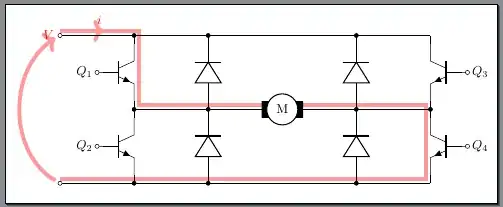
Note: With option tikz class standalone does also provide to generate several PDF pages in the same PDF, one for each tikzpicture. To change the options from page to page, you can use \standaloneconfig, e.g.,
\standaloneconfig{border={3mm 3mm 3mm 3mm}}
before the corresponding tikzpicture.
An even simpler suggestion would be to use \documentclass[landscape]{article} and \pagestyle{empty} and afterwards use pdfcrop to cut of the large white margins from the generated PDF. With
pdfcrop --margins 10pt original.pdf
the resulting original-crop.pdf would be almost the same as shown above.


