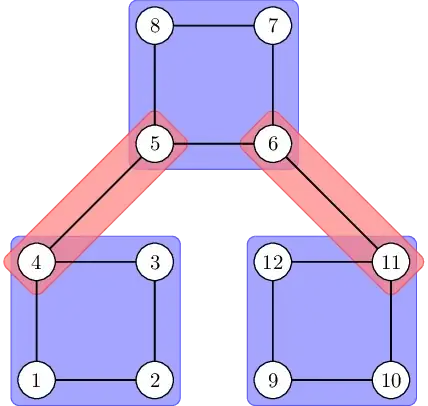
With plain TikZ and the library fit this can be done. I've added the backgrounds library and placed those boxes behind the edges and vertices. I've also chosen only a fill opacity (and no draw opacity) which means the borders are still fully opaque. There's also an all-encompassing opacity key.
The rotate fit key is essential for the red boxes.
Since the fit library only checks the north, east, south and west anchors when determining the size we have to explicitly give a list of four coordinates.
In this simple case, I've also explictily given the rotation angles. If you need this automatically, a bit more work is necessary.
Code
\documentclass[tikz]{standalone}
\usepackage{tkz-graph}
\usetikzlibrary{fit}
\usetikzlibrary{backgrounds}
\begin{document}
\begin{tikzpicture}[
  fitty/.style={
    fill opacity=.7,
    draw=#1!80,
    fill=#1!50,
    rounded corners,
  }
]
\SetGraphUnit{2}
\Vertex[x=0,y=0]{1}   \Vertex[x=2,y=0]{2}
\Vertex[x=2,y=2]{3}   \Vertex[x=0,y=2]{4}
%%
\Edge(1)(2)   \Edge(2)(3)
\Edge(3)(4)   \Edge(4)(1)
%%
\Vertex[x=2,y=4]{5}  \Vertex[x=4,y=4]{6}
\Vertex[x=4,y=6]{7}  \Vertex[x=2,y=6]{8}
%%
\Edge(4)(5)   \Edge(5)(6)
\Edge(6)(7)   \Edge(7)(8)
\Edge(8)(5)
%%
\Vertex[x=4,y=0]{9}  \Vertex[x=6,y=0]{10}
\Vertex[x=6,y=2]{11} \Vertex[x=4,y=2]{12}
%%
\Edge(9)(10)  \Edge(10)(11)
\Edge(11)(12) \Edge(12)(9)
\Edge(11)(6)
%%
\begin{scope}[on background layer]
\foreach \corners in {(8)(6), (1)(3), (9)(11)}
  \node[fitty=blue, fit=\corners]{};
\foreach \rot/\corners in {
  45/(4.south west) (5.north east)(4.north west) (5.south east),
 -45/(6.north west)(11.south east)(6.north east)(11.south west)}
\node[rotate fit=\rot, fit=\corners, fitty=red]{};
\end{scope}
\end{tikzpicture}
\end{document}


fitlibrary. The red one maybe, too. – Qrrbrbirlbel Dec 12 '22 at 17:07