1

I want to arrange text next to a calendar created by TikZ. Is there a way to use relative placement (section 3.8 of the manual) or something similar?

For example, I want to place "Text 2" below of "Text 1" (and still in the correct calendar row).

My MWE:

\documentclass{standalone}
\usepackage{tikz}
\usetikzlibrary{calendar}

\begin{document}

\begin{tikzpicture}[every day/.style={anchor=center}] \calendar[dates=2000-01-01 to 2000-01-last, week list] if (equals=2000-01-03) {\draw (0,0) circle (7.5pt); \node [right=5cm] {Text 1};} if (equals=2000-01-11) {\draw (0,0) circle (7.5pt); \node [right=5cm] {Text 2};} if (equals=2000-01-16) {\draw (0,0) circle (7.5pt); \node [right=5cm] {Text 3};} ; \end{tikzpicture}

\end{document}

Current output:

output

user1
  • 2,196
  • Have you not already done it? -there is a calendar -there is text right of it -and it is placed relative. – hpekristiansen Dec 15 '22 at 14:36
  • @hpekristiansen I updated my question – user1 Dec 15 '22 at 14:39
  • 1
    Where should Text 3 appear relative to Text 2 (since they are in the same week)? – Sandy G Dec 15 '22 at 14:42
  • @SandyG I'm open for suggestions (maybe just 2 cm right of "Text 2"). I thought, I might be able to adjust this myself, after I understood the mechanism. – user1 Dec 15 '22 at 14:48
  • You can give Text 1 a name and reference that when placing Text 2, same for the next. You could also do if (Sunday) [days={alias=lastSunday}] and use lastSunday as a reference for the right-most day in the calendar. (Obviously only works from the second week on.) week list shifts the coordinate system about the value of day xshift to the right, you could offset that, of course depending on the day of the week. – Qrrbrbirlbel Dec 15 '22 at 15:00
  • @Qrrbrbirlbel I tried giving "Text 1" a name like (A) and reference it (a few weeks ago), but that did't work for me – user1 Dec 15 '22 at 15:09

2 Answers2

1

There could be better or other ways of doing this - I do not know calendar well enough.

\documentclass[tikz, border=1cm]{standalone} 
\usetikzlibrary{calendar}
\begin{document}
\begin{tikzpicture}[every day/.style={anchor=center}]
\coordinate (col1) at (5,0);
\coordinate (col2) at (6.5,0);
\calendar[dates=2000-01-01 to 2000-01-last,
week list]
if (equals=2000-01-03) {\draw (0,0) circle (7.5pt); \node at (col1|-0,0) {Text 1};}
if (equals=2000-01-11) {\draw (0,0) circle (7.5pt); \node at (col1|-0,0) {Text 2};}
if (equals=2000-01-16) {\draw (0,0) circle (7.5pt); \node at (col2|-0,0) {Text 3};}
;
\end{tikzpicture}
\end{document}
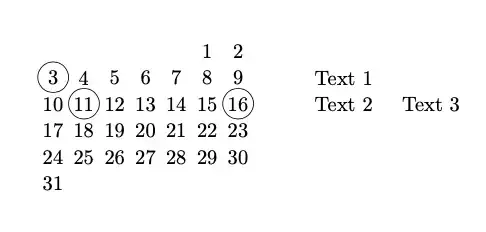
A calendar with three text nodes to the right

Edit: First node is named and the next nodes are placed relative to that. -same output.

\documentclass[tikz, border=1cm]{standalone} 
\usetikzlibrary{calendar}
\begin{document}
\begin{tikzpicture}[every day/.style={anchor=center}]
\calendar[dates=2000-01-01 to 2000-01-last,
week list]
if (equals=2000-01-03) {\draw (0,0) circle (7.5pt); \node[right=5cm] (A) {Text 1};}
if (equals=2000-01-11) {\draw (0,0) circle (7.5pt); \node at (A|-0,0) {Text 2};}
if (equals=2000-01-16) {\draw (0,0) circle (7.5pt); \node at ([xshift=1.5cm]A|-0,0) {Text 3};}
;
\end{tikzpicture}
\end{document}

Edit: With different length text and left adjusted:

\documentclass[tikz, border=1cm]{standalone} 
\usetikzlibrary{calendar}
\begin{document}
\begin{tikzpicture}[every node/.style={anchor=base west}, every day/.style={anchor=center}]
\calendar[dates=2000-01-01 to 2000-01-last,
week list]
if (equals=2000-01-03) {\draw (0,0) circle (7.5pt); \node[right=4cm] (A) {Text 1};}
if (equals=2000-01-11) {\draw (0,0) circle (7.5pt); \node at (A.west|-0,-0.1) {A very long Text 2};}
if (equals=2000-01-16) {\draw (0,0) circle (7.5pt); \node at ([xshift=3cm]A|-0,-0.1) {Text 3};}
;
\end{tikzpicture}
\end{document}
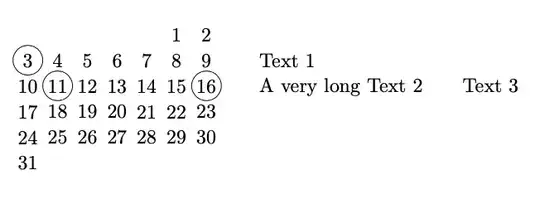
A calendar with text nodes

  • Is there an easy way to change the anchor for all text-nodes, so that "A very long Text 2" would be placed under "Text 1", but left-aligned? – user1 Dec 15 '22 at 16:20
  • You can use [every node/.style={anchor=base west}, every day/.style={anchor=center}] – hpekristiansen Dec 15 '22 at 16:52
  • By this the "A" of "A very long Text 2" is placed horizontally in the middle of "Text 1" – user1 Dec 16 '22 at 09:50
1

The idea is to toggle a boolean when the first node per week has been placed.

If it has, we place the next label in relation to the previous node (and name it the same so that a possible third label will be placed further to the right).

If not, we place it in relation to the current weekday (Monday = 0, Sunday = 6).

Using the base anchor for the days makes it easier to place the extra nodes. Though, we could also just do the placement of the first extra node relative to any anchor of the days nodes. (Though, since the origin is already at that anchor, it is not necessary in this simple calendar style.)


We could also check for the existence of a node but we would need to unexist it after the Sunday (just as with the toggle) or define those on a week per week basis (either through a global counter or the week number itself) but these gets interesting (and wasteful?) if you have more than one calendar in your document.

The toggle seems to be the most straight-forward one.

Code

\documentclass{standalone}
\usepackage{tikz}
\usetikzlibrary{calendar}
\newif\iftikzCalLabelPlacedThisWeek
\makeatletter
\newcommand*\tikzCalDayXshift{\tikz@lib@cal@xshift}
\pgfkeys{/utils/TeX/IF/.code n args={3}{\csname if#1\endcsname
  \expandafter\pgfutil@firstoftwo\else\expandafter\pgfutil@secondoftwo\fi
    {\pgfkeysalso{#2}}{\pgfkeysalso{#3}}}}
\makeatother
\tikzset{
  % needs to be global because "if" will be executed inside group
  % could also check for existence of a node on a week for week basis
  % but that needs more overhead when multiple calendars will be typeset.
  cal label node placed/.code={\global\tikzCalLabelPlacedThisWeektrue},
  cal label node/.style={
    name=cal-thisweek, % for reference for next cal label
    anchor=base west,
    /utils/TeX/IF={tikzCalLabelPlacedThisWeek}{
      % we've already placed one cal label? place the next one next to it
      xshift=1mm, at=(cal-thisweek.base east)
    }{ % first cal label this week: off set weekday shifting
      at={({(7-\pgfcalendarcurrentweekday)*\tikzCalDayXshift},0)}
      % at={([xshift=(7-\pgfcalendarcurrentweekday)*\tikzCalDayXshift]\tikzlastnode.base)}
    },
    cal label node placed},
  cal label/.style={
    days={
      append after command={
        (\tikzlastnode.center) edge[to path={circle[radius=7.5pt]}, draw]()
        node[cal label node]{#1}}}},
  week list with cal labels/.style={
    week list,
    % initialize false in case we've had same cal in document before
    /utils/exec=\tikzCalLabelPlacedThisWeekfalse,
    %  doesn't need to be global because we're not inside the day group
    execute after day scope=\ifdate{Sunday}{\tikzCalLabelPlacedThisWeekfalse}{}}}
\begin{document}
\begin{tikzpicture}[every day/.style={anchor=base}]
\calendar[dates=2000-01-01 to 2000-01-last,
          week list with cal labels]
          if (equals=2000-01-03) [cal label=Text 1]
          if (equals=2000-01-11) [cal label=A very long Text 2]
          if (equals=2000-01-16) [cal label=Text 3]
          ;
\end{tikzpicture}
\end{document}

Output

enter image description here

Qrrbrbirlbel
  • 119,821
  • If you want to circle a node but don't want to change the anchor of every day there are other ways available. (Both the circle and the cal node could be implemented as a label or an append after command to the day node.) – Qrrbrbirlbel Dec 15 '22 at 15:50