Besides usual speech to text approaches, you could try using speech to text to create prompts for ChatGPT.
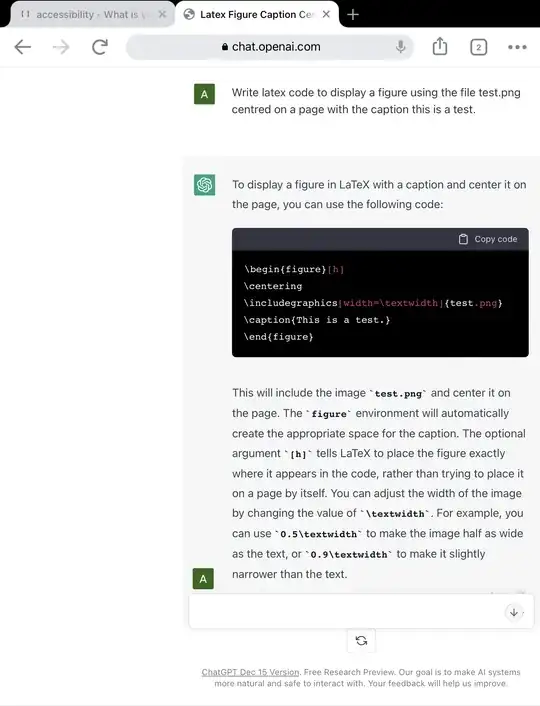
ChatGPT can write fairly decent latex code with natural-language prompts. For example, the prompt „write latex code for a figure using the file test.png with a caption this is a test“ gives perfectly usable code:
This approach appears to work also for dictating block text.
It’s not hands-off (you still have to copy the code) but it does simplify the problem of writing latex considerably. I suspect it would be challenged by using packages though, where using traditional voice control software to write commands should be much better.
That said, it can do tikz:
Write tikz code for an if-then-else flowchart
\begin{tikzpicture}[node distance=2cm]
% Define block styles
\tikzstyle{decision} = [diamond, draw, fill=blue!20, text width=4.5em, text badly centered, inner sep=0pt]
\tikzstyle{block} = [rectangle, draw, fill=blue!20, text width=5em, text centered, rounded corners, minimum height=4em]
\tikzstyle{line} = [draw, -latex']
% Place nodes
\node [block] (init) {Initialize};
\node [decision, below of=init] (decide) {Decide};
\node [block, below of=decide, node distance=3cm] (if) {If branch};
\node [block, right of=if, xshift=3cm] (else) {Else branch};
\node [block, below of=if] (endif) {End if};
% Draw edges
\path [line] (init) -- (decide);
\path [line] (decide) -- node {Yes} (if);
\path [line] (decide) -- node {No} (else);
\path [line] (if) -- (endif);
\path [line] (else) -- (endif);
\end{tikzpicture}
I’ve not tested it yet for equations as it’s too early in the year for maths…
Edit: it can do maths. It took some fiddling with the prompt, but this worked:
Write the complete latex code for an equation where y equals m times x plus c squared
…gave me this
\begin{equation}
y = mx + c^2
\end{equation}
It was important to use the phrase “complete latex code”, otherwise there was no equation environment.
Conclusion - seems like a potential way to generate latex code from voice prompts, but I doubt it would offer as much flexibility and utility in the long term as learning how to use a dedicated voice control software to control a decent latex editor / compiler. But maybe there is a niche here for helping new users learn how to use latex?


\cite{...}? Or functions like drawing a TikZ picture, or processing fontfiles and blocks of 10,000 Unicode characters? (I use a spreadsheet to build the code.) Probably making one-name macros for commonly used, or complex, command sets would be useful. – Cicada Jan 01 '23 at 07:57