Here is a proof of concept. The idea is:
- surround parts of the document that you want to translate with
\begin{translate} and \end{translate}
- collect the contents of this environment in a file
- escape all single
\ as double \\ to avoid shell control sequences that confuse the translation tool in the next step
- call a translate tool with this file and write the translation to another file
- input the other file in your LaTeX document
The implementation of step 2 was provided by Ulrike Fisher in https://tex.stackexchange.com/a/2574/.
For step 4 I used translate-shell for Linux which supports Google Translate, Bing, Apertium, Yandex, and a number of spell checkers which are not translation engines (spell, aspell, hunspell). For step 3 I used sed.
The target and source languages are given as an optional argument to the translate environment for the source (default English) and a mandatory argument for the target.
MWE:
\documentclass{article}
\usepackage{xcolor}
\usepackage{shellesc}
\usepackage{environ}
\newwrite\myexport
\makeatletter
\NewEnviron{translate}[2][en]{%
% step 2
\toks@=\expandafter{\BODY}%
\immediate\openout\myexport=totrans.tex
\immediate\write\myexport{\the\toks@}
\immediate\closeout\myexport
% step 3
\ShellEscape{sed -i -e 's/\/\\/g' totrans.tex}
% step 4
\ShellEscape{trans -b -i totrans.tex -o translated.tex #1:#2}
% step 5
\input{translated.tex}
}
\makeatother
\begin{document}
\begin{translate}[en]{es}
Can this be translated into another language? (Supposing of course it was in English for example into Spanish), As well as keeping some maths work.
The snippets can span multiple paragraphs.
\end{translate}
\section{Addition in Polish}
\begin{translate}{pl}
Addition in blue: \color{blue} This is how to Add $5+4$%%%%.  input
\end{translate}
$5+4=9$
\end{document}
Result:
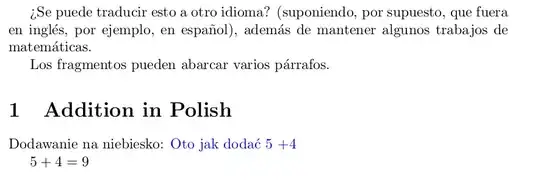
Disclaimer: saving the contents of an enviroment to a file in this way may break if the environment has some complex processing (for example if there is verbatim content). Also the translation may affect macro names or arguments, although Google Translate does seem to leave them alone (see the \color{blue} part in the MWE which is not translated). Of course step 3 above may also be a source of problems, although the doubled \\ gets back-converted during translation (i.e., blue: \\color{blue} is translated as niebiesko: \color{blue}).
One mistake here is that $5+4$ is mysteriously translated as 5 $ + 4 $ which messes up the spacing. You may need to experiment in how to enter the input such that the code survives the translation properly.
 I am unsure if this is way beyond what Latex can do but is there a way to translate a documents plain text into another language without having to do it paragraph by paragraph?


.texfile with the plain text in another language, or can the source code be in one language and the pdf output in another language, or would it be ok to just translate the pdf directly? Are you willing to add some extra code to the file, like\begin{translate}translate this part\end{translate}? On how many files do you want to do this? – Marijn Jan 03 '23 at 09:19