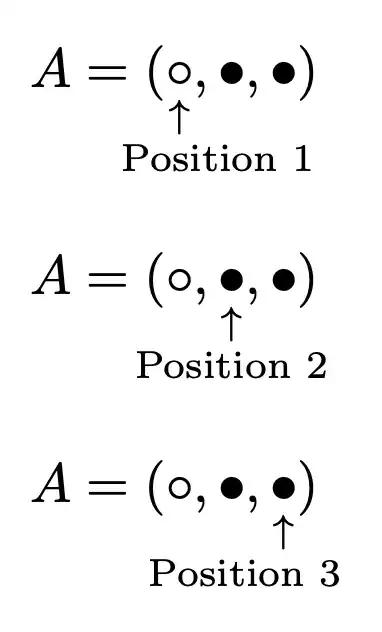
You can use \underset together with a command that places the text in a zero width box, but with the possibility of moving it with respect to the arrow.
The first argument to \showpos is the fraction of the width that should be left of the arrow.
\documentclass{article}
\usepackage{amsmath}
\newcommand{\showpos}[2]{% #1 = factor, #2 = text
  \makebox[0pt]{%
    \scriptsize
    \begin{tabular}{@{}c@{}}
      $\uparrow$ \
      \makebox[\dimexpr#1\width*2\relax][l]{#2}%
    \end{tabular}%
  }%
}
\begin{document}
[
A=(\underset{\showpos{0.3}{Position 1}}{{\circ}},{\bullet},{\bullet})
]
[
A=({\circ},\underset{\showpos{0.5}{Position 2}}{{\bullet}},{\bullet})
]
[
A=({\circ},{\bullet},\underset{\showpos{0.7}{Position 3}}{{\bullet}})
]
\end{document}
Some visual formatting is necessary, depending on the whole formula.